
Pics, Pixels and People - Covering photography, photographers, imaging, technology, tidbits, news and reviews...
Saturday, July 19, 2008
UK Government To Discuss Photography Guidelines With Police
The BJP have posted an article which details the Governments plans to discuss the issue of Photography in Public Places and recent behaviour by Police and Private Security Guards when it come to dealing with Photographers.


Samsung Announces New Cameras
Samsung have announced a number of new cameras. Their new NV100HD offers 14.7 megapixels, a 28mm Wide angle lens and can record 720p HD video. It also features a touch screen and has optical image stabilization. The new NV9 features a 5x optical zoom, 10.2 megapixel sensor and has the capability to play MP3 music files. The new Samsung L310W features a 13.6 megapixel camera and has a 28mm equivalent wide angle lens. Their S1070 compact digital camera, features a 10.2 megapixel sensor, a 3x optical zoom and a 2.7" LCD screen. The L201 is a 10.2 megapixel compact digital camera which feature Samsung's Auto Contrast Balance which will brighten dark areas in high-contrast and back-lit scenes. It can also charge batteries directly in the camera.
Tuesday, July 15, 2008
Phase One Intro 60 Megapixel Back
Phase One have announced their new P65+ 60 megapixel digital back. This unit is a full frame, 645 medium format back, which can shoot at 1 FPS, an uses a proprietary sensor built. The back will retail at $39,990 and will no doubt only be affordable for industrial level photographers.
Sunday, July 13, 2008
Nik Software Announces Silver Efex Pro™
Nik Software announced their new Silver Efex Pro photographic plug-in for use with Adobe® Photoshop® and Apple® Aperture™. Silver Efex Pro is an advanced solution which allows users to create black-and-white photographs which closely emulate real world films. It uses advanced imaging algorithms to protect against unwanted artifacts, and emulates 18 black-and-white film types. Silver Efex Pro also features a state-of-the-art grain engine that according to Nik software, "truly mimics the silver halide process and creates the highest quality black-and-white images possible from scanned or digital color photographs." For more information about Silver Efex Pro, and to download a free 15-day fully functional trial version, please visit silverefexpro.
Tuesday, July 08, 2008
Hasselblads 50 Megapixel Camera
Hasselblad are preparing to release their new 50-megapixel high-end digital camera, the H3DII-50. This baby will set you back a massive $37K and has been designed with the high-end commercial photographer in mind. The H3DII-50 features 3-inch display and Kodaks 50-megapixel CCD sensor, which generates a 300MB file at 1fps. Due out in October, this beauty won't be on my buying list anytime soon, unless of course some nice person out there is feeling extremely generous...
Color Efex Pro 3.0 For Capture NX 2
Nik Software Inc. have announced the immediate availability of their award-winning Color Efex Pro 3.0 photographic filters for Capture NX 2, the latest version of Nikon's flagship photo editing software. Color Efex Pro 3.0 is a powerful and easy to use set of photographic based filters. "Unlike using plug-ins in Photoshop which require controls located in a separate interface, enhancements are made directly on the image in real-time and non-destructively in Capture NX 2, ... This tight integration dramatically simplifies enhancing images and offers photographers a powerful photo editing solution," said Michael Slater, Nik's President and CEO.
Color Efex Pro 3.0 adds nine powerful new filters that increase the traditional and stylistic range of the collection. New filters include Bleach Bypass, Cross Balance, Film Effects, Film Grain, Glamour Glow, High Key, Low Key, Polaroid Transfer, and Tonal Enhancer. Previously available filters have also been updated to provide even more options. Color Efex Pro 3.0 for Capture NX 2 has 52 filters, with a possibility of over 250 effects available. A complete filter list can be found at: cep3fornx2.
Color Efex Pro 3.0 adds nine powerful new filters that increase the traditional and stylistic range of the collection. New filters include Bleach Bypass, Cross Balance, Film Effects, Film Grain, Glamour Glow, High Key, Low Key, Polaroid Transfer, and Tonal Enhancer. Previously available filters have also been updated to provide even more options. Color Efex Pro 3.0 for Capture NX 2 has 52 filters, with a possibility of over 250 effects available. A complete filter list can be found at: cep3fornx2.
Averatech All-In-One
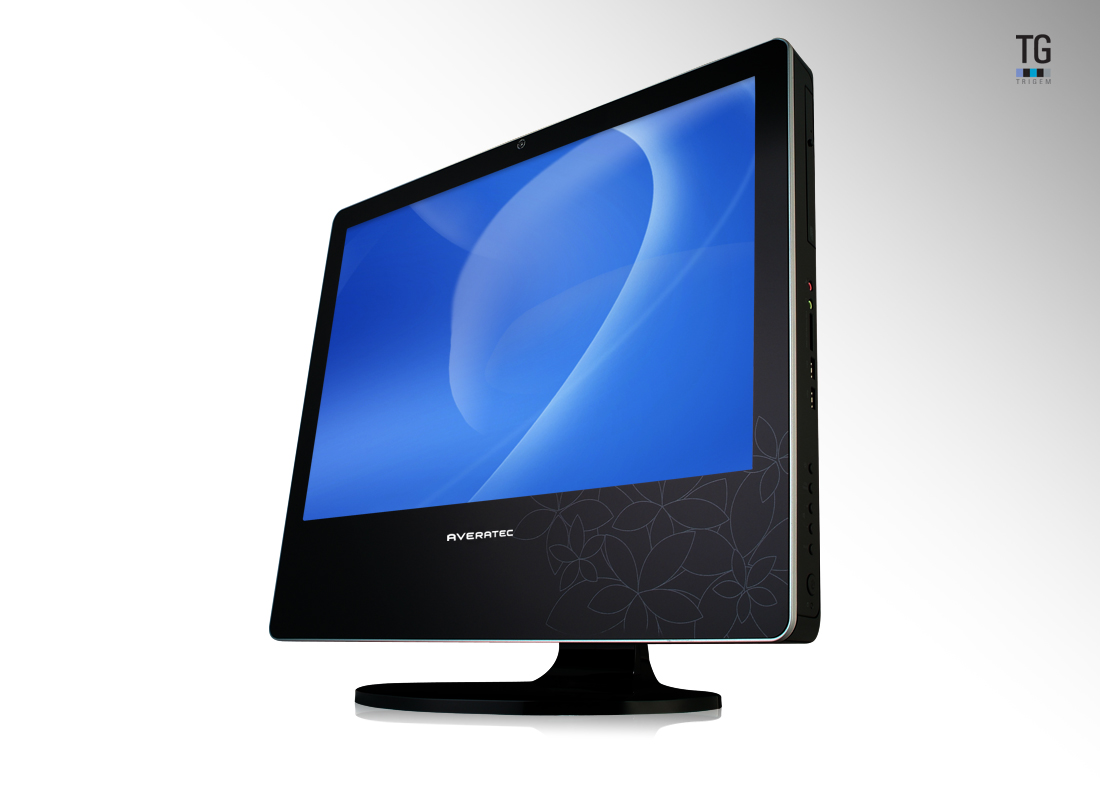
Averatech have launched their All-in-one PC. The desing is based around the form-factor we've seen previously in the iMac and the Dell XPS One. You biuld a display case which also houses everything a PC needs inside. The Averatec All-In-One has has a 22-inch display and has 2GB of RAM, a 320GB HDD, built-in HDTV tuner and like the iMac and XPS One features a slot loading optical drive. The All-In-One is powered by an Intel Core 2 Duo E4600 CPU and uses an NVIDIA GeForce 8400 for graphics. It is available for purchase now at an MSRP of $1249. For more info visit the
Saturday, July 05, 2008
Nikon D3 Firmware Update
Nikon have released a firmware upgrade for the D3. there are no major bug fixes other than one for a dead battery issue that some people have been experiencing with both the D3 and D300. There are however a a few additions worthy of consideration.
Modifications enabled with upgrade of A and B firmware to v.2.00
Images captured with “Rotate tall”, in the playback menu, set to “On”, are not automatically rotated for display immediately after capture (image review).
The following changes and additions have been made to “f4: Assign FUNC.Button > FUNC. Button + dials” ; “f5: Assign preview button > Preview + command dials”, and “f6: Assign AE-L / AF-L button > AE-L / AF-L + command dials” menus in Custom Settings:
The “Choose image area” option has been separated into two options, “Choose image area (FX / DX / 5:4)” and “Choose image area (FX / DX)”
A new “Shooting menu bank” option has been added.
When “Choose image area (FX / DX / 5:4)” or “Choose image area (FX/DX)” is selected and the function button (Fn) is pressed, the image area setting is displayed in the top control panel, in the shooting information display, and at the bottom of the viewfinder.
A “Copyright information” item has been added to the setup menu. When “Copyright information” is enabled, the copyright symbol ( © ) is shown in the shooting info display.
“Recent settings” can now be displayed in place of “My Menu”.
The virtual horizon can now be displayed with shooting in LiveView mode.
The “Vignette control” setting can now be confimed in shooting information.
The “Vignette control” item in the shooting menu now supports all types of G- and D-type lenses, except DX and PC lenses.
The “Vignette control” compensation value has been optimized for shooting with “Active D-Lighting” the shooting menu.
Electronic analog exposure displays are now shown in the control panel and shooting info display while the exposure compensation setting is being applied.
The degree of the “High ISO NR” setting can now be confirmed in the shooting info display while the “High ISO NR” setting item, in the shooting menu, is being applied.
Design of the FX-format icon in the “Choose image area” setting has been modified.
Ankara, Riyadh, Kuwait, and Manamah have been added to the “Time zone” options for the “World Time” item in the setup menu.
When a GPS device is used and no heading information is available, –.–° is now displayed for the “Position > Heading” option in the “GPS” item in the setup menu.
When shooting in LiveView mode using Camera Control Pro 2 (ver. 2.2.0) or later with a PC-E lens, the aperture setting can now be adjusted from the computer.
Autofocus performance has been improved.
Auto White Balance performance has been improved.
An issue that, in some rare circumstances, caused the battery indicator to blink, regardless of actual battery charge, has been resolved.
Errors in the German help displays have been corrected.
US customers can download the Nikon D3 Firmware 2.0 here.
Modifications enabled with upgrade of A and B firmware to v.2.00
Images captured with “Rotate tall”, in the playback menu, set to “On”, are not automatically rotated for display immediately after capture (image review).
The following changes and additions have been made to “f4: Assign FUNC.Button > FUNC. Button + dials” ; “f5: Assign preview button > Preview + command dials”, and “f6: Assign AE-L / AF-L button > AE-L / AF-L + command dials” menus in Custom Settings:
The “Choose image area” option has been separated into two options, “Choose image area (FX / DX / 5:4)” and “Choose image area (FX / DX)”
A new “Shooting menu bank” option has been added.
When “Choose image area (FX / DX / 5:4)” or “Choose image area (FX/DX)” is selected and the function button (Fn) is pressed, the image area setting is displayed in the top control panel, in the shooting information display, and at the bottom of the viewfinder.
A “Copyright information” item has been added to the setup menu. When “Copyright information” is enabled, the copyright symbol ( © ) is shown in the shooting info display.
“Recent settings” can now be displayed in place of “My Menu”.
The virtual horizon can now be displayed with shooting in LiveView mode.
The “Vignette control” setting can now be confimed in shooting information.
The “Vignette control” item in the shooting menu now supports all types of G- and D-type lenses, except DX and PC lenses.
The “Vignette control” compensation value has been optimized for shooting with “Active D-Lighting” the shooting menu.
Electronic analog exposure displays are now shown in the control panel and shooting info display while the exposure compensation setting is being applied.
The degree of the “High ISO NR” setting can now be confirmed in the shooting info display while the “High ISO NR” setting item, in the shooting menu, is being applied.
Design of the FX-format icon in the “Choose image area” setting has been modified.
Ankara, Riyadh, Kuwait, and Manamah have been added to the “Time zone” options for the “World Time” item in the setup menu.
When a GPS device is used and no heading information is available, –.–° is now displayed for the “Position > Heading” option in the “GPS” item in the setup menu.
When shooting in LiveView mode using Camera Control Pro 2 (ver. 2.2.0) or later with a PC-E lens, the aperture setting can now be adjusted from the computer.
Autofocus performance has been improved.
Auto White Balance performance has been improved.
An issue that, in some rare circumstances, caused the battery indicator to blink, regardless of actual battery charge, has been resolved.
Errors in the German help displays have been corrected.
US customers can download the Nikon D3 Firmware 2.0 here.
Thursday, July 03, 2008
Nikon Release D700 DSLR
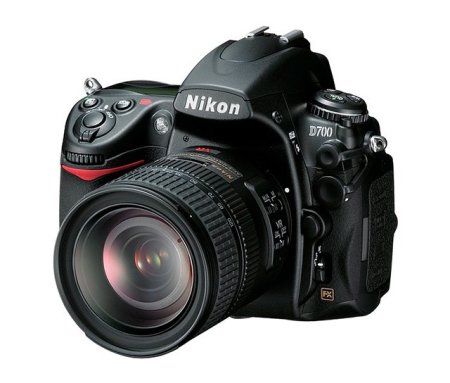
Nikon have just released the D700 digital SLR camera. This DSLR is aimed at the Prosumer and is based upon technologies found in their D3, boasting pro-level performance and an extensive array of features and innovations. It also features the Nikon FX-format CMOS sensor, Nikon’s EXPEED Image Processing System, Nikon’s renowned 51-point auto focus system with 3D Focus Tracking and two Live View shooting modes. Having seen the liveview in use on the D3 it is something I wish I had on my Canon Eos 5D.
Tuesday, July 01, 2008
Xandros Acquires Linspire
Growth in the Linux business - that is, the Linux business desktop - is slow. But determined companies can make things happen (and grow somewhat faster too?) as long as they keep their eye(s) on the ball. I remember when Xandros was a struggling little startup, but oh how times have changed. We still think that Xandros is the most business-facing Linux distribution (with kudos to Linspire and Red Hat as well, no doubt), and Xandros continues to remain focused on expanding its footprint on business desktops. The acquisition of Linspire (another Debian-based Linux distribution) helps narrow the somewhat bewildering field of choices confronting any business considering a jump to Linux. Choosing something other than Windows or Mac OS X has never been risk free, but we really think that Linux is a safe bet these days especially with Microsoft Office file compatibility so well covered by OpenOffice for Linux.
Saturday, June 28, 2008
Review of DPI Show in London
On Thursday Howard and I attended the Digital Photo and Imaging Show at the Business Design Centre in Islington. My first impression on entering the show was one of disappointment as it seemed a little on the small side, however this was soon to change as I made my way around the show. There were a few manufacturers present who were showing their solutions and we managed to spend some valuable time, one on one with their reps.
On the software front there were a number of vendors showing their wares including Apple and Adobe. OnOne and Nik Software were also there showing their respective photoshop plug-ins and running continuous demos. A number of distributors and resellers were also on hand demonstrating other solutions. The live theatres from Adobe, Apple and DPI were running all day and were well attended, often with crowds spilling out into aisles.
Printer manufacturers were there in force with stands from Canon, Epson and HP well manned and equipped with the latest in large format printers. Nikon were notable in their absence, disappointing really as there were plenty of Pro Users in attendance.
There were the usual publications and associations present and it was nice catching up with some of them. The BPPA, BIPP and The SWPP were there looking for new members and spending time with existing members. Magazines such as F2, The BJP, Digital Arts Magazine and Macworld were on hand, giving out free copies and selling subscriptions.
I was pleased with Canon's presence at the show as they were demonstrating a start to finish capability which other manufacturers lack. My associate Howard Carson, noted that Canon was able to demonstrate a complete solution for Photographers from Capture, Acquisition through to output. In addition to their pro cameras and output solutions they also had their projectors and pro video solutions on hand for demo.
Other exhibitors included Skillset, who were there discussing their training programs for Digital Skills, photography and creative workflows. It's definitely worth checking them out. A number of retailers and resellers such as AJ Purdy, The Flash Centre, The Pro Centre and Rapid Group were there promoting their wares and services and selling discounted products and providing some excellent show specials.
Other Vendors included Wacom who were demoing their excellent tablet solutions. Computer Unlimited were also in attendance demoing solutions from Corel, Datacolor, Shiraz and Vertus.
The lecture program and seminar at the show was full and possibly offered many useful and valuable insights. Speakers presented on lectures and seminars useful to photo-libraries, portrait photographers, on documentary photography, celebrity shots, visual journalism and on the art of photography.
Overall the show was small in scale but big on delivery, We were able to spend some valuable time with the companies we wanted to see. I hope that next years show will be similar in nature but somewhat larger in scale. Nikon should really be there, as should a few more third party software and hardware vendors.
On the software front there were a number of vendors showing their wares including Apple and Adobe. OnOne and Nik Software were also there showing their respective photoshop plug-ins and running continuous demos. A number of distributors and resellers were also on hand demonstrating other solutions. The live theatres from Adobe, Apple and DPI were running all day and were well attended, often with crowds spilling out into aisles.
Printer manufacturers were there in force with stands from Canon, Epson and HP well manned and equipped with the latest in large format printers. Nikon were notable in their absence, disappointing really as there were plenty of Pro Users in attendance.
There were the usual publications and associations present and it was nice catching up with some of them. The BPPA, BIPP and The SWPP were there looking for new members and spending time with existing members. Magazines such as F2, The BJP, Digital Arts Magazine and Macworld were on hand, giving out free copies and selling subscriptions.
I was pleased with Canon's presence at the show as they were demonstrating a start to finish capability which other manufacturers lack. My associate Howard Carson, noted that Canon was able to demonstrate a complete solution for Photographers from Capture, Acquisition through to output. In addition to their pro cameras and output solutions they also had their projectors and pro video solutions on hand for demo.
Other exhibitors included Skillset, who were there discussing their training programs for Digital Skills, photography and creative workflows. It's definitely worth checking them out. A number of retailers and resellers such as AJ Purdy, The Flash Centre, The Pro Centre and Rapid Group were there promoting their wares and services and selling discounted products and providing some excellent show specials.
Other Vendors included Wacom who were demoing their excellent tablet solutions. Computer Unlimited were also in attendance demoing solutions from Corel, Datacolor, Shiraz and Vertus.
The lecture program and seminar at the show was full and possibly offered many useful and valuable insights. Speakers presented on lectures and seminars useful to photo-libraries, portrait photographers, on documentary photography, celebrity shots, visual journalism and on the art of photography.
Overall the show was small in scale but big on delivery, We were able to spend some valuable time with the companies we wanted to see. I hope that next years show will be similar in nature but somewhat larger in scale. Nikon should really be there, as should a few more third party software and hardware vendors.
Wednesday, June 25, 2008
Datacolor’s Spyder3 Gets Price Reduction
Datacolor announced a price reduction for its Spyder3 range. As of June the 1st 2008, their award-winning Spyder3Elite is reduced in price from £175 to £155.99 whilst Spyder3Print is reduced by £60 to £253.99, including VAT. For more information on the Spyder3 range visit Datacolor.
Monday, June 23, 2008
Wacom Wins 2 Coveted Red Dot Awards
Wacom have won 2 Red Dot Awards for the Bamboo Fun Pen Tablet and their Cintiq 12WX hybrid interactive pen display. This is the second red dot award for the Bamboo range, as the first model in the series also received the same accolade in June 2007. The Cintiq 12WX features a high quality 12.1” screen, which is optimised for direct input using the ergonomically designed digital pen. With this form of interaction activities such as drawing, painting, sketching, storyboarding, finishing, retouching and compositing allow the creative to work much as they would on paper. For more information on the Bamboo Fun and the Cintiq 12WX visit Wacom.
For more information on the Red Dot award visit Red-Dot.org.
For more information on the Red Dot award visit Red-Dot.org.
Sunday, June 22, 2008
Akvis Relocate Headquarters To Canada
AKVIS Software Inc., the manufacturer of some excellent photo editing tools and plug-ins, has moved its head office to Vancouver in British Columbia, Canada. Founded in Russia, AKVIS is determined to improve their market presence by being able to get easier access to the North American software market.
Toshiba Tecra M9 Laptop review
Reviewed by: Mario Georgiou, June 2008
Manufactured by: Toshiba
Requires: Intel® Core™2 Duo Processor T7500 2.2 GHz,Intel® Wireless WiFi™ Link, Genuine Windows Vista® Business Edition, 2GB of 667MHz DDR2 RAM (maximum 4GB), 160GB hard disk drive, DVD Super Multi drive (Double Layer), 14.1" (1,440 x 900) display, NVIDIA® Quadro® NVS 130M mobile video card supporting TurboCache™ technology, Bluetooth version 2.0 plus Enhanced Data Rate (EDR)Wi-Fi™, 802.11a/b/g/Draft-N, 87 key keyboard, spill-resistant keyboard, type II PC card slot, 5-in-1 media card reader, VGA out, mic/headphone connectors, IEEE-1394 (FireWire), three USB 2.0 hi-speed ports, serial port
MSRP: US$1299.00
I currently own a terrific Toshiba m400 tablet PC. So when TalkToshiba called to tell me that they had a Tecra M9 available for review I jumped at the opportunity to find out what the latest generation of Toshiba laptops has to offer. The Tecra M9 is a laptop designed with business users in mind. The M9 ships with Windows Vista Business Edition.
The Toshiba Tecra M9 is a very clean looking machine, and the 14.1 inch screen looks a lot bigger than it actually is. With the higher than normal resolution for a 14.1" display I was quite comfortable with using it compared to similar laptops. The display on this notebook and the lid feel very secure, with very little flex. As a result I didn't experience any of the usual warping and momentary discolouration seen when adjusting the angle of the screen. The matte finish does a good job of diffusing any reflections. The vertical viewing angles are more limited than I would like, causing most dark or midrange colours to washout or completely disappear moving vertically above or below normal viewing angles. Horizontal viewing is somewhat better, but still washes out sooner than I've experienced with other laptops.
The Toshiba Tecra M9 is a very comfortable typing machine. The keys have a great feel, providing just the right amount of movement and feedback. Toshiba describes the M9's keyboard as spill resistant. The touchpad and pointer worked as expected, I also found that the left and right buttons used with the pointer control button were very nicely implemented. The keyboard and palm rest area exhibited a bit of movement when used compared to other laptops. However it wasn't enough to cause me any problems. The inclusion of a fingerprint reader for security also enhances the business-centric approach to the M9's design.
Moving around the M9, starting on the front, you will find the indicator light array, a wireless on/off switch, firewire connector, headphone/mic jacks, and volume knob. The left side of the laptop features a modem jack, Kensington lock slot, exhaust port, one USB port, PC-card Slot and the SD card slot. The back of the unit has a serial port, VGA connector, and AC plug port. The right side features two USB ports, the optical bay, and the LAN port.
The audio capabilities were what I expect from a laptop - clear and easy to hear. However I would always recommend using decent headphones for anything you really care to hear well. You can even try a pair of bluetooth headphones using the A2DP profile and the easy device discovery via Vista and Toshiba Bluetooth manager. The headphone jack had none of the telltale hiss and noise you would get from a sub-par connector, indicating good quality parts being used.
Starting up and shutting down the M9 was quick and painless. With this unit's 2GB of memory and the 2.2 GHz T7500 Intel Core 2 Duo processor and nVidia NVS 130M graphics card, I found no noticeable issues while using any of the standard productivity software or even the creative tools(and resource hogs) like Photoshop. Trying any of the graphically intensive games (like Crysis) was problematic and I found there was no point in attempting to squeeze any sort of decent gamely out of the M9 as the graphics capabilities weren't up to the task. It's not really much of an issue though, because the M9 is really meant to be a business machine.
Heat and noise didn't appear to be an issue at all for the M9. I kept the laptop running almost constantly for one day and found it quite comfortable to touch. The fan kept up quietly even when I took the laptop into a hot, noisy neighbourhood pub to test it out on a public wireless network.
Battery life was as expected, with the standard battery giving about 2.5 hours (on average) use. I did find the hard drive shock protection alarm a little on the sensitive side. The warning popped up with the slightest knock of the M9. This feature however can be disabled/enabled by pressing the Toshiba Assist button located next to the power on/off on the top of the keyboard.
Cons: Premature drop-off in display brightness. Somewhat oversensitive shock protection alarm. It's a business machine not a game platform, but a bit more graphics horsepower would provide a better all around experience with what is basically a very good laptop. Excellent screen resolution, but off-angle viewing could be better.
Pros: Nice spill resistant keyboard. Standard three year warranty. Excellent wireless support. Solid build quality. Runs Microsoft Office, Photoshop CS3 and most common business software very smoothly. I was initially a little afraid that the screen on the M9 would be a little on the small side, but after working with the unit for a few weeks I found that the high quality and high resolution more than met my needs. The Toshiba Tecra M9 is a nice business laptop that will more than do the job. Recommended
Manufactured by: Toshiba
Requires: Intel® Core™2 Duo Processor T7500 2.2 GHz,Intel® Wireless WiFi™ Link, Genuine Windows Vista® Business Edition, 2GB of 667MHz DDR2 RAM (maximum 4GB), 160GB hard disk drive, DVD Super Multi drive (Double Layer), 14.1" (1,440 x 900) display, NVIDIA® Quadro® NVS 130M mobile video card supporting TurboCache™ technology, Bluetooth version 2.0 plus Enhanced Data Rate (EDR)Wi-Fi™, 802.11a/b/g/Draft-N, 87 key keyboard, spill-resistant keyboard, type II PC card slot, 5-in-1 media card reader, VGA out, mic/headphone connectors, IEEE-1394 (FireWire), three USB 2.0 hi-speed ports, serial port
MSRP: US$1299.00
I currently own a terrific Toshiba m400 tablet PC. So when TalkToshiba called to tell me that they had a Tecra M9 available for review I jumped at the opportunity to find out what the latest generation of Toshiba laptops has to offer. The Tecra M9 is a laptop designed with business users in mind. The M9 ships with Windows Vista Business Edition.
The Toshiba Tecra M9 is a very clean looking machine, and the 14.1 inch screen looks a lot bigger than it actually is. With the higher than normal resolution for a 14.1" display I was quite comfortable with using it compared to similar laptops. The display on this notebook and the lid feel very secure, with very little flex. As a result I didn't experience any of the usual warping and momentary discolouration seen when adjusting the angle of the screen. The matte finish does a good job of diffusing any reflections. The vertical viewing angles are more limited than I would like, causing most dark or midrange colours to washout or completely disappear moving vertically above or below normal viewing angles. Horizontal viewing is somewhat better, but still washes out sooner than I've experienced with other laptops.
The Toshiba Tecra M9 is a very comfortable typing machine. The keys have a great feel, providing just the right amount of movement and feedback. Toshiba describes the M9's keyboard as spill resistant. The touchpad and pointer worked as expected, I also found that the left and right buttons used with the pointer control button were very nicely implemented. The keyboard and palm rest area exhibited a bit of movement when used compared to other laptops. However it wasn't enough to cause me any problems. The inclusion of a fingerprint reader for security also enhances the business-centric approach to the M9's design.
Moving around the M9, starting on the front, you will find the indicator light array, a wireless on/off switch, firewire connector, headphone/mic jacks, and volume knob. The left side of the laptop features a modem jack, Kensington lock slot, exhaust port, one USB port, PC-card Slot and the SD card slot. The back of the unit has a serial port, VGA connector, and AC plug port. The right side features two USB ports, the optical bay, and the LAN port.
The audio capabilities were what I expect from a laptop - clear and easy to hear. However I would always recommend using decent headphones for anything you really care to hear well. You can even try a pair of bluetooth headphones using the A2DP profile and the easy device discovery via Vista and Toshiba Bluetooth manager. The headphone jack had none of the telltale hiss and noise you would get from a sub-par connector, indicating good quality parts being used.
Starting up and shutting down the M9 was quick and painless. With this unit's 2GB of memory and the 2.2 GHz T7500 Intel Core 2 Duo processor and nVidia NVS 130M graphics card, I found no noticeable issues while using any of the standard productivity software or even the creative tools(and resource hogs) like Photoshop. Trying any of the graphically intensive games (like Crysis) was problematic and I found there was no point in attempting to squeeze any sort of decent gamely out of the M9 as the graphics capabilities weren't up to the task. It's not really much of an issue though, because the M9 is really meant to be a business machine.
Heat and noise didn't appear to be an issue at all for the M9. I kept the laptop running almost constantly for one day and found it quite comfortable to touch. The fan kept up quietly even when I took the laptop into a hot, noisy neighbourhood pub to test it out on a public wireless network.
Battery life was as expected, with the standard battery giving about 2.5 hours (on average) use. I did find the hard drive shock protection alarm a little on the sensitive side. The warning popped up with the slightest knock of the M9. This feature however can be disabled/enabled by pressing the Toshiba Assist button located next to the power on/off on the top of the keyboard.
Cons: Premature drop-off in display brightness. Somewhat oversensitive shock protection alarm. It's a business machine not a game platform, but a bit more graphics horsepower would provide a better all around experience with what is basically a very good laptop. Excellent screen resolution, but off-angle viewing could be better.
Pros: Nice spill resistant keyboard. Standard three year warranty. Excellent wireless support. Solid build quality. Runs Microsoft Office, Photoshop CS3 and most common business software very smoothly. I was initially a little afraid that the screen on the M9 would be a little on the small side, but after working with the unit for a few weeks I found that the high quality and high resolution more than met my needs. The Toshiba Tecra M9 is a nice business laptop that will more than do the job. Recommended
Thursday, June 19, 2008
Quark Announce QuarkXPress 8
QuarkXPress 8 is nearly complete and will be available within the next two months. Already Quark are promising to provide a free upgrade to folks who purchase and register QuarkXPress 7 in the next couple of months. XPress 8 includes new pen and picture tools, new drag and drop features, better file handling of Illustrator files, and better control over typography and layout. For more information on what's new in XPress 8 visit Quark.
Wednesday, June 11, 2008
ACDSee Photo Editor 2008
ACD Systems have released ACDSee Photo Editor 2008, the next version of their easy-to-use digital photo editing and design software. The new version offers:
• Faster processing time
• More custom creative tools and options for resizing, cropping and masking
• Quick Web optimization & advanced printing functions
• Artistic effects that can be added, modified or deleted
• "Trim to shape" for quick-and-easy design templates
• Advanced journaling and text curving capabilities
Photo Editor 2008 is available for a 30-day trial ... for more info and to download a demo visit ACDSee.
• Faster processing time
• More custom creative tools and options for resizing, cropping and masking
• Quick Web optimization & advanced printing functions
• Artistic effects that can be added, modified or deleted
• "Trim to shape" for quick-and-easy design templates
• Advanced journaling and text curving capabilities
Photo Editor 2008 is available for a 30-day trial ... for more info and to download a demo visit ACDSee.
DPI Show Reminder

For those of you who will be in and around London between the 26th and 27th of June, the Digital Photo & Imaging Show, taking place at the Business Design Centre in Islington, will the place to be. The DPI Show will provide pro-photographers and the whole photographic industry with a knowledge-based event where they can see and try the state of the art in creative tools and photographic equipment.
Exhibiting at the DPI Show are Adobe, Apple Solutions' Experts, BJP, BPPA, Canon, Colour Collective, CU, DataColor, Digital Arts, Digital Photo Solutions, Dreamtek, Epson, Hasselblad, HP, Macworld, Native Digital, Nik Software, OKI Printing Solutions, onOne, Pantone, Peartree, ProCentre, Profoto Ltd, Rapid Group, Republik Agency, Shiraz, Skillset, SWPP, Vertus, Wacom....
For more info visit The DPI Show.
Exhibiting at the DPI Show are Adobe, Apple Solutions' Experts, BJP, BPPA, Canon, Colour Collective, CU, DataColor, Digital Arts, Digital Photo Solutions, Dreamtek, Epson, Hasselblad, HP, Macworld, Native Digital, Nik Software, OKI Printing Solutions, onOne, Pantone, Peartree, ProCentre, Profoto Ltd, Rapid Group, Republik Agency, Shiraz, Skillset, SWPP, Vertus, Wacom....
For more info visit The DPI Show.
Sunday, May 18, 2008
Photomatix 3.0.3 Released

HDRsoft have released an updated version of Photomatix which includes several bugfixes.
Photomatix is a photo enhancement tool which deals with photography produced under difficult lighting conditions. Using Exposure Blending and Tone Mapping, images can be produced from multiple bracketed exposures, which offer a more balanced result. Photomatix 3.0.3 can be downloaded from the HDRsoft website. The upgrade from version 2.x to version 3.0 is free of charge. Download the Windows Version here and the Mac version
here...
Photomatix is a photo enhancement tool which deals with photography produced under difficult lighting conditions. Using Exposure Blending and Tone Mapping, images can be produced from multiple bracketed exposures, which offer a more balanced result. Photomatix 3.0.3 can be downloaded from the HDRsoft website. The upgrade from version 2.x to version 3.0 is free of charge. Download the Windows Version here and the Mac version
here...
Tuesday, May 13, 2008
FocalPoint 1.0 Released
onOne Software, Inc., announced the release of their new software plug-in, FocalPoint 1.0 for Adobe Photoshop and Photoshop Elements. FocalPoint is a selective focus and vignetting plug-in designed to help photographers easily blur and/or vignette areas of an image. It is available for immediate download at onOne.
Monday, May 12, 2008
Essentials 2 for iPhoto
onOne Software, Inc., announced the availability of Essentials 2 software for iPhoto users. Essentials 2 for iPhoto is a collection of four easy-to-use software tools based on technology used in the professional level onOne Software Photoshop® plug-ins PhotoTune 2.2, FocalPoint 1.0, PhotoFrame 3.1 and Genuine Fractals 5. Essentials 2 is designed to be used in iPhoto to help correct color, creatively blur a photo for dramatic visual impact, add creative borders and resize digital images for high quality large prints. Visit onOne for more info.
Tuesday, May 06, 2008
CHDK - Hacking Your Canon Point & Shoot
lifehacker.com have posted an excellent article on the Canon Hacker's Development Kit. CHDK is a free, open source project with which you can add features like RAW shooting mode, live RGB histograms, additional photographic settings, motion-detection, time-lapse, longer video recording and even games onto your existing Canon camera. The beauty of CHDK is that it is non-permanent and non-destructive, you can use when you want to; CHDK makes no changes to your camera. Installing CHDK entails having a couple of files added to your camera's memory card. Removing it involves simply restarting your camera without the memory card present.
Monday, May 05, 2008
UK Photographers Rights
Simon Moran and Linda Macpherson have announced the launch of the UK Photographers Rights PDF. The guide is intended to provide UK Photograpehrs with a short summary of the main legal restrictions on the right to take and publish photographs.
The guide was written by Linda Macpherson LL.B, Dip.L.P., LL.M, who is a lecturer in law at Heriot Watt University. The guide is a 2 page PDF, which can be printed out on the front and back of an A4 page. The guide is intended as an overview of the current legal situation in the UK for photographers, it is not a definitive bible of UK law. It can be downloaded directly from sirimo.co.uk, visit Simon Morans site for other useful information and articles.
The guide was written by Linda Macpherson LL.B, Dip.L.P., LL.M, who is a lecturer in law at Heriot Watt University. The guide is a 2 page PDF, which can be printed out on the front and back of an A4 page. The guide is intended as an overview of the current legal situation in the UK for photographers, it is not a definitive bible of UK law. It can be downloaded directly from sirimo.co.uk, visit Simon Morans site for other useful information and articles.
PhotoAcute Version 2.8 Released
PhotoAcute have released Version 2.8 of PhotoAcute Studio, their Super Resolution based application for enhancing digital images. Their Super Resolution technology is designed to process sets of photographs taken in continuous mode to produce high-resolution, low-noise pictures. It increases image resolution, removes noise without losing image details, corrects image geometry and chromatic aberrations and expands the dynamic range. Visit http://www.photoacute.com/ for more information.
Tuesday, April 22, 2008
Two Thousand Photographers Test ACDSee Photo Editor
ACDSee Photo Editor has entered the final stage of Beta Testing, with over 2000 photographers involved in testing it. ACDSee Photo Editor 2008, will be an easy-to-use digital design and layout application created with avid photographers and scrapbookers in mind. The application comes with custom creative tools and exclusive designer templates. Look for a summer release.
Apple Release Their Aperture Plug-In SDK
Apple have released their free Imaging Plug-in Software Development Kit (SDK) for Aperture. It is now available through the Apple Developer Connection (ADC). Interested developers should visit the ADC website to download the SDK.
Thursday, April 17, 2008
Xara Release Version 4 of Xara Xtreme and Xara Xtreme Pro
Xara Xtreme and Xtreme Pro have been updated to Version 4. Xara is one of the fastest and easiest creative tools to use. The flexibility of Xara Xtreme with its raster and vector capabilities is something worth trying. It is capable of drawing faster than pretty much any other package out ther. You can create 3D text, edit photos non destructively, create websites and even export flash animations. It also supports Photoshop plug-ins. Pop on over to the Xara Website to find out more and download a demo.
Sunday, April 13, 2008
Adobe Releases Lightroom 1.41 and Camera Raw 4.4.1 Updates
Lightroom Product Manager Tom Hogarty announced the release of updates to the Photoshop Lightroom, Photoshop Camera Raw plug-in and DNG Converter to correct problems found in Lightroom 1.4 and Camera Raw 4.4. The revisions address several issues including:
Lightroom
Lightroom 1.4 incorrectly modified the EXIF time date field of images that had a metadata update applied. This incorrect modification does not appear in Lightroom or Bridge and is only viewable through third party EXIF tools. This error has been corrected in Lightroom 1.4.1 and all files in a Lightroom catalog that have been incorrectly modified will be corrected on their next metadata update. (Metadata can be updated by selecting the files in the Library grid view and choosing Command or CTRL + S to save and update the metadata.)
Olympus JPEG files could render incorrectly in Lightroom 1.4, displaying an artifact in the exported file.
Any conversion to DNG in Lightroom 1.4 (Windows Only) would cause the DNG file to become unreadable by Lightroom’s Develop Module or Camera Raw 4.4 in Photoshop. The issue has been corrected and files can be converted to DNG again in order to resolve the issue for existing files. Returning to the original native raw files is not necessary. The affected DNG files can be selected and converted again using the DNG Converter 4.4.1 available at www.adobe.com/dng/.
This process is not required but recommended to ensure that a correct validation value is stored within the DNG files.
Lightroom 1.4 provided degraded import performance relative to Lightroom 1.3.
Camera Raw
Camera Raw 4.4 incorrectly modified the EXIF time date field of images that were saved as TIFF or JPEG files from the Camera Raw dialog. This has been corrected in Camera Raw 4.4.1
Olympus JPEG files could render incorrectly in Camera Raw 4.4, displaying an artifact in the exported file.
The updates have been posted to the following locations:
Lightroom 1.4.1 - Mac - Win.
Camera Raw 4.4.1 - Mac - Win.
Lightroom
Lightroom 1.4 incorrectly modified the EXIF time date field of images that had a metadata update applied. This incorrect modification does not appear in Lightroom or Bridge and is only viewable through third party EXIF tools. This error has been corrected in Lightroom 1.4.1 and all files in a Lightroom catalog that have been incorrectly modified will be corrected on their next metadata update. (Metadata can be updated by selecting the files in the Library grid view and choosing Command or CTRL + S to save and update the metadata.)
Olympus JPEG files could render incorrectly in Lightroom 1.4, displaying an artifact in the exported file.
Any conversion to DNG in Lightroom 1.4 (Windows Only) would cause the DNG file to become unreadable by Lightroom’s Develop Module or Camera Raw 4.4 in Photoshop. The issue has been corrected and files can be converted to DNG again in order to resolve the issue for existing files. Returning to the original native raw files is not necessary. The affected DNG files can be selected and converted again using the DNG Converter 4.4.1 available at www.adobe.com/dng/.
This process is not required but recommended to ensure that a correct validation value is stored within the DNG files.
Lightroom 1.4 provided degraded import performance relative to Lightroom 1.3.
Camera Raw
Camera Raw 4.4 incorrectly modified the EXIF time date field of images that were saved as TIFF or JPEG files from the Camera Raw dialog. This has been corrected in Camera Raw 4.4.1
Olympus JPEG files could render incorrectly in Camera Raw 4.4, displaying an artifact in the exported file.
The updates have been posted to the following locations:
Lightroom 1.4.1 - Mac - Win.
Camera Raw 4.4.1 - Mac - Win.
Wednesday, April 09, 2008
Digital Photography & Imaging Show 2008

The DPI show is a new event dedicated to digital photography and imaging. It is being held on June 26th & 27th at the Business Design Centre in Islington in North London.
The DPI show is designed to attract thousands of pro-photographers and agencies active in photojournalism, sports/action photography, portraiture, wedding and lifestyle photography, and those working in fashion and advertising, still life and macro. Industry leaders will come together to create a ‘Live Studio’, building a full-feature facility at the show with ‘celebrity’ photographers illustrating the facilities and capabilities of the studio.
A busy seminar programme will present 40-minute sessions on latest products and solutions so you can receive first-hand expert advice and tips from specialists in the technologies and processes, hear of case studies and then visit the exhibition area for hands-on experience.
Our conference programme will gather groups of speakers to look at improving workflow, at manipulating and storing images and at managing the demands of a modern photographic studio.
The show will feature stands from Industry leaders such as Adobe, Apple Solution Experts, Epson, HP, Hasselblad, Color Confidence, Extensis, A J Purdy, The SWPP, onOne and a whole lot more ... Many publications will also be represented, including Digital Photographer, Digital Arts, The BJP, Digital Camera and Macworld.
You can register for free at http://www.dpishow.com/
onOne Software Announces Plug-in Suite 4
onOne Software, Inc., announced the May release of their Plug-in Suite 4 software for Adobe Photoshop. Plug-In Suite 4 comprises of full versions of six essential software tools – Genuine Fractals 5 Print Pro, PhotoTools 1.0 Professional Edition, PhotoFrame 3.1 Professional Edition, Mask Pro 4.1, PhotoTune 2.2 and FocalPoint 1.0. The package should be available in early May to new users for $499.95, whereas existing users of Plug-in Suite versions 1, 2 or 3 can upgrade to Plug-In Suite 4 for only $199.95. For more information on Plug-In Suite 4, please visit onOne Software.
Subscribe to:
Posts (Atom)