Nikon have unveiled their new D90 DSLR. The D90 features a new 12.3 megapixel Nikon DX-format CMOS image sensor with an Integrated Dust Reduction System. The DSLR has a Low-noise capability which ranges from ISO 200 to 3200, it also has support for ISO 6400. The camera can also record video using their D-Movie mode, which records in AVI format at 320 x 216, 640 x 424 or 1,280 x 720.
Other features include:
Scene Recognition System based on 420 pixel RGB sensor for improved autofocus, autofocus and auto white balance, in addition to Face Detection.
Multi-CAM 1000 autofocus with 11 AF points.
3-inch, VGA Live View LCD.
4.5 fps continuous shooting
0.15 second startup
65ms shutter release lag.
SD / SDHC storage.
HDMI output
The Nikon should be available in kit form for around $1,299. For more info visit Nikon.com

Pics, Pixels and People - Covering photography, photographers, imaging, technology, tidbits, news and reviews...
Wednesday, August 27, 2008


Tuesday, August 26, 2008
Canon Eos 50D Announced

Canon have officially unveiled the EOS 50D. The 15.1 megapixel DSLR features an APS-C sized CMOS sensor, DIGIC 4 image processor, up to ISO 12800 support, a 3.0-inch LCD with Live View, face detection, HDMI output, 6.3fps burst mode. It also uses the same AF system found in Canon's 40D but with a new Microadjustment feature. This Prosumer centric model should have an SRP of $1,599 with Canon's EF 28-135mm f/3.5-5.6 IS USM zoom lens -- $1,399 for the body only.
Monday, August 18, 2008
How People Kill Their Cameras
Amateur Photographer have released an article detailing some of the ways in which the public destroy their cameras. The details come from data which has been released by insurance group Domestic & General in the UK. It seems that around a sixth of us blame children or dog, 3% of claims run over their camera with a car, about three quarters drop their cameras, either onto a "hard surface", into water, or other wise damage the camera by falling onto it and using it to cushion their fall. The article is worth a read.
Xara Xtreme Pro 4 Review
Reviewed by: Mario Georgiou, August 2008
Published by: Xara Group Limited
Requires: Windows 2000/XP/Vista, Pentium processor or better, 128MB RAM, 100MB available hard drive space
MSRP: US$249.00, £125.00 GBP
Xara has long been one of the "other" programs artists can use for creating designs and illustrations. It also has one very attractive capability in that it is much faster at rendering than comparable programs, in some cases it is much faster than Adobe Illustrator at rendering the same illustrations. Xara Xtreme Pro can be used very effectively to create logos, brochures, websites and photographic panoramas. It is very fast at all these tasks and comes with an array of professional level controls. Version 4 is an improvement over earlier versions in that it not only features new capabilities but also includes support for multicore processors.
Added to this new version are 3D capabilities and bitmap editing features which help make it a hybrid creative solution. The editing of bitmaps is in itself different from software like Photoshop in that Xara Xtreme Pro isn't a pixel editor but uses non-destructive kind of element editing which lets you re-edit and modify at a later date.
There were some problems with some of the bitmap handling in that when I used filters and plug-ins, Xara had a tendency to get bogged down. Some other problem areas include compatibility with newer Adobe Illustrator and PDF formats, an issue which can be bypassed by exporting the problem file in an earlier revision from the native application. The import of RAW files is also supported, though I haven't tested all available formats.
Xara Xtreme Pro provides a comprehensive environment for vector editing, animation and web design all without changing applications. The layer capabilities are well designed and allow you to layer elements for easy editing and tracing. The software features an excellent array of vector editing and creation capabilities including Bevel, Contour, Drop Shadow, Extrude, Fill, Polygon, Transparency and many others.
The handling of text is really easy — simplified but powerful. Things like text flow and styling can be done in a flash. Text can be resized, skewed, rotated and more, and it is even possible to apply effects like bevelling, drop shadows, and make the entire text block transparent. Xara Xtreme Pro supports Unicode making it easy to create documents in multiple languages. The Text extrusion tool is used to create and edit extruded text with textures in real time by simply placing and dragging the text. You'll also find controls and settings for creating multipage documents, along with desktop publishing features which include text flow around graphics and the kerning and editing of text.
Xara Xtreme Pro 4.0's web capabilities can export documents to HTML for use on a web site. CSS styles are used format your page elements and text and while the code isn't the cleanest, it does the job. One thing for Xara to focus on for the next version of Xara Xtreme Pro would be to offer an option to clean up the HTML code on export.
The files generated by Xara are pretty compact and suffer little of the bloat I’ve come to expect from other software in the same class. The PDF export capabilities include support for high resolution PDFs which support Pantone PMS colors and font embedding.
Cons: File import could be more versatile. Xara Xtreme Pro is not available for Mac OS X. No pixel editing.
Pros: Very fast rendering. Inexpensive in comparison to other competing software. Flexible and powerful. Unlike dedicated software, Xara has a great many features which are useful for the non-designer. Xara Xtreme Pro facilitates the easy creation and editing of documents which can be used by the business user who want to make quick work of their creative business documents (promotions, presentations, marketing, etc.). Using Xara Xtreme Pro you will soon come to appreciate its speed and flexibility. You can add photos, vectors and apply all sort of effects to your documents without having to learn five different programs. Highly recommended.
Published by: Xara Group Limited
Requires: Windows 2000/XP/Vista, Pentium processor or better, 128MB RAM, 100MB available hard drive space
MSRP: US$249.00, £125.00 GBP
Xara has long been one of the "other" programs artists can use for creating designs and illustrations. It also has one very attractive capability in that it is much faster at rendering than comparable programs, in some cases it is much faster than Adobe Illustrator at rendering the same illustrations. Xara Xtreme Pro can be used very effectively to create logos, brochures, websites and photographic panoramas. It is very fast at all these tasks and comes with an array of professional level controls. Version 4 is an improvement over earlier versions in that it not only features new capabilities but also includes support for multicore processors.
Added to this new version are 3D capabilities and bitmap editing features which help make it a hybrid creative solution. The editing of bitmaps is in itself different from software like Photoshop in that Xara Xtreme Pro isn't a pixel editor but uses non-destructive kind of element editing which lets you re-edit and modify at a later date.
There were some problems with some of the bitmap handling in that when I used filters and plug-ins, Xara had a tendency to get bogged down. Some other problem areas include compatibility with newer Adobe Illustrator and PDF formats, an issue which can be bypassed by exporting the problem file in an earlier revision from the native application. The import of RAW files is also supported, though I haven't tested all available formats.
Xara Xtreme Pro provides a comprehensive environment for vector editing, animation and web design all without changing applications. The layer capabilities are well designed and allow you to layer elements for easy editing and tracing. The software features an excellent array of vector editing and creation capabilities including Bevel, Contour, Drop Shadow, Extrude, Fill, Polygon, Transparency and many others.
The handling of text is really easy — simplified but powerful. Things like text flow and styling can be done in a flash. Text can be resized, skewed, rotated and more, and it is even possible to apply effects like bevelling, drop shadows, and make the entire text block transparent. Xara Xtreme Pro supports Unicode making it easy to create documents in multiple languages. The Text extrusion tool is used to create and edit extruded text with textures in real time by simply placing and dragging the text. You'll also find controls and settings for creating multipage documents, along with desktop publishing features which include text flow around graphics and the kerning and editing of text.
Xara Xtreme Pro 4.0's web capabilities can export documents to HTML for use on a web site. CSS styles are used format your page elements and text and while the code isn't the cleanest, it does the job. One thing for Xara to focus on for the next version of Xara Xtreme Pro would be to offer an option to clean up the HTML code on export.
The files generated by Xara are pretty compact and suffer little of the bloat I’ve come to expect from other software in the same class. The PDF export capabilities include support for high resolution PDFs which support Pantone PMS colors and font embedding.
Cons: File import could be more versatile. Xara Xtreme Pro is not available for Mac OS X. No pixel editing.
Pros: Very fast rendering. Inexpensive in comparison to other competing software. Flexible and powerful. Unlike dedicated software, Xara has a great many features which are useful for the non-designer. Xara Xtreme Pro facilitates the easy creation and editing of documents which can be used by the business user who want to make quick work of their creative business documents (promotions, presentations, marketing, etc.). Using Xara Xtreme Pro you will soon come to appreciate its speed and flexibility. You can add photos, vectors and apply all sort of effects to your documents without having to learn five different programs. Highly recommended.
Wednesday, August 13, 2008
Polaroid Reveal Future Instant Camera Plans
Polaroid are set to release an digital camera which includes an on-board printer which uses the Zink printing technology. The camera/printer will be able to produce 4 x 3 inch prints. It also looks likePolaroid are looking for consumer feedback on the devices final form factor. Visit amateurphotographer.co.uk for more information.
Monday, August 11, 2008
HP Launches New Laptops & Displays
HP launched a few new products at SIGGRAPH today. Firstly a few new laptops in the form of the 17" EliteBook 8730w and 15.4" EliteBook 8530w and 8530p. The 8730 features a 17-inch DreamColor display, a quad-core Intel CPU, 8GB of RAM and NVIDIA's 1GB Quadro FX graphics card. The EliteBook 8530w and 8530p, feature 8GB of RAM, a Core 2 Duo chip (the 8530w supports an optional quad-core chip) and HP's brushed anodized aluminum DuraCase.
HP also announced 22 and 24 inch displays. The 22-inch LP2275w lights up 92 percent of the NTSC color gamut across its 1680 x 1050 pixels, whilst the new 24-inch LP2475w puts 102 percent across its 1920 x 1200 pixels. Both displays feature 1000:1 contrast ratios, extra-bright panels and adjustable stands. The LP2275w will be avaialble immediately, while the LP247w will come next month. Retail pricing will be between $459 and $649 respectively.
HP also announced 22 and 24 inch displays. The 22-inch LP2275w lights up 92 percent of the NTSC color gamut across its 1680 x 1050 pixels, whilst the new 24-inch LP2475w puts 102 percent across its 1920 x 1200 pixels. Both displays feature 1000:1 contrast ratios, extra-bright panels and adjustable stands. The LP2275w will be avaialble immediately, while the LP247w will come next month. Retail pricing will be between $459 and $649 respectively.
Monday, August 04, 2008
Lowepro Announce Slingshot 350 AW

Lowepro, announced the launch of their SlingShot 350 AW. The 350 has larger carrying capacity that other sligshot models and includes a protective space for a widescreen notebook.
The SlingShot 350 AW features a main compartment that comfortably fits a professional DSLR fitted with a 70-200. It also accommodates 5-6 extra lenses or accessories.
The padded notebook compartment will fit a 15.4” widescreen notebook, it also features a fully adjustable, padded waistbelt; a built-in microfiber cloth to protect LCD screen; Hypalon SlipLock attachment loops for adding accessories; and Lowepro’s patented All Weather Cover. For more information about 350 AW or other Lowepro products, visit http://www.lowepro.com/.
The SlingShot 350 AW features a main compartment that comfortably fits a professional DSLR fitted with a 70-200. It also accommodates 5-6 extra lenses or accessories.
The padded notebook compartment will fit a 15.4” widescreen notebook, it also features a fully adjustable, padded waistbelt; a built-in microfiber cloth to protect LCD screen; Hypalon SlipLock attachment loops for adding accessories; and Lowepro’s patented All Weather Cover. For more information about 350 AW or other Lowepro products, visit http://www.lowepro.com/.
Friday, August 01, 2008
Dell Vostro 2510 Now Configurable
Dell have rolled out their Vostro 2510. Their new, slab like, 15.4-inch laptop comes in a two-tone black and red body, incorporates a slot-load drive and a cooling system that vents heat away from the bottom of the notebook. It uses current-generation Core 2 Duo processors, supports a slot-load Blu-ray burner, a minimum 1440x900 resolution display with a built-in webcam, a GeForce 8400M GS for video and a 160GB hard disk. you can increase the display to 1920x1200 and increase storage to 320GB. The laptop won't ship till mid-august but look for more goodies when it becomes available.
Tuesday, July 29, 2008
Dell Release Studio Hybrid Desktop
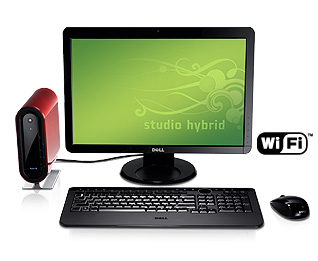
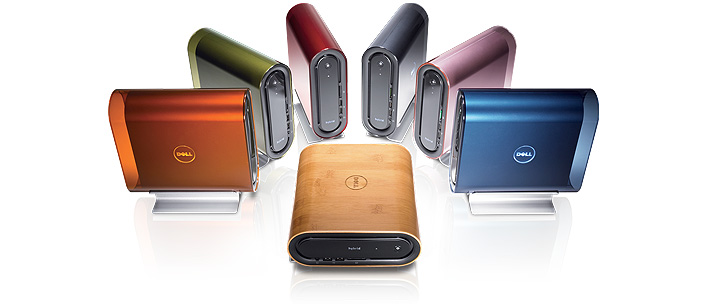
Dell went live with their Studio Hybrid Desktop product page yesterday. The Page shows the Studio Hybrid in a range of colours and offers the unit for a base configuration at $499 (UK prices start at £399). A bamboo version is available for an extra $130. The display will add at least $200 and for an extra $50 you can upgrade to 2GB of RAM. Bluray and Hifi will cost extra. Dell are offering some "Instant Savings," for preconfigured models but no idea if its gonna be a long term deal. These cool little units can be viewed and configured online at Dells product page.
Adobe Release Lightroom 2.0
Adobe have released Lightroom 2.0. They' ve added a few new features and improved the overall performance since it's brief public beta. New features since 1.0 include:
Local adjustment brush
Enhanced organizational tools
Volume management
Extensible architecture
Multiple monitor support
Flexible print package functionality
Streamlined Photoshop CS3 integration
Enhanced output sharpening
64-bit support for Windows® and Mac OS
Adobe has also released Camera RAW 4.5 to support the additional Lightroom 2 adjustments within Photoshop and Bridge. Lightroom 2 will cost £175 in the UK and $299 in the US. Upgrades from existing versions will cost £69 and $99. UK Pricing excludes VAT.
Local adjustment brush
Enhanced organizational tools
Volume management
Extensible architecture
Multiple monitor support
Flexible print package functionality
Streamlined Photoshop CS3 integration
Enhanced output sharpening
64-bit support for Windows® and Mac OS
Adobe has also released Camera RAW 4.5 to support the additional Lightroom 2 adjustments within Photoshop and Bridge. Lightroom 2 will cost £175 in the UK and $299 in the US. Upgrades from existing versions will cost £69 and $99. UK Pricing excludes VAT.
Monday, July 21, 2008
The Moment It Clicks: Photography Secrets From One Of The World's Top Shooters
Reviewed by: Mario Georgiou, July 2008
Author: Joe McNally
Published by: New Riders & Peach Pit Press
ISBN-10: 0321544080
ISBN-13: 978-0321544087
Requires: Amateur or pro interest in photography
MSRP: US$54.99 USD, £29.99 GBP, $59.99 CAD
(Ed. Note: Books like this often tell readers about more than the apparent subject. Most often, a semi-autobiographical book of this type provides examples for success which transcend the categories of life, career, technique and business into which we tend to slot ourselves, others and our efforts throughout our lives. I love reading about the details, techniques and events, told from a personal perspective, which have occured and affected skilled, successful people because the knowledge helps me organize and make sense of the details, techniques and events in my own life. I hope you feel the same way.)
Joe McNally's book “The Moment It Clicks” has received a lot of press and acclaim, so when I received it for review, I already felt that it would be a book which would provide a challenge. There has been a lot of hype about it from all over the photography world. The book has become a bestseller and nothing I say will add to or take away from that. The Moment It Clicks tells a story which is essentially all about the 30 year photography career of Joe McNally, his life, and experiences both professional and personal. The book was written to provide an insight into the world of commercial photography and photojournalism.
The Moment It Clicks is not a biographical tome, but more about the pictures McNally has taken, the events in his life and how they have been shaped by his career. The book doesn't really take a chapter type approach (typically, photography books are always organized into traditional chapters and sub-sections), taking instead a more subjective approach. McNally uses a picture and then tells the story behind the picture and details how it was shot. This isn’t a step-by-step approach either, focusing rather on the more important details and insights which will add to your experience of McNally's photography as well as adding to the critical appreciation of your own photography efforts and learning process. The "How It Was Shot" section accompanying each photo provides varying detail with respect to subjective items such as lighting, camera positions, supporting elements, technical and aesthetic considerations key to learning about particular subjects.
McNally details the events which surrounded or led up to the moment of each photo. He frequently relates stories about how events affected his life, the adventures and often the misadventures related to the photography he's produced. Some of the stories are highly insightful and others somewhat sentimental. None of this takes away from one's experience of this book and the story it tells. Like many other great storytellers, McNally talks about his mistakes and the things he has learned which have added to his experiences and his art.
The Moment It Clicks is well put together and features many excellent images, it also features quite a few images which failed to inspire me. Overall the book is clearly aimed at those of you who are looking for or already involved in photography which is of a more commercial nature.
There are some other annoyances such as the frequent repetition of certain terms throughout the book and in the footnotes. As well, the photo in which McNally shows all his kit is a bit of overload. The reality is that it's quite unlikely that Joe would carry all that kit around with him all the time. In fact, he'd need a retinue of Porters to carry it all. It would have been more useful if he showed the various kit he carries on different assignments.
All that aside, Joe McNally tells his story well, and leaves you with some very memorable, useful and inspiring insights. This kind of book stays with you a lot longer than most technically based, how-to books, because it humanizes the process of learning and the process of involving yourself in photography. There is a folkloric nature to it, which you can identify with much moreso that any technical manual or step-by-step type of book. Life, after all, is experiential and the best way to relate those experiences is to tell stories.
Cons: Very few. Definite bias toward commercial photography. Frequent repetition in footnotes.
Pros: Humanistic approach to storytelling. Storytelling that engages and educates the reader. Joe McNally tells his story in a manner which allows the reader to identify and learn from his own personal experiences in photography. As a book on commercial photography it is a book you must have. If you are looking for a book on fine art photography this may not be it. The allegorical nature of the teaching in this book is engaging and will leave the reader with much to think about. Highly recommended.
Author: Joe McNally
Published by: New Riders & Peach Pit Press
ISBN-10: 0321544080
ISBN-13: 978-0321544087
Requires: Amateur or pro interest in photography
MSRP: US$54.99 USD, £29.99 GBP, $59.99 CAD
(Ed. Note: Books like this often tell readers about more than the apparent subject. Most often, a semi-autobiographical book of this type provides examples for success which transcend the categories of life, career, technique and business into which we tend to slot ourselves, others and our efforts throughout our lives. I love reading about the details, techniques and events, told from a personal perspective, which have occured and affected skilled, successful people because the knowledge helps me organize and make sense of the details, techniques and events in my own life. I hope you feel the same way.)
Joe McNally's book “The Moment It Clicks” has received a lot of press and acclaim, so when I received it for review, I already felt that it would be a book which would provide a challenge. There has been a lot of hype about it from all over the photography world. The book has become a bestseller and nothing I say will add to or take away from that. The Moment It Clicks tells a story which is essentially all about the 30 year photography career of Joe McNally, his life, and experiences both professional and personal. The book was written to provide an insight into the world of commercial photography and photojournalism.
The Moment It Clicks is not a biographical tome, but more about the pictures McNally has taken, the events in his life and how they have been shaped by his career. The book doesn't really take a chapter type approach (typically, photography books are always organized into traditional chapters and sub-sections), taking instead a more subjective approach. McNally uses a picture and then tells the story behind the picture and details how it was shot. This isn’t a step-by-step approach either, focusing rather on the more important details and insights which will add to your experience of McNally's photography as well as adding to the critical appreciation of your own photography efforts and learning process. The "How It Was Shot" section accompanying each photo provides varying detail with respect to subjective items such as lighting, camera positions, supporting elements, technical and aesthetic considerations key to learning about particular subjects.
McNally details the events which surrounded or led up to the moment of each photo. He frequently relates stories about how events affected his life, the adventures and often the misadventures related to the photography he's produced. Some of the stories are highly insightful and others somewhat sentimental. None of this takes away from one's experience of this book and the story it tells. Like many other great storytellers, McNally talks about his mistakes and the things he has learned which have added to his experiences and his art.
The Moment It Clicks is well put together and features many excellent images, it also features quite a few images which failed to inspire me. Overall the book is clearly aimed at those of you who are looking for or already involved in photography which is of a more commercial nature.
There are some other annoyances such as the frequent repetition of certain terms throughout the book and in the footnotes. As well, the photo in which McNally shows all his kit is a bit of overload. The reality is that it's quite unlikely that Joe would carry all that kit around with him all the time. In fact, he'd need a retinue of Porters to carry it all. It would have been more useful if he showed the various kit he carries on different assignments.
All that aside, Joe McNally tells his story well, and leaves you with some very memorable, useful and inspiring insights. This kind of book stays with you a lot longer than most technically based, how-to books, because it humanizes the process of learning and the process of involving yourself in photography. There is a folkloric nature to it, which you can identify with much moreso that any technical manual or step-by-step type of book. Life, after all, is experiential and the best way to relate those experiences is to tell stories.
Cons: Very few. Definite bias toward commercial photography. Frequent repetition in footnotes.
Pros: Humanistic approach to storytelling. Storytelling that engages and educates the reader. Joe McNally tells his story in a manner which allows the reader to identify and learn from his own personal experiences in photography. As a book on commercial photography it is a book you must have. If you are looking for a book on fine art photography this may not be it. The allegorical nature of the teaching in this book is engaging and will leave the reader with much to think about. Highly recommended.
Canon DSLR: The Ultimate Photographer's Guide
Reviewed by: Mario Georgiou, July 2008
Author: Christopher Grey
Published by: Focal Press
ISBN-10: 0240520408,
ISBN-13: 978-0240520407
Requires: An interest in Canon cameras
MSRP: US$39.95, UK £22.99
Christopher Grey has produced a reference book which covers most Canon digital SLR (DSLR) cameras and is squarely aimed at improving your use of your DSLR. The title of the book includes the phrase "The Ultimate Photographer's Guide" which is quite a boast. So as usual when we encounter this sort of thing, our initial goal during the review is to establish whether or not the substance of the book lives up to the 'hype' of the title.
The book begins by looking at the basics of photography and then briefly at the concepts of workflow. It continues by covering many of the existing workflow models and then looks into the common technology and features used in all Canon's Cameras. In the Common Ground section, Christopher Grey introduces the first of his many Photographer Spotlights found throughout the book in which he interviews and looks at the working practices of a large number of professional photographers
Grey then looks at the Zones — Basic and Creative — which allow users either easy choices for shooting under different conditions or, as in the Creative zone, a more technical approach requiring some knowledge of the features and capabilities of your Canon camera. The Basic Zone uses icons to allow the user to easily select a preferred shooting mode. With shooting mode selections in Canon DSLRs for Full Auto, Portrait, Landscape, Close-up, Sports and Night Portrait, it's easy enough for most people (especially casual photographers, more serious but still novice photographers, and even many intermediate photographers). A Basic Zone selector is missing from the dial on all prosumer and pro Canon DSLR models.
Canon DSLR: The Ultimate Photographer's Guide then looks at the focus, exposure and style, examining the use of external light meters, color temperature, focus methodologies and preferences. It is here where some excellent lessons are imparted regarding the judicious use of the excellent focusing technologies found in Canon cameras.
Grey then takes a look at Canon lenses. The coverage here is good, firmly establishing the practical uses of a wide variety of Canon lenses and examining the where and why of lens use too. In the next chapter, the use of Canon flashes is covered including built-in pop-up flash, accessory flash, off-camera flash, studio flash and location lighting.
The book's penultimate chapter looks at one of the most important parts of your toolkit: The use of the Canon Digital Photo Professional software. In this chapter the handling of your images — more specifically the Digital Negative or RAW file — is covered in some depth. Although Adobe Camera RAW (ACR) is mentioned, neither it nor Adobe Lightroom, Apple Aperture, ACDSee Pro 2 or any of the other RAW acquisition solutions are covered. The book finishes with a look at the works of a number of photographers from around the world.
Cons: No coverage of other RAW software.
Pros: Excellent layout and information throughout the book. Easy to follow. Although the book is aimed at the beginner and intermediate user there are many pros out there who use it instead of the manuals supplied with their Canon DSLR. Canon DSLR: The Ultimate Photographer's Guide is a book which should easily be updated as newer DSLR models are released. If you own a Canon Digital SLR camera then this excellent book from Focal Press is a worthy addition to your library. A must have for almost any serious photographer's reference library (because you never know when you might need to use a Canon). Highly recommended.
Author: Christopher Grey
Published by: Focal Press
ISBN-10: 0240520408,
ISBN-13: 978-0240520407
Requires: An interest in Canon cameras
MSRP: US$39.95, UK £22.99
Christopher Grey has produced a reference book which covers most Canon digital SLR (DSLR) cameras and is squarely aimed at improving your use of your DSLR. The title of the book includes the phrase "The Ultimate Photographer's Guide" which is quite a boast. So as usual when we encounter this sort of thing, our initial goal during the review is to establish whether or not the substance of the book lives up to the 'hype' of the title.
The book begins by looking at the basics of photography and then briefly at the concepts of workflow. It continues by covering many of the existing workflow models and then looks into the common technology and features used in all Canon's Cameras. In the Common Ground section, Christopher Grey introduces the first of his many Photographer Spotlights found throughout the book in which he interviews and looks at the working practices of a large number of professional photographers
Grey then looks at the Zones — Basic and Creative — which allow users either easy choices for shooting under different conditions or, as in the Creative zone, a more technical approach requiring some knowledge of the features and capabilities of your Canon camera. The Basic Zone uses icons to allow the user to easily select a preferred shooting mode. With shooting mode selections in Canon DSLRs for Full Auto, Portrait, Landscape, Close-up, Sports and Night Portrait, it's easy enough for most people (especially casual photographers, more serious but still novice photographers, and even many intermediate photographers). A Basic Zone selector is missing from the dial on all prosumer and pro Canon DSLR models.
Canon DSLR: The Ultimate Photographer's Guide then looks at the focus, exposure and style, examining the use of external light meters, color temperature, focus methodologies and preferences. It is here where some excellent lessons are imparted regarding the judicious use of the excellent focusing technologies found in Canon cameras.
Grey then takes a look at Canon lenses. The coverage here is good, firmly establishing the practical uses of a wide variety of Canon lenses and examining the where and why of lens use too. In the next chapter, the use of Canon flashes is covered including built-in pop-up flash, accessory flash, off-camera flash, studio flash and location lighting.
The book's penultimate chapter looks at one of the most important parts of your toolkit: The use of the Canon Digital Photo Professional software. In this chapter the handling of your images — more specifically the Digital Negative or RAW file — is covered in some depth. Although Adobe Camera RAW (ACR) is mentioned, neither it nor Adobe Lightroom, Apple Aperture, ACDSee Pro 2 or any of the other RAW acquisition solutions are covered. The book finishes with a look at the works of a number of photographers from around the world.
Cons: No coverage of other RAW software.
Pros: Excellent layout and information throughout the book. Easy to follow. Although the book is aimed at the beginner and intermediate user there are many pros out there who use it instead of the manuals supplied with their Canon DSLR. Canon DSLR: The Ultimate Photographer's Guide is a book which should easily be updated as newer DSLR models are released. If you own a Canon Digital SLR camera then this excellent book from Focal Press is a worthy addition to your library. A must have for almost any serious photographer's reference library (because you never know when you might need to use a Canon). Highly recommended.
Saturday, July 19, 2008
Nik Software Announce Free Update For Color Efex Pro 3.0
Nik software have released an update for Color Efex Pro 3.0. The 3.1 update includes support for Aperture and Capture NX 2, and compatibility with Photoshop® Smart Filters.
UK Government To Discuss Photography Guidelines With Police
The BJP have posted an article which details the Governments plans to discuss the issue of Photography in Public Places and recent behaviour by Police and Private Security Guards when it come to dealing with Photographers.
Samsung Announces New Cameras
Samsung have announced a number of new cameras. Their new NV100HD offers 14.7 megapixels, a 28mm Wide angle lens and can record 720p HD video. It also features a touch screen and has optical image stabilization. The new NV9 features a 5x optical zoom, 10.2 megapixel sensor and has the capability to play MP3 music files. The new Samsung L310W features a 13.6 megapixel camera and has a 28mm equivalent wide angle lens. Their S1070 compact digital camera, features a 10.2 megapixel sensor, a 3x optical zoom and a 2.7" LCD screen. The L201 is a 10.2 megapixel compact digital camera which feature Samsung's Auto Contrast Balance which will brighten dark areas in high-contrast and back-lit scenes. It can also charge batteries directly in the camera.
Tuesday, July 15, 2008
Phase One Intro 60 Megapixel Back
Phase One have announced their new P65+ 60 megapixel digital back. This unit is a full frame, 645 medium format back, which can shoot at 1 FPS, an uses a proprietary sensor built. The back will retail at $39,990 and will no doubt only be affordable for industrial level photographers.
Sunday, July 13, 2008
Nik Software Announces Silver Efex Pro™
Nik Software announced their new Silver Efex Pro photographic plug-in for use with Adobe® Photoshop® and Apple® Aperture™. Silver Efex Pro is an advanced solution which allows users to create black-and-white photographs which closely emulate real world films. It uses advanced imaging algorithms to protect against unwanted artifacts, and emulates 18 black-and-white film types. Silver Efex Pro also features a state-of-the-art grain engine that according to Nik software, "truly mimics the silver halide process and creates the highest quality black-and-white images possible from scanned or digital color photographs." For more information about Silver Efex Pro, and to download a free 15-day fully functional trial version, please visit silverefexpro.
Tuesday, July 08, 2008
Hasselblads 50 Megapixel Camera
Hasselblad are preparing to release their new 50-megapixel high-end digital camera, the H3DII-50. This baby will set you back a massive $37K and has been designed with the high-end commercial photographer in mind. The H3DII-50 features 3-inch display and Kodaks 50-megapixel CCD sensor, which generates a 300MB file at 1fps. Due out in October, this beauty won't be on my buying list anytime soon, unless of course some nice person out there is feeling extremely generous...
Color Efex Pro 3.0 For Capture NX 2
Nik Software Inc. have announced the immediate availability of their award-winning Color Efex Pro 3.0 photographic filters for Capture NX 2, the latest version of Nikon's flagship photo editing software. Color Efex Pro 3.0 is a powerful and easy to use set of photographic based filters. "Unlike using plug-ins in Photoshop which require controls located in a separate interface, enhancements are made directly on the image in real-time and non-destructively in Capture NX 2, ... This tight integration dramatically simplifies enhancing images and offers photographers a powerful photo editing solution," said Michael Slater, Nik's President and CEO.
Color Efex Pro 3.0 adds nine powerful new filters that increase the traditional and stylistic range of the collection. New filters include Bleach Bypass, Cross Balance, Film Effects, Film Grain, Glamour Glow, High Key, Low Key, Polaroid Transfer, and Tonal Enhancer. Previously available filters have also been updated to provide even more options. Color Efex Pro 3.0 for Capture NX 2 has 52 filters, with a possibility of over 250 effects available. A complete filter list can be found at: cep3fornx2.
Color Efex Pro 3.0 adds nine powerful new filters that increase the traditional and stylistic range of the collection. New filters include Bleach Bypass, Cross Balance, Film Effects, Film Grain, Glamour Glow, High Key, Low Key, Polaroid Transfer, and Tonal Enhancer. Previously available filters have also been updated to provide even more options. Color Efex Pro 3.0 for Capture NX 2 has 52 filters, with a possibility of over 250 effects available. A complete filter list can be found at: cep3fornx2.
Averatech All-In-One
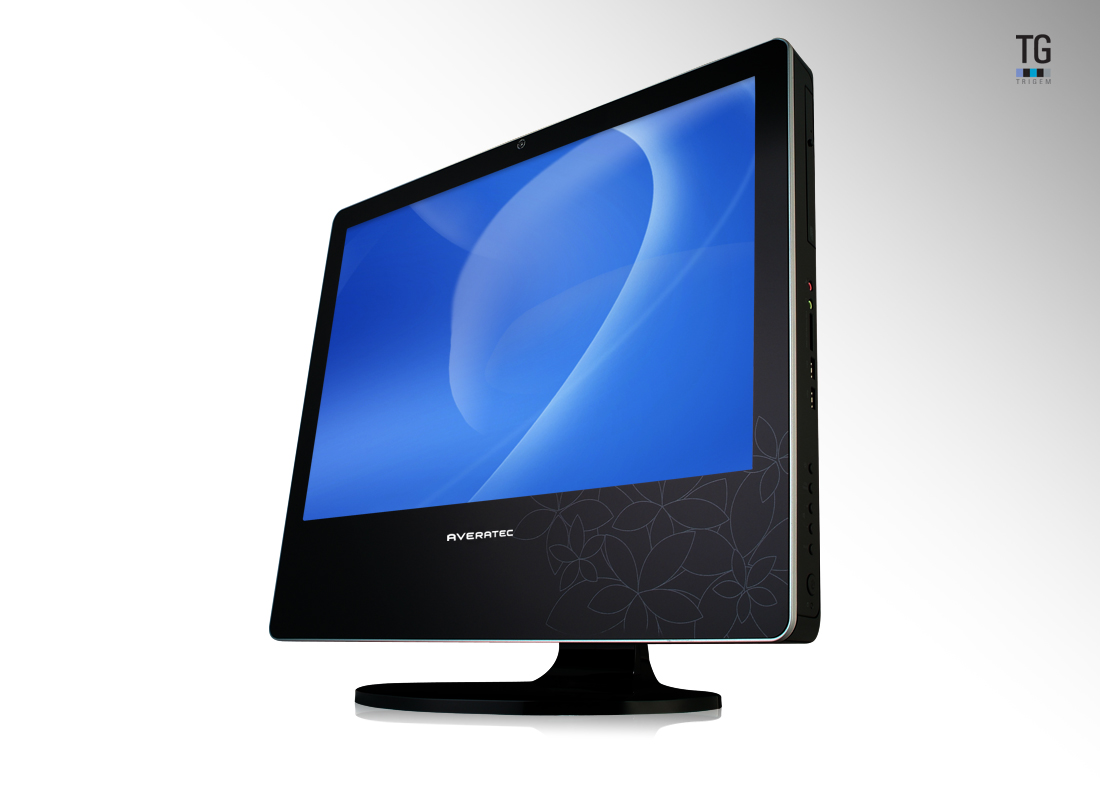
Averatech have launched their All-in-one PC. The desing is based around the form-factor we've seen previously in the iMac and the Dell XPS One. You biuld a display case which also houses everything a PC needs inside. The Averatec All-In-One has has a 22-inch display and has 2GB of RAM, a 320GB HDD, built-in HDTV tuner and like the iMac and XPS One features a slot loading optical drive. The All-In-One is powered by an Intel Core 2 Duo E4600 CPU and uses an NVIDIA GeForce 8400 for graphics. It is available for purchase now at an MSRP of $1249. For more info visit the
Saturday, July 05, 2008
Nikon D3 Firmware Update
Nikon have released a firmware upgrade for the D3. there are no major bug fixes other than one for a dead battery issue that some people have been experiencing with both the D3 and D300. There are however a a few additions worthy of consideration.
Modifications enabled with upgrade of A and B firmware to v.2.00
Images captured with “Rotate tall”, in the playback menu, set to “On”, are not automatically rotated for display immediately after capture (image review).
The following changes and additions have been made to “f4: Assign FUNC.Button > FUNC. Button + dials” ; “f5: Assign preview button > Preview + command dials”, and “f6: Assign AE-L / AF-L button > AE-L / AF-L + command dials” menus in Custom Settings:
The “Choose image area” option has been separated into two options, “Choose image area (FX / DX / 5:4)” and “Choose image area (FX / DX)”
A new “Shooting menu bank” option has been added.
When “Choose image area (FX / DX / 5:4)” or “Choose image area (FX/DX)” is selected and the function button (Fn) is pressed, the image area setting is displayed in the top control panel, in the shooting information display, and at the bottom of the viewfinder.
A “Copyright information” item has been added to the setup menu. When “Copyright information” is enabled, the copyright symbol ( © ) is shown in the shooting info display.
“Recent settings” can now be displayed in place of “My Menu”.
The virtual horizon can now be displayed with shooting in LiveView mode.
The “Vignette control” setting can now be confimed in shooting information.
The “Vignette control” item in the shooting menu now supports all types of G- and D-type lenses, except DX and PC lenses.
The “Vignette control” compensation value has been optimized for shooting with “Active D-Lighting” the shooting menu.
Electronic analog exposure displays are now shown in the control panel and shooting info display while the exposure compensation setting is being applied.
The degree of the “High ISO NR” setting can now be confirmed in the shooting info display while the “High ISO NR” setting item, in the shooting menu, is being applied.
Design of the FX-format icon in the “Choose image area” setting has been modified.
Ankara, Riyadh, Kuwait, and Manamah have been added to the “Time zone” options for the “World Time” item in the setup menu.
When a GPS device is used and no heading information is available, –.–° is now displayed for the “Position > Heading” option in the “GPS” item in the setup menu.
When shooting in LiveView mode using Camera Control Pro 2 (ver. 2.2.0) or later with a PC-E lens, the aperture setting can now be adjusted from the computer.
Autofocus performance has been improved.
Auto White Balance performance has been improved.
An issue that, in some rare circumstances, caused the battery indicator to blink, regardless of actual battery charge, has been resolved.
Errors in the German help displays have been corrected.
US customers can download the Nikon D3 Firmware 2.0 here.
Modifications enabled with upgrade of A and B firmware to v.2.00
Images captured with “Rotate tall”, in the playback menu, set to “On”, are not automatically rotated for display immediately after capture (image review).
The following changes and additions have been made to “f4: Assign FUNC.Button > FUNC. Button + dials” ; “f5: Assign preview button > Preview + command dials”, and “f6: Assign AE-L / AF-L button > AE-L / AF-L + command dials” menus in Custom Settings:
The “Choose image area” option has been separated into two options, “Choose image area (FX / DX / 5:4)” and “Choose image area (FX / DX)”
A new “Shooting menu bank” option has been added.
When “Choose image area (FX / DX / 5:4)” or “Choose image area (FX/DX)” is selected and the function button (Fn) is pressed, the image area setting is displayed in the top control panel, in the shooting information display, and at the bottom of the viewfinder.
A “Copyright information” item has been added to the setup menu. When “Copyright information” is enabled, the copyright symbol ( © ) is shown in the shooting info display.
“Recent settings” can now be displayed in place of “My Menu”.
The virtual horizon can now be displayed with shooting in LiveView mode.
The “Vignette control” setting can now be confimed in shooting information.
The “Vignette control” item in the shooting menu now supports all types of G- and D-type lenses, except DX and PC lenses.
The “Vignette control” compensation value has been optimized for shooting with “Active D-Lighting” the shooting menu.
Electronic analog exposure displays are now shown in the control panel and shooting info display while the exposure compensation setting is being applied.
The degree of the “High ISO NR” setting can now be confirmed in the shooting info display while the “High ISO NR” setting item, in the shooting menu, is being applied.
Design of the FX-format icon in the “Choose image area” setting has been modified.
Ankara, Riyadh, Kuwait, and Manamah have been added to the “Time zone” options for the “World Time” item in the setup menu.
When a GPS device is used and no heading information is available, –.–° is now displayed for the “Position > Heading” option in the “GPS” item in the setup menu.
When shooting in LiveView mode using Camera Control Pro 2 (ver. 2.2.0) or later with a PC-E lens, the aperture setting can now be adjusted from the computer.
Autofocus performance has been improved.
Auto White Balance performance has been improved.
An issue that, in some rare circumstances, caused the battery indicator to blink, regardless of actual battery charge, has been resolved.
Errors in the German help displays have been corrected.
US customers can download the Nikon D3 Firmware 2.0 here.
Thursday, July 03, 2008
Nikon Release D700 DSLR
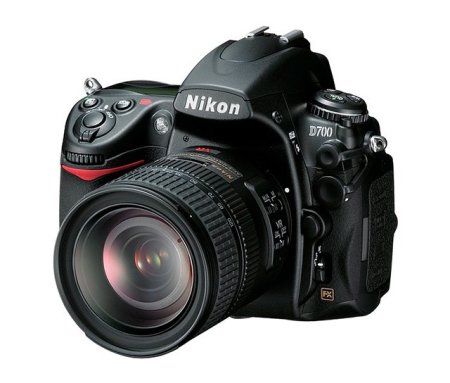
Nikon have just released the D700 digital SLR camera. This DSLR is aimed at the Prosumer and is based upon technologies found in their D3, boasting pro-level performance and an extensive array of features and innovations. It also features the Nikon FX-format CMOS sensor, Nikon’s EXPEED Image Processing System, Nikon’s renowned 51-point auto focus system with 3D Focus Tracking and two Live View shooting modes. Having seen the liveview in use on the D3 it is something I wish I had on my Canon Eos 5D.
Tuesday, July 01, 2008
Xandros Acquires Linspire
Growth in the Linux business - that is, the Linux business desktop - is slow. But determined companies can make things happen (and grow somewhat faster too?) as long as they keep their eye(s) on the ball. I remember when Xandros was a struggling little startup, but oh how times have changed. We still think that Xandros is the most business-facing Linux distribution (with kudos to Linspire and Red Hat as well, no doubt), and Xandros continues to remain focused on expanding its footprint on business desktops. The acquisition of Linspire (another Debian-based Linux distribution) helps narrow the somewhat bewildering field of choices confronting any business considering a jump to Linux. Choosing something other than Windows or Mac OS X has never been risk free, but we really think that Linux is a safe bet these days especially with Microsoft Office file compatibility so well covered by OpenOffice for Linux.
Saturday, June 28, 2008
Review of DPI Show in London
On Thursday Howard and I attended the Digital Photo and Imaging Show at the Business Design Centre in Islington. My first impression on entering the show was one of disappointment as it seemed a little on the small side, however this was soon to change as I made my way around the show. There were a few manufacturers present who were showing their solutions and we managed to spend some valuable time, one on one with their reps.
On the software front there were a number of vendors showing their wares including Apple and Adobe. OnOne and Nik Software were also there showing their respective photoshop plug-ins and running continuous demos. A number of distributors and resellers were also on hand demonstrating other solutions. The live theatres from Adobe, Apple and DPI were running all day and were well attended, often with crowds spilling out into aisles.
Printer manufacturers were there in force with stands from Canon, Epson and HP well manned and equipped with the latest in large format printers. Nikon were notable in their absence, disappointing really as there were plenty of Pro Users in attendance.
There were the usual publications and associations present and it was nice catching up with some of them. The BPPA, BIPP and The SWPP were there looking for new members and spending time with existing members. Magazines such as F2, The BJP, Digital Arts Magazine and Macworld were on hand, giving out free copies and selling subscriptions.
I was pleased with Canon's presence at the show as they were demonstrating a start to finish capability which other manufacturers lack. My associate Howard Carson, noted that Canon was able to demonstrate a complete solution for Photographers from Capture, Acquisition through to output. In addition to their pro cameras and output solutions they also had their projectors and pro video solutions on hand for demo.
Other exhibitors included Skillset, who were there discussing their training programs for Digital Skills, photography and creative workflows. It's definitely worth checking them out. A number of retailers and resellers such as AJ Purdy, The Flash Centre, The Pro Centre and Rapid Group were there promoting their wares and services and selling discounted products and providing some excellent show specials.
Other Vendors included Wacom who were demoing their excellent tablet solutions. Computer Unlimited were also in attendance demoing solutions from Corel, Datacolor, Shiraz and Vertus.
The lecture program and seminar at the show was full and possibly offered many useful and valuable insights. Speakers presented on lectures and seminars useful to photo-libraries, portrait photographers, on documentary photography, celebrity shots, visual journalism and on the art of photography.
Overall the show was small in scale but big on delivery, We were able to spend some valuable time with the companies we wanted to see. I hope that next years show will be similar in nature but somewhat larger in scale. Nikon should really be there, as should a few more third party software and hardware vendors.
On the software front there were a number of vendors showing their wares including Apple and Adobe. OnOne and Nik Software were also there showing their respective photoshop plug-ins and running continuous demos. A number of distributors and resellers were also on hand demonstrating other solutions. The live theatres from Adobe, Apple and DPI were running all day and were well attended, often with crowds spilling out into aisles.
Printer manufacturers were there in force with stands from Canon, Epson and HP well manned and equipped with the latest in large format printers. Nikon were notable in their absence, disappointing really as there were plenty of Pro Users in attendance.
There were the usual publications and associations present and it was nice catching up with some of them. The BPPA, BIPP and The SWPP were there looking for new members and spending time with existing members. Magazines such as F2, The BJP, Digital Arts Magazine and Macworld were on hand, giving out free copies and selling subscriptions.
I was pleased with Canon's presence at the show as they were demonstrating a start to finish capability which other manufacturers lack. My associate Howard Carson, noted that Canon was able to demonstrate a complete solution for Photographers from Capture, Acquisition through to output. In addition to their pro cameras and output solutions they also had their projectors and pro video solutions on hand for demo.
Other exhibitors included Skillset, who were there discussing their training programs for Digital Skills, photography and creative workflows. It's definitely worth checking them out. A number of retailers and resellers such as AJ Purdy, The Flash Centre, The Pro Centre and Rapid Group were there promoting their wares and services and selling discounted products and providing some excellent show specials.
Other Vendors included Wacom who were demoing their excellent tablet solutions. Computer Unlimited were also in attendance demoing solutions from Corel, Datacolor, Shiraz and Vertus.
The lecture program and seminar at the show was full and possibly offered many useful and valuable insights. Speakers presented on lectures and seminars useful to photo-libraries, portrait photographers, on documentary photography, celebrity shots, visual journalism and on the art of photography.
Overall the show was small in scale but big on delivery, We were able to spend some valuable time with the companies we wanted to see. I hope that next years show will be similar in nature but somewhat larger in scale. Nikon should really be there, as should a few more third party software and hardware vendors.
Wednesday, June 25, 2008
Datacolor’s Spyder3 Gets Price Reduction
Datacolor announced a price reduction for its Spyder3 range. As of June the 1st 2008, their award-winning Spyder3Elite is reduced in price from £175 to £155.99 whilst Spyder3Print is reduced by £60 to £253.99, including VAT. For more information on the Spyder3 range visit Datacolor.
Monday, June 23, 2008
Wacom Wins 2 Coveted Red Dot Awards
Wacom have won 2 Red Dot Awards for the Bamboo Fun Pen Tablet and their Cintiq 12WX hybrid interactive pen display. This is the second red dot award for the Bamboo range, as the first model in the series also received the same accolade in June 2007. The Cintiq 12WX features a high quality 12.1” screen, which is optimised for direct input using the ergonomically designed digital pen. With this form of interaction activities such as drawing, painting, sketching, storyboarding, finishing, retouching and compositing allow the creative to work much as they would on paper. For more information on the Bamboo Fun and the Cintiq 12WX visit Wacom.
For more information on the Red Dot award visit Red-Dot.org.
For more information on the Red Dot award visit Red-Dot.org.
Sunday, June 22, 2008
Akvis Relocate Headquarters To Canada
AKVIS Software Inc., the manufacturer of some excellent photo editing tools and plug-ins, has moved its head office to Vancouver in British Columbia, Canada. Founded in Russia, AKVIS is determined to improve their market presence by being able to get easier access to the North American software market.
Toshiba Tecra M9 Laptop review
Reviewed by: Mario Georgiou, June 2008
Manufactured by: Toshiba
Requires: Intel® Core™2 Duo Processor T7500 2.2 GHz,Intel® Wireless WiFi™ Link, Genuine Windows Vista® Business Edition, 2GB of 667MHz DDR2 RAM (maximum 4GB), 160GB hard disk drive, DVD Super Multi drive (Double Layer), 14.1" (1,440 x 900) display, NVIDIA® Quadro® NVS 130M mobile video card supporting TurboCache™ technology, Bluetooth version 2.0 plus Enhanced Data Rate (EDR)Wi-Fi™, 802.11a/b/g/Draft-N, 87 key keyboard, spill-resistant keyboard, type II PC card slot, 5-in-1 media card reader, VGA out, mic/headphone connectors, IEEE-1394 (FireWire), three USB 2.0 hi-speed ports, serial port
MSRP: US$1299.00
I currently own a terrific Toshiba m400 tablet PC. So when TalkToshiba called to tell me that they had a Tecra M9 available for review I jumped at the opportunity to find out what the latest generation of Toshiba laptops has to offer. The Tecra M9 is a laptop designed with business users in mind. The M9 ships with Windows Vista Business Edition.
The Toshiba Tecra M9 is a very clean looking machine, and the 14.1 inch screen looks a lot bigger than it actually is. With the higher than normal resolution for a 14.1" display I was quite comfortable with using it compared to similar laptops. The display on this notebook and the lid feel very secure, with very little flex. As a result I didn't experience any of the usual warping and momentary discolouration seen when adjusting the angle of the screen. The matte finish does a good job of diffusing any reflections. The vertical viewing angles are more limited than I would like, causing most dark or midrange colours to washout or completely disappear moving vertically above or below normal viewing angles. Horizontal viewing is somewhat better, but still washes out sooner than I've experienced with other laptops.
The Toshiba Tecra M9 is a very comfortable typing machine. The keys have a great feel, providing just the right amount of movement and feedback. Toshiba describes the M9's keyboard as spill resistant. The touchpad and pointer worked as expected, I also found that the left and right buttons used with the pointer control button were very nicely implemented. The keyboard and palm rest area exhibited a bit of movement when used compared to other laptops. However it wasn't enough to cause me any problems. The inclusion of a fingerprint reader for security also enhances the business-centric approach to the M9's design.
Moving around the M9, starting on the front, you will find the indicator light array, a wireless on/off switch, firewire connector, headphone/mic jacks, and volume knob. The left side of the laptop features a modem jack, Kensington lock slot, exhaust port, one USB port, PC-card Slot and the SD card slot. The back of the unit has a serial port, VGA connector, and AC plug port. The right side features two USB ports, the optical bay, and the LAN port.
The audio capabilities were what I expect from a laptop - clear and easy to hear. However I would always recommend using decent headphones for anything you really care to hear well. You can even try a pair of bluetooth headphones using the A2DP profile and the easy device discovery via Vista and Toshiba Bluetooth manager. The headphone jack had none of the telltale hiss and noise you would get from a sub-par connector, indicating good quality parts being used.
Starting up and shutting down the M9 was quick and painless. With this unit's 2GB of memory and the 2.2 GHz T7500 Intel Core 2 Duo processor and nVidia NVS 130M graphics card, I found no noticeable issues while using any of the standard productivity software or even the creative tools(and resource hogs) like Photoshop. Trying any of the graphically intensive games (like Crysis) was problematic and I found there was no point in attempting to squeeze any sort of decent gamely out of the M9 as the graphics capabilities weren't up to the task. It's not really much of an issue though, because the M9 is really meant to be a business machine.
Heat and noise didn't appear to be an issue at all for the M9. I kept the laptop running almost constantly for one day and found it quite comfortable to touch. The fan kept up quietly even when I took the laptop into a hot, noisy neighbourhood pub to test it out on a public wireless network.
Battery life was as expected, with the standard battery giving about 2.5 hours (on average) use. I did find the hard drive shock protection alarm a little on the sensitive side. The warning popped up with the slightest knock of the M9. This feature however can be disabled/enabled by pressing the Toshiba Assist button located next to the power on/off on the top of the keyboard.
Cons: Premature drop-off in display brightness. Somewhat oversensitive shock protection alarm. It's a business machine not a game platform, but a bit more graphics horsepower would provide a better all around experience with what is basically a very good laptop. Excellent screen resolution, but off-angle viewing could be better.
Pros: Nice spill resistant keyboard. Standard three year warranty. Excellent wireless support. Solid build quality. Runs Microsoft Office, Photoshop CS3 and most common business software very smoothly. I was initially a little afraid that the screen on the M9 would be a little on the small side, but after working with the unit for a few weeks I found that the high quality and high resolution more than met my needs. The Toshiba Tecra M9 is a nice business laptop that will more than do the job. Recommended
Manufactured by: Toshiba
Requires: Intel® Core™2 Duo Processor T7500 2.2 GHz,Intel® Wireless WiFi™ Link, Genuine Windows Vista® Business Edition, 2GB of 667MHz DDR2 RAM (maximum 4GB), 160GB hard disk drive, DVD Super Multi drive (Double Layer), 14.1" (1,440 x 900) display, NVIDIA® Quadro® NVS 130M mobile video card supporting TurboCache™ technology, Bluetooth version 2.0 plus Enhanced Data Rate (EDR)Wi-Fi™, 802.11a/b/g/Draft-N, 87 key keyboard, spill-resistant keyboard, type II PC card slot, 5-in-1 media card reader, VGA out, mic/headphone connectors, IEEE-1394 (FireWire), three USB 2.0 hi-speed ports, serial port
MSRP: US$1299.00
I currently own a terrific Toshiba m400 tablet PC. So when TalkToshiba called to tell me that they had a Tecra M9 available for review I jumped at the opportunity to find out what the latest generation of Toshiba laptops has to offer. The Tecra M9 is a laptop designed with business users in mind. The M9 ships with Windows Vista Business Edition.
The Toshiba Tecra M9 is a very clean looking machine, and the 14.1 inch screen looks a lot bigger than it actually is. With the higher than normal resolution for a 14.1" display I was quite comfortable with using it compared to similar laptops. The display on this notebook and the lid feel very secure, with very little flex. As a result I didn't experience any of the usual warping and momentary discolouration seen when adjusting the angle of the screen. The matte finish does a good job of diffusing any reflections. The vertical viewing angles are more limited than I would like, causing most dark or midrange colours to washout or completely disappear moving vertically above or below normal viewing angles. Horizontal viewing is somewhat better, but still washes out sooner than I've experienced with other laptops.
The Toshiba Tecra M9 is a very comfortable typing machine. The keys have a great feel, providing just the right amount of movement and feedback. Toshiba describes the M9's keyboard as spill resistant. The touchpad and pointer worked as expected, I also found that the left and right buttons used with the pointer control button were very nicely implemented. The keyboard and palm rest area exhibited a bit of movement when used compared to other laptops. However it wasn't enough to cause me any problems. The inclusion of a fingerprint reader for security also enhances the business-centric approach to the M9's design.
Moving around the M9, starting on the front, you will find the indicator light array, a wireless on/off switch, firewire connector, headphone/mic jacks, and volume knob. The left side of the laptop features a modem jack, Kensington lock slot, exhaust port, one USB port, PC-card Slot and the SD card slot. The back of the unit has a serial port, VGA connector, and AC plug port. The right side features two USB ports, the optical bay, and the LAN port.
The audio capabilities were what I expect from a laptop - clear and easy to hear. However I would always recommend using decent headphones for anything you really care to hear well. You can even try a pair of bluetooth headphones using the A2DP profile and the easy device discovery via Vista and Toshiba Bluetooth manager. The headphone jack had none of the telltale hiss and noise you would get from a sub-par connector, indicating good quality parts being used.
Starting up and shutting down the M9 was quick and painless. With this unit's 2GB of memory and the 2.2 GHz T7500 Intel Core 2 Duo processor and nVidia NVS 130M graphics card, I found no noticeable issues while using any of the standard productivity software or even the creative tools(and resource hogs) like Photoshop. Trying any of the graphically intensive games (like Crysis) was problematic and I found there was no point in attempting to squeeze any sort of decent gamely out of the M9 as the graphics capabilities weren't up to the task. It's not really much of an issue though, because the M9 is really meant to be a business machine.
Heat and noise didn't appear to be an issue at all for the M9. I kept the laptop running almost constantly for one day and found it quite comfortable to touch. The fan kept up quietly even when I took the laptop into a hot, noisy neighbourhood pub to test it out on a public wireless network.
Battery life was as expected, with the standard battery giving about 2.5 hours (on average) use. I did find the hard drive shock protection alarm a little on the sensitive side. The warning popped up with the slightest knock of the M9. This feature however can be disabled/enabled by pressing the Toshiba Assist button located next to the power on/off on the top of the keyboard.
Cons: Premature drop-off in display brightness. Somewhat oversensitive shock protection alarm. It's a business machine not a game platform, but a bit more graphics horsepower would provide a better all around experience with what is basically a very good laptop. Excellent screen resolution, but off-angle viewing could be better.
Pros: Nice spill resistant keyboard. Standard three year warranty. Excellent wireless support. Solid build quality. Runs Microsoft Office, Photoshop CS3 and most common business software very smoothly. I was initially a little afraid that the screen on the M9 would be a little on the small side, but after working with the unit for a few weeks I found that the high quality and high resolution more than met my needs. The Toshiba Tecra M9 is a nice business laptop that will more than do the job. Recommended
Thursday, June 19, 2008
Quark Announce QuarkXPress 8
QuarkXPress 8 is nearly complete and will be available within the next two months. Already Quark are promising to provide a free upgrade to folks who purchase and register QuarkXPress 7 in the next couple of months. XPress 8 includes new pen and picture tools, new drag and drop features, better file handling of Illustrator files, and better control over typography and layout. For more information on what's new in XPress 8 visit Quark.
Wednesday, June 11, 2008
ACDSee Photo Editor 2008
ACD Systems have released ACDSee Photo Editor 2008, the next version of their easy-to-use digital photo editing and design software. The new version offers:
• Faster processing time
• More custom creative tools and options for resizing, cropping and masking
• Quick Web optimization & advanced printing functions
• Artistic effects that can be added, modified or deleted
• "Trim to shape" for quick-and-easy design templates
• Advanced journaling and text curving capabilities
Photo Editor 2008 is available for a 30-day trial ... for more info and to download a demo visit ACDSee.
• Faster processing time
• More custom creative tools and options for resizing, cropping and masking
• Quick Web optimization & advanced printing functions
• Artistic effects that can be added, modified or deleted
• "Trim to shape" for quick-and-easy design templates
• Advanced journaling and text curving capabilities
Photo Editor 2008 is available for a 30-day trial ... for more info and to download a demo visit ACDSee.
Subscribe to:
Posts (Atom)