Both the NV10 and NV7 offer slimline styling with advanced features. The NV10 offers a 10-megapixel sensor with anti shake technology and features an innovative touch pad GUI. It has a sleek, brushed black aluminum body and compact design. Measuring under an inch in thickness, it includes a Schneider 3x optical zoom lens (35-105mm equivalent), a 5x digital zoom and a large, 2.5-inch color LCD display. It is also video capable and can record in VGA (640x480) at 30fps.
The NV7 is a seven-megapixel slimline model which uses Optical Picture Stabilisation "which physically adjusts the CCD to combat handshake and Samsung's Advanced Shake Reduction (ASR)" and it also features a 7x Optical zoom. It too, can record in VGA (640x480) at 30fps. Both cameras will be available to the consumer market in the autumn of 2006.

Pics, Pixels and People - Covering photography, photographers, imaging, technology, tidbits, news and reviews...
Thursday, July 06, 2006


Canto Releases Cumulus 7
Canto have announced the release of Cumulus 7, an upgrade to their powerful Digital Asset Management solution. Canto has promised that the new features offer "increased asset control, faster production, and more efficient collaboration, improving the business of organizations that have made asset management an integral part of their marketing and communication processes."
Updates also include improvements to the database engine and include server enhancements such as the introduction of mirroring and permanent cacheing. Cumulus 7 Server and Client software are also available as Universal Binary applications on Mactel computers. Having worked with Cumulus Solutions in the past I look forward to seeing how they've improved it's performance and functionality. For more information on Cumulus 7 please visit Canto.
Updates also include improvements to the database engine and include server enhancements such as the introduction of mirroring and permanent cacheing. Cumulus 7 Server and Client software are also available as Universal Binary applications on Mactel computers. Having worked with Cumulus Solutions in the past I look forward to seeing how they've improved it's performance and functionality. For more information on Cumulus 7 please visit Canto.
Wednesday, July 05, 2006
Intuos3 A5 Wide / 6x11 Graphics Tablet
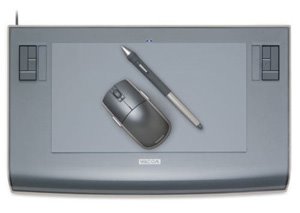
Reviewed by: Mario Georgiou, July 2006
Manufactured by: Wacom Europe, Wacom USA
Requires: For PC—Windows 98SE/ME/2000 and XP; for Apple—MacOS X 10.2.6 or later; all platforms require a CD-ROM drive and available active USB port
MSRP: US$369.95, UK £297.00, EUR429,00
(Ed. Note: Digital Imaging & Graphics Products Editor Mario Georgiou is based in London, England, so from time to time we review the UK/European versions of some products. This Wacom tablet is marketed in North America as the Intuos3 6x11 model).
For many designers and artists, the advent of the graphics tablet provided an almost natural way for them to work with computers. Tablets were wonderful until recently, when wide aspect/wide screen monitors came along. Using a wide screen monitors with any of the standard tablets has proven to be a real pain and seeing that more and more designers are using wide aspect monitors or even multiple monitors for work, it seems that it would be only natural for someone to address the problem.
Along comes Wacom, who have been in the graphics tablet business for a long time, and who are wonderfully innovative in their product design. The announcement of the Intuos A5 Wide met with a lot of interest amongst my creative colleagues. I heard "Wow", "Cool" and "It's about time" repeated quite often. Before I tell you about my experiences, let me first state that I've never really been comfortable with graphics tablets. I'm still not entirely convinced that they're as intuitive as drawing on paper. The basic idea of looking at a vertically oriented monitor and drawing on a separate horizontally oriented graphics tablet surface annoys me (although not as much as trying to do the same thing with a mouse).
So how does the Intuos3 A5 Wide stack up? First, it is big—about twice the size I expected—so having one of those wide aspect monitors with space under it is going to be a necessity. Next, it's really well designed and put together. I love the new stylus design too. Last but not least, it’s really easy to set up and use. My installation took less than a couple of minutes as all the drivers were provided on CD and the USB interface made it a painless exercise.
The Intuos3 A5 Wide is bundled with Corel Painter Essentials, which is a super-light version of Painter. I didn't bother installing it as I have Photoshop CS2 and Painter IX.5 which both work extremely well with the unit.
It took a few sessions to get to grips with the tablet and familiar with its usage and learning how to work with the Custom ExpressKeys and Touch Strip. I decided that using the tablet would have been even better had I also received the excellent Intuos3 Mouse for review. The mouse is in fact included with the standard A5 model and I strongly suggest to Wacom that future A5 Wide packages should also include a mouse.
The working area of the tablet is approximately 6" x 11" (15cm x 28cm), which makes it the perfect size for drawing and mousing around. The whole experience of using this tablet and the pen is something that any creative will appreciate. It is as close as you can get to a natural interface without spending thousands on one of its bigger brothers such as a Cintiq. Support for this excellent product is also good, with updated drivers, FAQs and help available via phone, email and online forums.
The Use It section on the Wacom web site features some great online demos, tips, techniques (which are well worth investigating) and downloads which cover usage and ergonomics. Apropos of nothing at all, I wonder if Wacom is going to partner its technology with one of the Tablet PC makers?
In the UK and the rest of Europe, Wacom has doubled the product support period via the commercial Intuos3 CarePack. This means you can obtain a total of four years of support and warranty coverage if you purchase the Intuos3 CarePack. The additional two years of coverage costs a total of UK£64.99/€499,99 and it's well worth the investment if you are a professional user. Unfortunately, the CarePack does not appear to be available in North America.
Cons: Still not as natural as using a sketchbook. No mouse provided.
Pros: Easy to set up and use. Excellent Custom ExpressKeys feature. Support for multiple operating systems. Superb design and finish. As any good creative will tell you, the tool is only as good as the talent. This tablet more than fills a hole in the market which needed to be addressed. The attention to detail which Wacom has put into this product is evident in every part and in the smooth and effortless functionality. I really enjoyed using the A5 Wide. Experiencing the Intuos3 A5 Wide has been exciting and now I can't wait to get my hands on a Wacom Cintiq interactive pen display for review. I highly recommend the Wacom Intuos3 6x11/A5 Wide for any creative who prefers a pen to a mouse.
This review has been reproduced in its entirety from Kickstartnews.com
Tuesday, June 27, 2006
Corel announces Alta.
Corel Corporation have announced their plans to release a new modular digital imaging platform, which they have code-named "Alta." "Representing the first hybrid product offering from Corel, Alta combines the speed, power, and security of desktop software with the connectivity and rapid enhancement cycle of Web-based applications."
Corel will make the first release of this new platform a free download that should be available by Autumn of 2006. "Once customers install the free version of Alta, they will have the tools they need to easily organize, enhance and share their digital photos and video clips. In addition, they will be able to add new functionality by upgrading additional components as they need them. This will provide customers and partners with unprecedented control and flexibility in customizing their digital imaging and photo management software." This all sounds like they've developed a modular toolkit for consumer based users to use for managing, enhancing and sharing their photos and videos.
Corel will make the first release of this new platform a free download that should be available by Autumn of 2006. "Once customers install the free version of Alta, they will have the tools they need to easily organize, enhance and share their digital photos and video clips. In addition, they will be able to add new functionality by upgrading additional components as they need them. This will provide customers and partners with unprecedented control and flexibility in customizing their digital imaging and photo management software." This all sounds like they've developed a modular toolkit for consumer based users to use for managing, enhancing and sharing their photos and videos.
Adobe purchases RawShooter Technology
Adobe has announced that it has bought the 'technology assets' of Pixmantec, the Danish company behind the RawShooter raw workflow and conversion application. Adobe indicates that they expect this acquisition to strengthen their leadership in raw processing and that they will integrate Pixmantec's raw processing technology into Lightroom and other Adobe products. Although Adobe will still support and make available the Essential edition of RawShooter, the Premium edition will be discontinued. For more information visit Adobe.
iView Acquired by Microsoft
iView Multimedia has announced that it has 'joined' Microsoft. iView are the creators of MediaPro which is a digital imaging workflow and management application, created for Mac and which was later developed for Windows. Yan Calotychos, who is the founder of iView, is adamant that Mac support would continue and that the iView product range will continue to be available (and supported and that development would continue. Read the release here.
Window Seat: The Art of Digital Photography & Creative Thinking
Reviewed by: Mario Georgiou, June 2006
Written by: Julieanne Kost
ISBN: 0596100833
Published by: O'Reilly
Requires: N/A
MSRP: US$39.99, UK£28.50, CAD$55.99
Julieanne Kost is a creative artist and Photoshop expert who has spent much of her professional career as an evangelist for Adobe. Her talents are evident to anyone who has been exposed to her work and knowledge through one of the many workshops she presents. The concept behind Window Seat is just what the title suggests—a look into the creative process, an intimate window into the way Kost sees the world, and a creative exploration of subject matter which, even if commonly experienced, is something many of us who travel take very much for granted.
When I received the publication in early May 2006 I really enjoyed reading it and looking at the images that Kost created for this excellent book. The often rich and beautiful images presented in Window Seat were created from photos she took while flying from one city to another. Taking photos from the vantage point of an airplane cabin window is no mean feat because the glass which protects passengers from the world outside also makes it very difficult to get any useful photos. The images Kost has created are substantially and skillfully reworked by her using Photoshop. All the shots are taken using the camera without any sort of flash unit (you're dozens, hundreds or thousands of feet from anything which kind of makes a flash useless, besides which any sort of flash would reflect back from the cabin window and ruin most photos anyway).
The book is organized into three distinct sections and an introduction. The textual content only spans some thirty or so pages with the rest of the pages dedicated to stunning images and screenshots of Photoshop in action.
The first section, The Art of Creative Thinking, details some eighteen key philosophical insights and working practices. This book isn't as instructional as it is insightful, so you will get more out of experiencing it than you will by just reading it. It is more like walking into a gallery of Kost's works with her as the guide providing you with thoughts about the process of creativity rather than about the work itself.
The practical component is demonstrated in literally the last 25 or so pages of this book, but this is more than enough to demonstrate what one can achieve within the scope of the dedicated application of these excellent tools.
My only criticisms are that the book was too short and that the images would have benefited more from being printed using a high fidelity process. Having said this, it’s not a real criticism but more of a desire to see more of these images and have them displayed in a medium which truly does them justice. Experiencing this book reminded me of another one I bought a few years ago called, "Ember Glance: The Permanence of Memory". It featured images of an installation of sculpture, sound and light by David Sylvian & Russell Mills. What is key about both books is their experiential nature.
After finishing Window Seat, I took it down to the pub with me one day and came across a friend. He opened the book out of curiosity and this led to one of the most enjoyable chats I've had in a long time, the most delightful part of which was watching his facial expressions as he discovered each image and felt compelled to offer his interpretation of what he saw. This to me reveals what art is all about and also the very personal and experiential nature of what we encounter in it. Window Seat is as much about the thinking and philosophy of creativity as it is about the practical exploration of artistic processes.
Cons: Very few. It could have been longer and printed using a high fidelity process. The Textual content is somewhat thin.
Pros: Window Seat is well written and features a clean layout and design which adds to the reading experience. Kost's beautiful images are a tapestry which is a pleasure to behold. If you have been looking for a book with which to explore the working of the creative mind, then look no further—Window Seat is it. The book is filled with insights and excellent images which will open your eyes and inspire you to think about the world around you in new and creative ways. What is truly enjoyable is that it opens an intimate window into Julieanne Kost's working processes and the thoughts behind them. Highly recommended.
This review has been reproduced in its entirety from Kickstartnews.com
Written by: Julieanne Kost
ISBN: 0596100833
Published by: O'Reilly
Requires: N/A
MSRP: US$39.99, UK£28.50, CAD$55.99
Julieanne Kost is a creative artist and Photoshop expert who has spent much of her professional career as an evangelist for Adobe. Her talents are evident to anyone who has been exposed to her work and knowledge through one of the many workshops she presents. The concept behind Window Seat is just what the title suggests—a look into the creative process, an intimate window into the way Kost sees the world, and a creative exploration of subject matter which, even if commonly experienced, is something many of us who travel take very much for granted.
When I received the publication in early May 2006 I really enjoyed reading it and looking at the images that Kost created for this excellent book. The often rich and beautiful images presented in Window Seat were created from photos she took while flying from one city to another. Taking photos from the vantage point of an airplane cabin window is no mean feat because the glass which protects passengers from the world outside also makes it very difficult to get any useful photos. The images Kost has created are substantially and skillfully reworked by her using Photoshop. All the shots are taken using the camera without any sort of flash unit (you're dozens, hundreds or thousands of feet from anything which kind of makes a flash useless, besides which any sort of flash would reflect back from the cabin window and ruin most photos anyway).
The book is organized into three distinct sections and an introduction. The textual content only spans some thirty or so pages with the rest of the pages dedicated to stunning images and screenshots of Photoshop in action.
The first section, The Art of Creative Thinking, details some eighteen key philosophical insights and working practices. This book isn't as instructional as it is insightful, so you will get more out of experiencing it than you will by just reading it. It is more like walking into a gallery of Kost's works with her as the guide providing you with thoughts about the process of creativity rather than about the work itself.
The practical component is demonstrated in literally the last 25 or so pages of this book, but this is more than enough to demonstrate what one can achieve within the scope of the dedicated application of these excellent tools.
My only criticisms are that the book was too short and that the images would have benefited more from being printed using a high fidelity process. Having said this, it’s not a real criticism but more of a desire to see more of these images and have them displayed in a medium which truly does them justice. Experiencing this book reminded me of another one I bought a few years ago called, "Ember Glance: The Permanence of Memory". It featured images of an installation of sculpture, sound and light by David Sylvian & Russell Mills. What is key about both books is their experiential nature.
After finishing Window Seat, I took it down to the pub with me one day and came across a friend. He opened the book out of curiosity and this led to one of the most enjoyable chats I've had in a long time, the most delightful part of which was watching his facial expressions as he discovered each image and felt compelled to offer his interpretation of what he saw. This to me reveals what art is all about and also the very personal and experiential nature of what we encounter in it. Window Seat is as much about the thinking and philosophy of creativity as it is about the practical exploration of artistic processes.
Cons: Very few. It could have been longer and printed using a high fidelity process. The Textual content is somewhat thin.
Pros: Window Seat is well written and features a clean layout and design which adds to the reading experience. Kost's beautiful images are a tapestry which is a pleasure to behold. If you have been looking for a book with which to explore the working of the creative mind, then look no further—Window Seat is it. The book is filled with insights and excellent images which will open your eyes and inspire you to think about the world around you in new and creative ways. What is truly enjoyable is that it opens an intimate window into Julieanne Kost's working processes and the thoughts behind them. Highly recommended.
This review has been reproduced in its entirety from Kickstartnews.com
Sunday, June 25, 2006
News for week of June 18 - 25
111 Megapixel Sensor
DALSA Semiconductor announced that it has developed the worlds first 100 plus megapixel sensor. This sensor, is specifically aimed at astronomy and features 10,560 x 10,560 pixels. The sensors active area measures approximately four by four inches and has a 9 µm pixel pitch. The sensor has been jointly developed with Semiconductor Technology Associates for the US Naval Observatory. I for one, am looking forward to seeing the images it produces.
Google launches Picasa Web Albums
Google announced a new web albums feature for their photo management application, Picasa. The new feature, which is only available by invitation at the moment, enables quick and easy uploading of images from Picasa to a Google hosted gallery system. With the Web Albums you get 250 MB of storage free and for $25 a year you can add an additional 6 GB of storage.
DPReview posts an exclusive preview of the new Panasonic Lumix DMC-L1
For those of you who are fans of Leica Lenses DPReview have got an exclusive preview of the new Lumix DMC-L1 which uses Leica "D" class lenses. This Camera is designed to comply with Four Thirds™ standard. Visit DPReview for their exclusive hands-on preview.
ExpoDisc Digital White Balance Filters will be available at Ritz Camera and Image stores
ExpoImaging told DPReview that their ExpoDisc Digital White Balance Filters will soon be available in Ritz Camera and Image stores nationwide as well as through Ritz Camera online. "The ExpoDisc design enables it to receive, scramble and transmit light from a wide angle in front of the disc through to the camera’s image sensor for a faster, easier and more accurate white balance correction. This produces excellent results, even in mixed light."
"Each ExpoDisc is manufactured and individually calibrated by hand to strict tolerances of light transmission and color neutrality. Consisting of multiple layers of carefully selected and matched optical grade materials, each ExpoDisc is guaranteed for neutrality (+/- 2%) for demanding photographic professionals." For more information visit ExpoImaging Inc.
Bibble Labs updated to 4.8
Bibble Labs have just released version 4.8 of Bibble Labs Pro and Bibble Labs Lite. These new versions are available free to existing Bibble 4 owners. This release includes advanced lens correction (distortion, chromatic aberrations and vignetting) as well as B&W and spot color filters. It also adds support for the Fujifilm S3 Pro. Visit BibbleLabs for the new version.
Apple releases Aperture update.
Apple have released Aperture 1.1.2 for Mac. This appears to be largely a maintenance and performance based release. Apple have indicated that the release "addresses issues related to overall reliability and performance." I need to get a mac to take a look at Aperture and Lightroom. The update for aperture is available here.
DALSA Semiconductor announced that it has developed the worlds first 100 plus megapixel sensor. This sensor, is specifically aimed at astronomy and features 10,560 x 10,560 pixels. The sensors active area measures approximately four by four inches and has a 9 µm pixel pitch. The sensor has been jointly developed with Semiconductor Technology Associates for the US Naval Observatory. I for one, am looking forward to seeing the images it produces.
Google launches Picasa Web Albums
Google announced a new web albums feature for their photo management application, Picasa. The new feature, which is only available by invitation at the moment, enables quick and easy uploading of images from Picasa to a Google hosted gallery system. With the Web Albums you get 250 MB of storage free and for $25 a year you can add an additional 6 GB of storage.
DPReview posts an exclusive preview of the new Panasonic Lumix DMC-L1
For those of you who are fans of Leica Lenses DPReview have got an exclusive preview of the new Lumix DMC-L1 which uses Leica "D" class lenses. This Camera is designed to comply with Four Thirds™ standard. Visit DPReview for their exclusive hands-on preview.
ExpoDisc Digital White Balance Filters will be available at Ritz Camera and Image stores
ExpoImaging told DPReview that their ExpoDisc Digital White Balance Filters will soon be available in Ritz Camera and Image stores nationwide as well as through Ritz Camera online. "The ExpoDisc design enables it to receive, scramble and transmit light from a wide angle in front of the disc through to the camera’s image sensor for a faster, easier and more accurate white balance correction. This produces excellent results, even in mixed light."
"Each ExpoDisc is manufactured and individually calibrated by hand to strict tolerances of light transmission and color neutrality. Consisting of multiple layers of carefully selected and matched optical grade materials, each ExpoDisc is guaranteed for neutrality (+/- 2%) for demanding photographic professionals." For more information visit ExpoImaging Inc.
Bibble Labs updated to 4.8
Bibble Labs have just released version 4.8 of Bibble Labs Pro and Bibble Labs Lite. These new versions are available free to existing Bibble 4 owners. This release includes advanced lens correction (distortion, chromatic aberrations and vignetting) as well as B&W and spot color filters. It also adds support for the Fujifilm S3 Pro. Visit BibbleLabs for the new version.
Apple releases Aperture update.
Apple have released Aperture 1.1.2 for Mac. This appears to be largely a maintenance and performance based release. Apple have indicated that the release "addresses issues related to overall reliability and performance." I need to get a mac to take a look at Aperture and Lightroom. The update for aperture is available here.
Saturday, June 17, 2006
Adobe releases Lightroom Beta 3
Adobe have posted Lightroom Beta 3, the latest public release of the their upcoming pro photo management and RAW conversion application. Lightroom is still Mac only, I'm dying to get my hands on a Wintel release. More information on what's new is in Lightroom's release notes.
Photoshop World Opens Registration With Discount Offer.
Photoshop World Conference & Expo – the largest Photoshop educational event in the world – will be held September 7-9 at the Mandalay Bay Resort & Casino in Las Vegas. Photoshop World is offering an advance registration discount of $100 until Friday, August 4th. Registration is open at photoshopworld.com or by calling 800-738-8513, Monday-Friday, 8:30 AM – 7:00 PM EST.
Thinck.com Launches Online ICC Colour Profiling Service
In what looks to be a reasonably priced service, Thinck.com have announced the launch of its ICC Colour Profiling Service. It promises to make high-quality colour management available at affordable prices using a system which allows users to download the appropriate test charts (colour targets), print them out and subsequently send them to Thinck.com by post. Thinck indicate in their press release that less than a week later, the customer will receive their new printer profile via email. Prices start at €45.00 for a RGB or CMYK printer profile.
Whilst this is a good start I can see that this will have to go hand in hand with solutions in the most important are of colour management - Calibration of Display Devices. For more information the service, visit thinck.com.
Whilst this is a good start I can see that this will have to go hand in hand with solutions in the most important are of colour management - Calibration of Display Devices. For more information the service, visit thinck.com.
Monday, June 12, 2006
Announcing Spymac Galleries
I dont usually like to quote directly from press releases but the following is excerpted from a relase I received from Spymacs PR Agency -Thomas PR
June 12, 2006, NY, NY – Spymac www.spymac.com, the largest Macintosh community with over 1 million members, announced today Spymac Galleries, the first photo and video community that lets you express yourself like never before. Post photos, movies and music online for free and then discuss personal photos, new music, crazy videos, gossip, news, etc. online with friends and other Spymac members.
Available for Mac and Windows, Spymac Galleries let you upload for free massive multimedia files of up to 3GB using new “Spymac Disk” technology for exceptional drag-n-drop ease of use. An additional 9GB of online storage space and other services are also available to Spymac Club members for a small annual fee of only $25/year. Users can share or embed their photos and videos in their own or other’s blogs, auctions and web pages.
Spymac Galleries – Create Your Own Photo & Video Community
With Spymac Galleries, the emphasis is on community. Socialize, build relationships, and have fun sharing and exploring files, bookmarks, multimedia, schedules and other content with your friends and family. Files can be made public or viewable only to your friends and colleagues. Spymac visitors can comment, rate, and be polled on new multimedia creations for an unequaled interactive experience and a true community of friends and family all over the world.
Easy to Use Spymac Disk Technology
Posting to the Spymac Galleries is extremely easy. Using new Spymac Disk technology with advanced AJAX and WebDAV features, photo and video galleries can be quickly designed by dragging and dropping files. Spymac Disk makes it easy to drag files from your computer to the Spymac servers, where they can be displayed and viewed. Spymac Disk shows up on your desktop as a drive (just as an iPod or other storage device would), and managing files is just as simple as dragging and dropping photos, music and video from the drive where they are located to the Spymac Disk drive. Spymac Disk synchronizes with the Spymac site in the background while you work, so sharing and storing files online has never been easier.
Should definitely be an interesting experience and worthy of some exploration. Visit Spymac now and sign up for an account.
June 12, 2006, NY, NY – Spymac www.spymac.com, the largest Macintosh community with over 1 million members, announced today Spymac Galleries, the first photo and video community that lets you express yourself like never before. Post photos, movies and music online for free and then discuss personal photos, new music, crazy videos, gossip, news, etc. online with friends and other Spymac members.
Available for Mac and Windows, Spymac Galleries let you upload for free massive multimedia files of up to 3GB using new “Spymac Disk” technology for exceptional drag-n-drop ease of use. An additional 9GB of online storage space and other services are also available to Spymac Club members for a small annual fee of only $25/year. Users can share or embed their photos and videos in their own or other’s blogs, auctions and web pages.
Spymac Galleries – Create Your Own Photo & Video Community
With Spymac Galleries, the emphasis is on community. Socialize, build relationships, and have fun sharing and exploring files, bookmarks, multimedia, schedules and other content with your friends and family. Files can be made public or viewable only to your friends and colleagues. Spymac visitors can comment, rate, and be polled on new multimedia creations for an unequaled interactive experience and a true community of friends and family all over the world.
Easy to Use Spymac Disk Technology
Posting to the Spymac Galleries is extremely easy. Using new Spymac Disk technology with advanced AJAX and WebDAV features, photo and video galleries can be quickly designed by dragging and dropping files. Spymac Disk makes it easy to drag files from your computer to the Spymac servers, where they can be displayed and viewed. Spymac Disk shows up on your desktop as a drive (just as an iPod or other storage device would), and managing files is just as simple as dragging and dropping photos, music and video from the drive where they are located to the Spymac Disk drive. Spymac Disk synchronizes with the Spymac site in the background while you work, so sharing and storing files online has never been easier.
Should definitely be an interesting experience and worthy of some exploration. Visit Spymac now and sign up for an account.
Photography Great, Arnold Newman Dies
Another great has left us ... Arnold Newman is perhaps one of the most candid and powerful photographers you will ever come across. His work is famous for capturing the essence of his subjects. His portraits of Igor Stravinsky, Pablo Picasso, Marilyn Monroe, Otto Frank, Andrew Wyeth, Andy Warhol and Alfried Krupp are excellent examples of his ability to capture and convey character. His death is a great loss to us. To see some of his powerful images visit PDNs Legends Online and Digital Journalist.
I leave you with a quote which captures the essence of his talent -
I leave you with a quote which captures the essence of his talent -
We do not take pictures with our cameras,
but with our hearts and minds.
but with our hearts and minds.
Arnold Newman 88 - 1918-2006
News for June 2 - 12
HP recalls Photosmart R707 cameras
HP is recalling nearly 700,000 Photosmart R707 cameras dues to reports of a fire which was apparently caused when the camera was fitted with a non-rechargeable battery. A firmware update has been released which corrects the problem -- or they can contact HP to have the update carried out. The Firmware is available here.
Sony introduces Alpha DSLR-A100 digital SLR.
Sony have relased their much awaited DSLR, known as the Alpha (α) DSLR-A100, the camera is based upon Konica Minolta's Maxxum 5D/7D models. This further reinforces the continuation of the Konica/Minolta product line (which Sony bought last year) whilst bolstering Sonys Digicam offerings. In addition there are also 19 new lenses, including three from German lensmaker Carl Zeiss.
The basic specs are listed below, and if you want more details be sure to check out the reviews from Digital Camera Resource or DP Review
Alpha DSLR-A100:
10.2 effective Megapixel CCD, produces images at 3872 x 2592
Super SteadyShot CCD-shift image stabilization system
Sony/Minolta Alpha mount, supports most KM lenses and all the new Sony ones.
A hardware based Dynamic Range Optimizer.
Two dust reduction systems: special coating on sensor repels dust, and CCD "shakes" the rest off when camera is turned on/off.
2.5" LCD display with 230,000 pixels.
Enhanced full manual capability
ISO support up to 1600
RAW, RAW + JPEG support
Unlimited JPEG continuous shooting at 3 fps
Proprietary Hot shoe for external flash.
CompactFlash Type II slot; Memory Stick Duo adapter included
USB 2.0 High Speed support
Uses new NP-FM55H lithium-ion battery; 750 shots per charge
Ships in July for $899 body only or $999 with a Sony 18 - 70 mm lens
HP is recalling nearly 700,000 Photosmart R707 cameras dues to reports of a fire which was apparently caused when the camera was fitted with a non-rechargeable battery. A firmware update has been released which corrects the problem -- or they can contact HP to have the update carried out. The Firmware is available here.
Sony introduces Alpha DSLR-A100 digital SLR.
Sony have relased their much awaited DSLR, known as the Alpha (α) DSLR-A100, the camera is based upon Konica Minolta's Maxxum 5D/7D models. This further reinforces the continuation of the Konica/Minolta product line (which Sony bought last year) whilst bolstering Sonys Digicam offerings. In addition there are also 19 new lenses, including three from German lensmaker Carl Zeiss.
The basic specs are listed below, and if you want more details be sure to check out the reviews from Digital Camera Resource or DP Review
Alpha DSLR-A100:
10.2 effective Megapixel CCD, produces images at 3872 x 2592
Super SteadyShot CCD-shift image stabilization system
Sony/Minolta Alpha mount, supports most KM lenses and all the new Sony ones.
A hardware based Dynamic Range Optimizer.
Two dust reduction systems: special coating on sensor repels dust, and CCD "shakes" the rest off when camera is turned on/off.
2.5" LCD display with 230,000 pixels.
Enhanced full manual capability
ISO support up to 1600
RAW, RAW + JPEG support
Unlimited JPEG continuous shooting at 3 fps
Proprietary Hot shoe for external flash.
CompactFlash Type II slot; Memory Stick Duo adapter included
USB 2.0 High Speed support
Uses new NP-FM55H lithium-ion battery; 750 shots per charge
Ships in July for $899 body only or $999 with a Sony 18 - 70 mm lens
Thursday, June 01, 2006
ArcSoft announce Panorama Maker 4
ArcSoft Panorama Maker 4 allows users to easily create seamless panoramic images from a series of digital photos. In the words of Mr. Stephan Cote, ArcSoft Vice President of Sales, Desktop Imaging Group. "Panorama Maker 4 is truly an amazing piece of software. In just seconds it will stitch a small set of pictures into a beautiful, wide-angle shot or turn a whole series of photos into a panoramic work of art, ... Almost every part of Panorama Maker has been upgraded. The workflow has been simplified, photo selection and photo ordering is now fully automated and photo stitching is fast and flawless. Fans of the previous version will love this upgrade but it's going to turn a lot of new heads too." I'll download a demo and try it out and report back when I get a chance. Panorama Maker 4 is available from the ArcSoft website.
Nikon Announce D2Xs and New Software
Nikon announced the D2Xs, which is a slightly upgraded D2X. The improvements include a larger 2.5" LCD, electronic masking of the focusing screen in high-speed crop mode, modified metering in high-speed crop mode, longer lasting battery life, a black and white mode, Adobe RGB in all color modes, up to 3 custom tone curves, 1/3 step ISO boost options, in-camera trim functions, and it's compatible with image authentication systems.
Nikon have also announced Nikon Camera Control Pro and Nikon Image Authentication. The former is an enhancement of Nikon Capture 4 Camera Control, and is compatible with Nikon Capture NX. Nikon Image Authentication is a Windows only product and is aimed at law enforcement, government, media and insurance markets. The software enables the integrity verification of images captured with the D2Xs, it can report if metadata or even the image itself has been altered since the image was taken. This last tool is especially important in forensics and any situation where images require legal usage and fidelity.
Nikon have also announced Nikon Camera Control Pro and Nikon Image Authentication. The former is an enhancement of Nikon Capture 4 Camera Control, and is compatible with Nikon Capture NX. Nikon Image Authentication is a Windows only product and is aimed at law enforcement, government, media and insurance markets. The software enables the integrity verification of images captured with the D2Xs, it can report if metadata or even the image itself has been altered since the image was taken. This last tool is especially important in forensics and any situation where images require legal usage and fidelity.
Tuesday, May 30, 2006
Pentax Announce The K100D
Pentax have announce the K100D which features Shake Reduction technology. "The SR mechanism is designed to minimize camera shake by oscillating the CCD image sensor vertically and horizontally at high speed using magnetic force, while adjusting the speed of oscillation in proportion to the amount of camera shake detected by a built-in sensor. As a result, the system does not require special anti-shake lenses and can be used with almost all existing PENTAX interchangeable lenses." Also announced was the PENTAX K110D, an entry-level digital SLR camera, which has all of the features of the K100D with the exception of Shake Reduction. Both cameras feature 6.1 megapixel CCD based sensors. The Naming convention references compatibility with the PENTAX K-mount lens system. The PENTAX K100D will ship along with the smc 18-55mm lens in July 2006 for $699.95 US, while the PENTAX K110D will ship along with the smc 18-55mm lens in August 2006 for $599.95 US.
Forgent Patent Claims Rejected by Patent Office
I thought this one was worth full coverage ... In my mind it covers something which has annoyed me to no end. The use of patents against the public interest. Read on...
PUBPAT NEWS > Patent Asserted Against JPEG Standard Rejected by Patent Office as Result of PUBPAT Request
Patent Asserted Against JPEG Standard Rejected by Patent Office as Result of PUBPAT Request: Public Interest Group's Review Results in Broadest Claims of Forgent Networks Patent Being Ruled Invalid
NEW YORK -- May 26, 2006 -- In the reexamination proceeding initiated late last year by the Public Patent Foundation ("PUBPAT"), the United States Patent and Trademark Office has rejected the broadest claims of the patent Forgent Networks (Nasdaq: FORG) is asserting against the Joint Photographic Experts Group (JPEG) international standard for the electronic sharing of photo-quality images. In its Office Action released yesterday, the Patent Office found that the prior art submitted by PUBPAT completely anticipated the broadest claims of the patent, U.S. Patent No. 4,698,672 (the '672 Patent).
Forgent Networks acquired the '672 Patent through the purchase of Compression Labs, Inc. in 1997 and began aggressively asserting it against the JPEG standard through lawsuits and the media in 2004. The company has the opportunity to respond to the Patent Office's rejection, but third party requests for reexamination, like the one filed by PUBPAT, result in having the subject patent either modified or completely revoked roughly 70% of the time.
"The Patent Office has agreed with our conclusion that it would have never granted Forgent Networks' '672 patent had it been aware of the prior art that we uncovered and submitted to them," said Dan Ravicher, PUBPAT's Executive Director. "Making matters worse here is that this new prior art was known by those who filed the application that led to the '672 patent, but none of them told the Patent Office about it, despite their duty to do so."
More information about the reexamination the Forgent Networks patent being asserted against the JPEG standard, including a copy of the Patent Office's Office Action rejecting its broadest claims, can be found at PUBPAT Activities > Protecting the Public Domain.
Contact:
Daniel Ravicher, Executive Director
Public Patent Foundation
(212) 796-0570
info@pubpat.org
About PUBPAT:
The Public Patent Foundation ("PUBPAT") is a not-for-profit legal services organization working to protect the public from the harms caused by the patent system, particularly the harms caused by wrongly issued patents and unsound patent policy. To be kept informed of PUBPAT News, subscribe to the PUBPAT News List by sending an email with "subscribe" in the subject line to news-request@pubpat.org.
... Good news if you ask me.
PUBPAT NEWS > Patent Asserted Against JPEG Standard Rejected by Patent Office as Result of PUBPAT Request
Patent Asserted Against JPEG Standard Rejected by Patent Office as Result of PUBPAT Request: Public Interest Group's Review Results in Broadest Claims of Forgent Networks Patent Being Ruled Invalid
NEW YORK -- May 26, 2006 -- In the reexamination proceeding initiated late last year by the Public Patent Foundation ("PUBPAT"), the United States Patent and Trademark Office has rejected the broadest claims of the patent Forgent Networks (Nasdaq: FORG) is asserting against the Joint Photographic Experts Group (JPEG) international standard for the electronic sharing of photo-quality images. In its Office Action released yesterday, the Patent Office found that the prior art submitted by PUBPAT completely anticipated the broadest claims of the patent, U.S. Patent No. 4,698,672 (the '672 Patent).
Forgent Networks acquired the '672 Patent through the purchase of Compression Labs, Inc. in 1997 and began aggressively asserting it against the JPEG standard through lawsuits and the media in 2004. The company has the opportunity to respond to the Patent Office's rejection, but third party requests for reexamination, like the one filed by PUBPAT, result in having the subject patent either modified or completely revoked roughly 70% of the time.
"The Patent Office has agreed with our conclusion that it would have never granted Forgent Networks' '672 patent had it been aware of the prior art that we uncovered and submitted to them," said Dan Ravicher, PUBPAT's Executive Director. "Making matters worse here is that this new prior art was known by those who filed the application that led to the '672 patent, but none of them told the Patent Office about it, despite their duty to do so."
More information about the reexamination the Forgent Networks patent being asserted against the JPEG standard, including a copy of the Patent Office's Office Action rejecting its broadest claims, can be found at PUBPAT Activities > Protecting the Public Domain.
Contact:
Daniel Ravicher, Executive Director
Public Patent Foundation
(212) 796-0570
info@pubpat.org
About PUBPAT:
The Public Patent Foundation ("PUBPAT") is a not-for-profit legal services organization working to protect the public from the harms caused by the patent system, particularly the harms caused by wrongly issued patents and unsound patent policy. To be kept informed of PUBPAT News, subscribe to the PUBPAT News List by sending an email with "subscribe" in the subject line to news-request@pubpat.org.
... Good news if you ask me.
PhotoMagic Version 2.0 Released
PhotoMagic version 2.0 is a Shareware photo imaging tool which facillitates quickly renaming, resizing, converting and applying special effects to multiple images. It supports Windows Imaging Acquisition (WIA) and has been designed around a Wizard based interface which makes it extremely easy to use. PhotoMagic can be purchased at Cheapshareware.co.uk.
News for week of May 22 - 30
iView MediaPro 3.1 released
iView MediaPro 3.1 for Windows and Mac has been officially released. This new version of the popular image management software runs natively on Mactel processors and includes a Notepad tool for adding and sharing comments about cataloged items.
Canon considers halt to Film SLR Development
According to Reuters Canon is considering whether it needs to continue developing both compact and SLR film camera models because the markets for both are shrinking. This is yet another indication of how digital photography is rapidly taking over from film. The use of megapixel plus Digital sensors in camera phones and the already reasonably price compact digital camera models which have flooded the market appear to have had an effect on traditional film sales. Manufacturers like Canon, Nikon, Konica/Minolta and Kodak have all seen sales of their film based usings fall dramatically.
iView MediaPro 3.1 for Windows and Mac has been officially released. This new version of the popular image management software runs natively on Mactel processors and includes a Notepad tool for adding and sharing comments about cataloged items.
Canon considers halt to Film SLR Development
According to Reuters Canon is considering whether it needs to continue developing both compact and SLR film camera models because the markets for both are shrinking. This is yet another indication of how digital photography is rapidly taking over from film. The use of megapixel plus Digital sensors in camera phones and the already reasonably price compact digital camera models which have flooded the market appear to have had an effect on traditional film sales. Manufacturers like Canon, Nikon, Konica/Minolta and Kodak have all seen sales of their film based usings fall dramatically.
Microsoft Announce new still image format.
Just when we thought there were enough image formats to contend with Microsoft announce another one. Windows Media Photo will feature a .WDP file extension and promises multiple colour space support and fast compression algorithms. Microsoft promises Windows Media Photo will support a wide range of features including:
Multiple color formats for display or print.
Fixed or floating point, high-dynamic-range image encoding.
Lossless or high-quality lossy compression.
Extremely efficient decoding for multiple resolutions and sub-regions.
Minimal overhead for format conversion or transformations during decoding.
Obviously another attempt to dominate the imaging arena by Microsoft it remains to be seen how many vendor will take a serious look at yet another file format. However with all the patent bull thats going on at the moment it would be nice if this is a fairly open standard, it appears however to be tied into the XML based XPS. You can read more at Microsofts information page on WDP here or obtain the specification document.
Multiple color formats for display or print.
Fixed or floating point, high-dynamic-range image encoding.
Lossless or high-quality lossy compression.
Extremely efficient decoding for multiple resolutions and sub-regions.
Minimal overhead for format conversion or transformations during decoding.
Obviously another attempt to dominate the imaging arena by Microsoft it remains to be seen how many vendor will take a serious look at yet another file format. However with all the patent bull thats going on at the moment it would be nice if this is a fairly open standard, it appears however to be tied into the XML based XPS. You can read more at Microsofts information page on WDP here or obtain the specification document.
Exposure 1.0 Review
Exposure 1.0
Reviewed Published May 2006
Published by: Alien Skin Software
Requires: Photoshop CS or a recent edition of a plug-in compliant host application.
Windows 2000 or XP, 2GHz Pentium 4 or later, 256MB RAM;
Mac 1GHz Power PC G4 processor, 256MB RAM, Mac OS X 10.3.8 or later
MSRP: US$199.00
Alien Skin specializes in creating cool and useful Photoshop plug-ins for imageers and designers. Exposure is a tool which has been created to answer a particular need of both digital and film photographers. Many a photographer and designer has a favorite 35mm or medium format film or look they like. Some like the rich saturated colors of Velvia, some like the gritty look of T-Max and others like the fidelity of Kodakchrome.
What Exposure does is allow the user to emulate the look and feel of specific film types as well as adjust and control color, tone, focus and grain. It works in two modes: a) the emulation of B&W film types or toned images, and b) color film, processes and treatments. The list of available emulations is quite comprehensive with more promised in future.
Exposure is great for emulating specific black and white films, B&W infrared, toned and specially processed images like Calotypes, Daguerreotypes and Orthochromatic images. It even features several types of cross-processing treatments such as C41 to E6, E6 to C41, Lomo and old film effects. I was quite impressed by how well these were implemented.
Exposure is really easy to use and allows a great deal of modification from the base effect. Each interface features five control panes which allow you to select the effect you want to use and then modify its color, tonality, focus, the grain attributes and settings.
The individual filters are easy to figure out from their descriptive labels and would be obvious to anyone one who has had a broad experience with shooting film. Most of the filters do look a great deal like their real world equivalents but some could do with a little refinement, something which happily Exposure readily enables. Another big plus is the capability to save your own library of presets, something which I consider to be a must for any tool of this kind.
Film grain is one of the hardest attributes to effectively emulate and it is often something which many imageers are asked to remove from scans and images. In Exposure this attibute is actually a requirement because the user is trying to emulate a real world quality which has its own aesthetic value. Grain in Exposure is nicely implemented with controls for affecting the inclusion of grain in shadows, midtones and highlights as well as grain size and the grain color variation when it's applied in color film mode. One of the attributes which would greatly improve the handling here is the inclusion of features like clumping and grain shape to allow for special effects and more realistic grain effects. It might be possible to create application curves and profiles for different types of grain and effects.
I found the best results were created when using a fairly neutral image with no overt color casts. I also found that using higher resolution images was a neccessity, as with lower resolution images the grain effects proved unrealistic. A 4 megapixel image is a recommended baseline.
Technical and creative support for Exposure is excellent with online help, web based support including user forums, and a manual which covers not only the software but also the real world issues around which the capabilities of Exposure are based. Visiting the forums at Alien Skin will also yield additional settings and tips for improving your use of this excellent tool.
Exposure is impressive and it is my feeling that the only real way to improve the conversion process is to use a spectral mapping system for determining the characteristics of each film type and then using a characteristics table which allows you to determine image source and image target profiles.
Cons: Would like to see more film types. The interface needs a little improvement on its focus. The grain effects could also be more realistic in their character. Some of the filters need fine tuning. It would be nice to be able to access all of the presets in one place. The effects will only work in RGB mode so those of you who prefer to work in CMYK need not apply.
Pros: Fast and easy to use. Highly configurable. Exposure is aimed at and priced for professional users who can appreciate the work that's been put into this excellent plug-in. Excellent support forums. Whilst much of what Exposure does can be achieved using a whole array of features found within Photoshop, the plug-in unifies these capabilities in an interface which makes it easy to achieve the desired result. The available presets further simplify the process. Exposure is easy to use and doesn't get in the way of the process of exploring what you can do with your images. All told, Exposure is a must have for any photographer and imageer who works in the digital realm. What's more, you'll have fun working with it. Highly Recommended.
This review has been reproduced in its entirety from Kickstartnews.com
Reviewed Published May 2006
Published by: Alien Skin Software
Requires: Photoshop CS or a recent edition of a plug-in compliant host application.
Windows 2000 or XP, 2GHz Pentium 4 or later, 256MB RAM;
Mac 1GHz Power PC G4 processor, 256MB RAM, Mac OS X 10.3.8 or later
MSRP: US$199.00
Alien Skin specializes in creating cool and useful Photoshop plug-ins for imageers and designers. Exposure is a tool which has been created to answer a particular need of both digital and film photographers. Many a photographer and designer has a favorite 35mm or medium format film or look they like. Some like the rich saturated colors of Velvia, some like the gritty look of T-Max and others like the fidelity of Kodakchrome.
What Exposure does is allow the user to emulate the look and feel of specific film types as well as adjust and control color, tone, focus and grain. It works in two modes: a) the emulation of B&W film types or toned images, and b) color film, processes and treatments. The list of available emulations is quite comprehensive with more promised in future.
Exposure is great for emulating specific black and white films, B&W infrared, toned and specially processed images like Calotypes, Daguerreotypes and Orthochromatic images. It even features several types of cross-processing treatments such as C41 to E6, E6 to C41, Lomo and old film effects. I was quite impressed by how well these were implemented.
Exposure is really easy to use and allows a great deal of modification from the base effect. Each interface features five control panes which allow you to select the effect you want to use and then modify its color, tonality, focus, the grain attributes and settings.
The individual filters are easy to figure out from their descriptive labels and would be obvious to anyone one who has had a broad experience with shooting film. Most of the filters do look a great deal like their real world equivalents but some could do with a little refinement, something which happily Exposure readily enables. Another big plus is the capability to save your own library of presets, something which I consider to be a must for any tool of this kind.
Film grain is one of the hardest attributes to effectively emulate and it is often something which many imageers are asked to remove from scans and images. In Exposure this attibute is actually a requirement because the user is trying to emulate a real world quality which has its own aesthetic value. Grain in Exposure is nicely implemented with controls for affecting the inclusion of grain in shadows, midtones and highlights as well as grain size and the grain color variation when it's applied in color film mode. One of the attributes which would greatly improve the handling here is the inclusion of features like clumping and grain shape to allow for special effects and more realistic grain effects. It might be possible to create application curves and profiles for different types of grain and effects.
I found the best results were created when using a fairly neutral image with no overt color casts. I also found that using higher resolution images was a neccessity, as with lower resolution images the grain effects proved unrealistic. A 4 megapixel image is a recommended baseline.
Technical and creative support for Exposure is excellent with online help, web based support including user forums, and a manual which covers not only the software but also the real world issues around which the capabilities of Exposure are based. Visiting the forums at Alien Skin will also yield additional settings and tips for improving your use of this excellent tool.
Exposure is impressive and it is my feeling that the only real way to improve the conversion process is to use a spectral mapping system for determining the characteristics of each film type and then using a characteristics table which allows you to determine image source and image target profiles.
Cons: Would like to see more film types. The interface needs a little improvement on its focus. The grain effects could also be more realistic in their character. Some of the filters need fine tuning. It would be nice to be able to access all of the presets in one place. The effects will only work in RGB mode so those of you who prefer to work in CMYK need not apply.
Pros: Fast and easy to use. Highly configurable. Exposure is aimed at and priced for professional users who can appreciate the work that's been put into this excellent plug-in. Excellent support forums. Whilst much of what Exposure does can be achieved using a whole array of features found within Photoshop, the plug-in unifies these capabilities in an interface which makes it easy to achieve the desired result. The available presets further simplify the process. Exposure is easy to use and doesn't get in the way of the process of exploring what you can do with your images. All told, Exposure is a must have for any photographer and imageer who works in the digital realm. What's more, you'll have fun working with it. Highly Recommended.
This review has been reproduced in its entirety from Kickstartnews.com
Sunday, May 21, 2006
Elsewhere on the Web.
DPReview post Canon PowerShot S3 IS Review
As usual DPReview produce a comprehensive look at this image stabilized modle from Canon. Image stabilization in Point and Shoots seem to be the new feature being touted by many manufacturers. It's a feature which has even made its way to Mobile Phones. The review can be found here
Photo-i Review Epson V750 Scanner
Photo-i have posted an in progress review of the Epson V750. The pages that are there so far are well worth a read if you're interested in aquiring a new scanner. I've always had good results with the Epsons and this new scanner looks to be no different. Although the Nikon Photo-i always produce excellent reviews with good examples providing a balanced viewpoint and good examples. The Review can be found here.
As usual DPReview produce a comprehensive look at this image stabilized modle from Canon. Image stabilization in Point and Shoots seem to be the new feature being touted by many manufacturers. It's a feature which has even made its way to Mobile Phones. The review can be found here
Photo-i Review Epson V750 Scanner
Photo-i have posted an in progress review of the Epson V750. The pages that are there so far are well worth a read if you're interested in aquiring a new scanner. I've always had good results with the Epsons and this new scanner looks to be no different. Although the Nikon Photo-i always produce excellent reviews with good examples providing a balanced viewpoint and good examples. The Review can be found here.
News for week of May 15 - 21
Breeze Systems DSLR Remote Pro v1.2
Breeze Systems has released DSLR Remote Pro v1.2, which has added support for the Canon EOS 30D. DSLR Remote Pro enables the control of Canon DSLR cameras from a Windows PC and includes a live view allowing cameras to be controlled from up to 5m away from the computer using a standard USB cable. V1.2 also supports the Canon EOS 5D, 350D/Rebel XT, 20D, EOS-1D Mark II and EOS-1Ds Mark II, 10D, 300D/Rebel, EOS-1D and EOS-1Ds. Visit Breeze Systems for more information.
New Beta of Calico for Mac
Kekus Digital have posted a new beta of Calico, its panoramic stitching program for the Mac. New in 1.2 beta4 are bug fixes as well as PTMac project file export. Calico 1.1, is also available at Kekus Digital.
Canon EOS 30D support added to DxO Optics Pro
DxO Labs have updated their image correction software DxO Optics Pro to be able to process RAW and JPEG files captured with the Canon EOS 30D and one of 12 compatible lenses. The update is free to licensed users of v3.55b of either the Standard or Elite versions of the software.
ISO 24,000 Film from Kodak
Kodak announced the development of a new silver halide emulsion that is thermally developed to produce a positive image at speeds of up to ISO 24,000. Kodak Researchers presented a report at the International Congress of Imaging Science in Rochester, NY. You can read the conference abstract here. Kodak are investigating the viability of producing this film as a product.
Breeze Systems has released DSLR Remote Pro v1.2, which has added support for the Canon EOS 30D. DSLR Remote Pro enables the control of Canon DSLR cameras from a Windows PC and includes a live view allowing cameras to be controlled from up to 5m away from the computer using a standard USB cable. V1.2 also supports the Canon EOS 5D, 350D/Rebel XT, 20D, EOS-1D Mark II and EOS-1Ds Mark II, 10D, 300D/Rebel, EOS-1D and EOS-1Ds. Visit Breeze Systems for more information.
New Beta of Calico for Mac
Kekus Digital have posted a new beta of Calico, its panoramic stitching program for the Mac. New in 1.2 beta4 are bug fixes as well as PTMac project file export. Calico 1.1, is also available at Kekus Digital.
Canon EOS 30D support added to DxO Optics Pro
DxO Labs have updated their image correction software DxO Optics Pro to be able to process RAW and JPEG files captured with the Canon EOS 30D and one of 12 compatible lenses. The update is free to licensed users of v3.55b of either the Standard or Elite versions of the software.
ISO 24,000 Film from Kodak
Kodak announced the development of a new silver halide emulsion that is thermally developed to produce a positive image at speeds of up to ISO 24,000. Kodak Researchers presented a report at the International Congress of Imaging Science in Rochester, NY. You can read the conference abstract here. Kodak are investigating the viability of producing this film as a product.
Tuesday, May 16, 2006
Adobe release Photoshop 9 update...
Adobe have released an update to Photoshop, Version 9.0.1 handles several issues including performance and bug fixes. Fixes include the following:
• Photoshop no longer hangs for several seconds when using painting tools with quick strokes.
• A runtime error that could appear when mousing over a high-res document with the Brush tool has been fixed.
• Documents containing a large number of text layers now open more quickly.
• Problems related to palettes (slow redraw, palettes go white, possible crash) have been addressed.
• TIFF files from certain scanners can now be opened correctly.
• After editing an image in Photoshop CS2 via the TouchUp tool in Adobe Acrobat software, the image no longer gets repositioned.
• XMP metadata from AI and PDF files is now retained in Photoshop.
• Slow performance when toggling layer visibility has been fixed.
• Info palette numbers are now displayed and updated when moving a curve point in Curves via the cursor keys.
• Problems opening certain TIFF and PSB files greater than 2GB have been resolved.
• The Merge to HDR command now functions properly when using high-ASCII characters in user login.
The updates are available for both OSX and Windows and can be accessed at Adobes New Downloads Page.
• Photoshop no longer hangs for several seconds when using painting tools with quick strokes.
• A runtime error that could appear when mousing over a high-res document with the Brush tool has been fixed.
• Documents containing a large number of text layers now open more quickly.
• Problems related to palettes (slow redraw, palettes go white, possible crash) have been addressed.
• TIFF files from certain scanners can now be opened correctly.
• After editing an image in Photoshop CS2 via the TouchUp tool in Adobe Acrobat software, the image no longer gets repositioned.
• XMP metadata from AI and PDF files is now retained in Photoshop.
• Slow performance when toggling layer visibility has been fixed.
• Info palette numbers are now displayed and updated when moving a curve point in Curves via the cursor keys.
• Problems opening certain TIFF and PSB files greater than 2GB have been resolved.
• The Merge to HDR command now functions properly when using high-ASCII characters in user login.
The updates are available for both OSX and Windows and can be accessed at Adobes New Downloads Page.
Luminous Landscape - Measuring Megabytes
The Luminous Landscape have published an article called 'Measuring Megabytes' in which Chris Sanderson, Michael Reichmann, Charles Cramer, Bill Atkinson have produced photographs using a range of high end digital SLRs, medium format digital backs and 4x5 medium format film. The medium format backs were from Phase One and included the P25, P30 and P45 which have resolutions of 22, 31 and 39 megapixels respectively. The digital SLRs used were the 16.6 megapixel Canon EOS 1Ds Mark II, 12.7 megapixel Canon EOS 5D and the 11 megapixel Canon EOS 1Ds. The results of the shoot will be of interest to anyone who has questions about how resolution affects the results of your work and on the differences between the different types of equipment. The results are also being published on a DVD which will include Raw files from the shoot and scans from the film produced. The article can be accessed here.
Wednesday, May 10, 2006
NAPP launch Photoshop Training Site
The National Association of Photoshop Professionals (NAPP), the world’s leading educational and training resource for Adobe® Photoshop®, has recently launched its training site, Photoshop Training. Featured on the new site is a 21 day course, Photoshop for Digital Photographers by well the respected Scott Kelby.
Adobe Release Camera Raw Version 3.4
Adobe have released Camera Raw Version 3.4 for Photoshop CS2. Camera Raw can be downloaded from Adobe's download servers Download Servers. Support for the processing of RAW files from 8 new cameras and digital backs has been added since v3.3.
Newly Supported Models include:
Canon EOS 30D,
Epson R-D1s
Leaf Aptus 65
Leaf Aptus 75
Olympus EVOLT E-330
Olympus SP-320
Pentax *ist DL2
Samsung GX-1S
Adobe have also updated their DNG converter to Version 3.4 which can be downloaded from Adobes DNG Site.
Newly Supported Models include:
Canon EOS 30D,
Epson R-D1s
Leaf Aptus 65
Leaf Aptus 75
Olympus EVOLT E-330
Olympus SP-320
Pentax *ist DL2
Samsung GX-1S
Adobe have also updated their DNG converter to Version 3.4 which can be downloaded from Adobes DNG Site.
Saturday, May 06, 2006
Infrared Basketball Photography
Sportsshooter.com has published an excellent article by freelance photographer Tom Dahlin who shot some stunning black-and-white infrared images with a modified Canon EOS D60. The Shoot was produced as an assignment for the Minnesota Timberwolves. The pictures are a mixture of game action and studio portraits. Read the full article at Sportsshooter.com.
Digital Imaging News - May 6th 2006
Mamiya to Sell Optical Equipment Division
Mamiya-OP is selling its Optical Equipment Division to Cosmos Scientific Systems Inc. Mamiya has been producing cameras since the late 1940's, but has failed to successfully market digital vesions of their professional photography equipment.
Hopefully Cosmos will be able to turn things around and make the product line a viable and successful business in the professional digital photography world. I'll be very interested in seeing what they do with the Mamiya ZD 'medium format' digital SLR and back.
Kodak EasyShare V6.0
Kodak's EasyShare digital camera and docking system is celebrating its fifth birthday. Kodak have released their new EasyShare V610 dual lens camera and version 6.0 of its EasyShare software. Version 6.0 features a new user interface, a photo card printing feature and will be available this month to download for free.
ACDSee Updates
ACD Systems has released updates to its two flagship products, ACDSee 8 Photo Manager and ACDSee Pro Photo Manager. ACDSee 8.1 Photo Manager includes more than 50 feature, performance and productivity enhancements and RAW support, and the Pro Photo Manager update offers improved speed and performance in RAW processing. Free upgrades are available now at ACD Systems.
Canon 5D CSPro Released for Mac
Fred Miranda has released the Canon 5D CSpro Plugin for Mac. The Plugin features new and improved sharpening technology (CS) specific designed to accommodate Canon 5D SLR files. New with 5D CSpro is the ability to work with layered files. So, if you are working on a image with layers, they will remain intact. Canon 5D CSpro provides everything from haloless sharpening, edge-sharpening, luminance sharpening, mode sharpening, and more with just the press of a button. With this plugin you can also choose from low or high ISO settings. Other options allow you to sharpen fine detail. There are pre-designed intensity levels, and options to reduce color noise from high ISO files as well. You can even create your own sharpening profiles, preview settings and tweak intensity results. For more information visit the product page at Fred Miranda.
Microsoft Launches Future Pro Photographers Contest
Microsoft has announced the inaugural Microsoft Future Pro Photographers Photography Contest, which is open to college photographers from around the world. The grand prize is US$20,000 in cash plus thousands of dollars worth of computer hardware and software. The deadline for submissions is May 31, 2006.
Aperture 1.1.1 Released
Apple have released Aperture 1.1.1 for Mac. The update features a minor update that fixes several bugs and improves integration with iPhoto.
Light Machine released for MacOS X
The Plugin Site released the MacOS X version of LightMachine, a plugin for performing all kinds of light adjustments in photos. LightMachine combines shadow/highlight, virtual lighting and color-based correction tools for performing sophisticated corrections without the need for time-consuming selections and layer stacks. It lets you selectively correct photos taken under bad light conditions or with inadequate camera settings and achieve results that rival photos taken under the best circumstances.
Additionally LightMachine can achieve special effects like glows, sunsets, high key and selective b/w effects, replace one color with another and simulate polarizing filters. LightMachine works in several graphics applications including Photoshop, Photoshop Elements, Illustrator, Painter, Canvas and Fireworks. LightMachine can be applied to 8bit and 16bit RGB images.
Mamiya-OP is selling its Optical Equipment Division to Cosmos Scientific Systems Inc. Mamiya has been producing cameras since the late 1940's, but has failed to successfully market digital vesions of their professional photography equipment.
Hopefully Cosmos will be able to turn things around and make the product line a viable and successful business in the professional digital photography world. I'll be very interested in seeing what they do with the Mamiya ZD 'medium format' digital SLR and back.
Kodak EasyShare V6.0
Kodak's EasyShare digital camera and docking system is celebrating its fifth birthday. Kodak have released their new EasyShare V610 dual lens camera and version 6.0 of its EasyShare software. Version 6.0 features a new user interface, a photo card printing feature and will be available this month to download for free.
ACDSee Updates
ACD Systems has released updates to its two flagship products, ACDSee 8 Photo Manager and ACDSee Pro Photo Manager. ACDSee 8.1 Photo Manager includes more than 50 feature, performance and productivity enhancements and RAW support, and the Pro Photo Manager update offers improved speed and performance in RAW processing. Free upgrades are available now at ACD Systems.
Canon 5D CSPro Released for Mac
Fred Miranda has released the Canon 5D CSpro Plugin for Mac. The Plugin features new and improved sharpening technology (CS) specific designed to accommodate Canon 5D SLR files. New with 5D CSpro is the ability to work with layered files. So, if you are working on a image with layers, they will remain intact. Canon 5D CSpro provides everything from haloless sharpening, edge-sharpening, luminance sharpening, mode sharpening, and more with just the press of a button. With this plugin you can also choose from low or high ISO settings. Other options allow you to sharpen fine detail. There are pre-designed intensity levels, and options to reduce color noise from high ISO files as well. You can even create your own sharpening profiles, preview settings and tweak intensity results. For more information visit the product page at Fred Miranda.
Microsoft Launches Future Pro Photographers Contest
Microsoft has announced the inaugural Microsoft Future Pro Photographers Photography Contest, which is open to college photographers from around the world. The grand prize is US$20,000 in cash plus thousands of dollars worth of computer hardware and software. The deadline for submissions is May 31, 2006.
Aperture 1.1.1 Released
Apple have released Aperture 1.1.1 for Mac. The update features a minor update that fixes several bugs and improves integration with iPhoto.
Light Machine released for MacOS X
The Plugin Site released the MacOS X version of LightMachine, a plugin for performing all kinds of light adjustments in photos. LightMachine combines shadow/highlight, virtual lighting and color-based correction tools for performing sophisticated corrections without the need for time-consuming selections and layer stacks. It lets you selectively correct photos taken under bad light conditions or with inadequate camera settings and achieve results that rival photos taken under the best circumstances.
Additionally LightMachine can achieve special effects like glows, sunsets, high key and selective b/w effects, replace one color with another and simulate polarizing filters. LightMachine works in several graphics applications including Photoshop, Photoshop Elements, Illustrator, Painter, Canvas and Fireworks. LightMachine can be applied to 8bit and 16bit RGB images.
Subscribe to:
Posts (Atom)