
Pics, Pixels and People - Covering photography, photographers, imaging, technology, tidbits, news and reviews...
Thursday, April 20, 2006
Capture One Updated - significant performance enhancements
Phase One has updated Capture One to version 3.7.4, The Capture One update significantly speed ups transfer rates and also included is support for more cameras and more RAW file formats. Capture One is now also designed to run natively on both Intel and PowerPC based Mac computers with a purported performance increase of 40%. Capture One 3.7.4 also offers speed enhancements for Windows and PowerPC Mac users and is a free update for existing users. Visit Phase One® for more information...


The 2006 TIPA Awards
The Technical Image Press Association have annouced their awards for 2006. Having been an interesting year in product development and releases there were only a couple of surprises, but some excellent products.
The awards were awarded as follows:
D-SLR ENTRY LEVEL - Nikon D50
D-SLR EXPERT - Nikon D200
D-SLR PROFESSIONAL - Canon EOS 5D
MEDIUM FORMAT D-SYSTEM - Hasselblad H2D-39
HI-END PROFESSIONAL CAMERA SYSTEM - Sinar m System
D-ULTRA COMPACT CAMERA - Canon Digital Ixus 65
D-COMPACT CAMERA - Fujifilm FinePix F30
D-SUPERZOOM CAMERA - Panasonic Lumix DMC-TZ1
MULTIMEDIA D-CAMERA - Samsung Digimax i6 PMP
CONSUMER LENS - Sigma 10-20mm f/4-5.6 EX DC
PROFESSIONAL LENS - AF-S VR Micro Nikkor 105mm f/2.8G IF-ED
PRESTIGE CAMERA - Ricoh GR Digital
DIGITAL CAMERA BACK - Leaf Aptus 75
FLATBED PHOTO SCANNER - Epson Perfection V750 Pro
SMALL FORMAT PHOTO PRINTER - Panasonic KX-PX1 / PX10
A4 PHOTO PRINTER - Epson Stylus Photo RX640
A3 PHOTO PRINTER - HP Photosmart Pro B9180
LARGE FORMAT PRINTER - Canon imagePROGRAPH iPF5000
INNOVATIVE PRINTING TECHNOLOGY - Epson UltraChrome K3™
PHOTO PROJECTOR - Panasonic PT-P1SD
INDEPENDENT INKJET PHOTO PAPER - Innova Art FibaPrint Gloss
COLOR MANAGEMENT SYSTEM - ColorVision PrintFIX Pro Suite
IMAGING PERIPHERAL - Pantone huey
IMAGING INNOVATION - Olympus E-330 Live View
IMAGING STORAGE MEDIA - Lexar LockTight System
STORAGE BACK-UP - Jobo Giga Vu Pro evolution
PHOT0 SOFTWARE - DxO Optics Pro 3.5
MOBILE IMAGING DEVICE - Nokia N80
INNOVATIVE DESIGN - Kata Bags
MONITOR - NEC spectraview 2180 LED reference
The awards were awarded as follows:
D-SLR ENTRY LEVEL - Nikon D50
D-SLR EXPERT - Nikon D200
D-SLR PROFESSIONAL - Canon EOS 5D
MEDIUM FORMAT D-SYSTEM - Hasselblad H2D-39
HI-END PROFESSIONAL CAMERA SYSTEM - Sinar m System
D-ULTRA COMPACT CAMERA - Canon Digital Ixus 65
D-COMPACT CAMERA - Fujifilm FinePix F30
D-SUPERZOOM CAMERA - Panasonic Lumix DMC-TZ1
MULTIMEDIA D-CAMERA - Samsung Digimax i6 PMP
CONSUMER LENS - Sigma 10-20mm f/4-5.6 EX DC
PROFESSIONAL LENS - AF-S VR Micro Nikkor 105mm f/2.8G IF-ED
PRESTIGE CAMERA - Ricoh GR Digital
DIGITAL CAMERA BACK - Leaf Aptus 75
FLATBED PHOTO SCANNER - Epson Perfection V750 Pro
SMALL FORMAT PHOTO PRINTER - Panasonic KX-PX1 / PX10
A4 PHOTO PRINTER - Epson Stylus Photo RX640
A3 PHOTO PRINTER - HP Photosmart Pro B9180
LARGE FORMAT PRINTER - Canon imagePROGRAPH iPF5000
INNOVATIVE PRINTING TECHNOLOGY - Epson UltraChrome K3™
PHOTO PROJECTOR - Panasonic PT-P1SD
INDEPENDENT INKJET PHOTO PAPER - Innova Art FibaPrint Gloss
COLOR MANAGEMENT SYSTEM - ColorVision PrintFIX Pro Suite
IMAGING PERIPHERAL - Pantone huey
IMAGING INNOVATION - Olympus E-330 Live View
IMAGING STORAGE MEDIA - Lexar LockTight System
STORAGE BACK-UP - Jobo Giga Vu Pro evolution
PHOT0 SOFTWARE - DxO Optics Pro 3.5
MOBILE IMAGING DEVICE - Nokia N80
INNOVATIVE DESIGN - Kata Bags
MONITOR - NEC spectraview 2180 LED reference
Sony α (alpha)
Sony has announced the brand name for its D-SLR cameras that will be launched sometime this summer. Sony will be using the symbol α which they describe as “meaning “beginning” and “essential,” the symbol (pronounced alpha) embodies the spirit of Sony’s approach to the D-SLR market. Under this sub-brand, Sony will produce a complete camera system of accessories and lenses to enhance the enjoyment of photography.”
“The Sony α™ mount system of cameras, lenses and accessories will integrate advanced electromechanical technologies that are key to D-SLR performance, the versatility of the well-established Maxxum lens mount system, and Sony’s renown in imaging devices and technologies. These include CCD and CMOS imaging sensors, as well as other image processing technologies, in addition to overall product miniaturization. People who have already made investments in many of Konica-Minolta’s lenses and accessories will be able to take full advantage of Sony’s new D-SLR cameras.”
This brand is in fact a continuation of Konica-Minolta’s earlier efforts in this area. It'll be of interest to see what Sony release this summer as they promise several models.
“The Sony α™ mount system of cameras, lenses and accessories will integrate advanced electromechanical technologies that are key to D-SLR performance, the versatility of the well-established Maxxum lens mount system, and Sony’s renown in imaging devices and technologies. These include CCD and CMOS imaging sensors, as well as other image processing technologies, in addition to overall product miniaturization. People who have already made investments in many of Konica-Minolta’s lenses and accessories will be able to take full advantage of Sony’s new D-SLR cameras.”
This brand is in fact a continuation of Konica-Minolta’s earlier efforts in this area. It'll be of interest to see what Sony release this summer as they promise several models.
Wednesday, April 12, 2006
ILEX Digital Studio Series for Photoshop
Reviewed by: Mario Georgiou, April 2006
Published by: ILEX Press
Requires: N/A
MSRP: UK£71.80 (4 titles)
During the many years that I've been using digital imaging tools and Adobe Photoshop in particular, I've found that very few of us really know the full extent of Photoshop's power and versatility. Even Adobe's user manual falls short of really covering Photoshop's capabilities. The idea of a recipe-based approach to learning about Photoshop appealed to me, because if it's done right, should simplify the process of understanding the tools and features and providing a context for them. All four books in the ILEX Digital Studio Series follow the same format. There are actually five books in my list at the end of this review, but the latest release is not part of the Digital Studio Series as of yet. I consider it to be so, therefore I'm treating it as such. When I received the ILEX press release for the Digital Studio Series, I knew that I had to get my hands on it.
All the Digital Studio Series books look well produced. Like all good recipe books, they begin by introducing the basic elements and tools to be used in the creation of your projects. After covering the basics well, each book then takes a particular project type, technique or recipe and provides very easy step-by-step instructions for you to follow. Each recipe offers plenty of clarity and visual references and covers the features needed to complete each project. In some cases more than one method of reaching the intended goal is provided.
The Blending Modes Cookbook is excellent and begins by covering what the blending modes actually do. It actually provides several excellent examples for each mode and leaves you in no doubt as to the power of this understated feature. Blending modes are also demonstrated in combination with other features in Photoshop to help achieve a given effect or correction. Blending Modes Cookbook author John Beardsworth provides comprehensive coverage of what can be achieved. The book then goes into some excellent recipes using blending modes and other features to create several types of bleaching effects and treatments, repairing highlights and shadows, high contrast effects and explorations of several different sharpening techniques. The book then finishes with several excellent illustrative and graphical treatments.
The next book in the series is the Filter Effects Cookbook and it too is comprehensive in its coverage of the filters found in Photoshop CS2, with every filter covered in some depth. The variety and scope will provide you with plenty of inspiration and ideas and reasons to try filters on your own creations. It is not so much a recipe book as much as it is a reference and idea manual. As in the Blending Modes book, the features covered here are well illustrated.
The Photo Effects Cookbook is an exploration of the kind of graphical effects achievable with Photoshop. It is a book which doesn't really focus on any one function but more on how to create some very useful graphic treatments. There are 61 recipes in the book, broken up into several categories: Tonal and Color, Graphic Art, Lighting, Natural World, Traditional Photographic, Distortion Texture and Presentation effects. Some of the effects like Art Nouveau and the Fish Eye lens effect could have been better executed, but I did find some very useful lessons in this book. Amongst my favorites are Selective Coloring, Warhol Screen-Print, Watercolor, Oil Painting, Pencil Sketch and the Infrared Photography effects recipes, all of which are well demonstrated. In fact nearly all the recipes in this book are extremely well executed.
The Retouching Cookbook takes a look at common issues you are likely to encounter in photos and how to correct or adjust for them. The recipes here demonstrate how to handle exposure and color correction, focus manipulation, the retouching of several types of images and color and lighting effects. My favorite section dealt with the emulation of traditional darkroom effects like cross processing, hand tinting, solarization and mezzotints. The book then looks at the processing of RAW files and finishes up by dealing with several recipes for photo restoration and compositing techniques. Again this title is quite comprehensive in its coverage of the issues you may encounter as an imageer or photoretoucher.
The final book in this review is the Fine Art Cookbook and whilst it isn't part of the Digital Studio set, it is in the series. This book is the one I would most likely recommend to the digital artist who only has a budget for one book from this series and who may want to use Photoshop to create artistically styled images or illustrations. This book does a good job of covering a broad spectrum of artistic and photographic styles and techniques. It demonstrates the emulation of the artistic styles of artists such as Andy Warhol, David Hockney, Roy Lichtenstein, Seurat and Van Gogh as well as several photographic schools and styles. The featured photographic styles, schools and media types are well worth exploring and may lead you to find a reason to visit your nearest art or photographic gallery in order to explore the history of these styles and schools.
Cons: Some of the examples created for the recipes were a bit weak. There are some errors in layout where the before & after examples are inconsistently placed. This may have been done to prevent the books from becoming staid or predictable but may also create some confusion. There is some repetition between books with respect to the techniques which are featured.
Pros: Excellent design, layout and writing. Comprehensive coverage of the featured tools. Easy to follow recipes. If you have all the books in this series, then you might find some repetition. But this occurs in only in some of the techniques featured and the examples in each case are different, so the minor repetition may be more likely to reinforce the viability of the featured techniques. In many ways, I feel that anyone using Photoshop would definitely benefit from having these excellent reference books on their bookshelf. A must-buy. Highly recommended.
The Digital Studio Series consists of:
Photoshop Blending Modes Cookbook for Digital Photographers: 49 Easy-to-follow Recipes to Fix Problem Photos and Create Amazing Effects
Author: John Beardsworth
Paperback 176 pages
ISBN: 1904705685
List Price: UK £17.95
Photoshop Filter Effects Cookbook: The Hands-on Desktop Reference for Digital Photographers and Artists
Author: Roger Pring
Paperback 192 pages
ISBN: 1904705677
List Price: UK £17.95
Photoshop Photo Effects Cookbook: 61 Easy-to-follow Recipes for Digital Photographers, Designers and Artists
Author: Tim Shelbourne
Paperback 176 pages
ISBN: 1904705618
List Price: UK £17.95
Photoshop Retouching Cookbook for Digital Photographers: 113 Easy-to-follow Recipes to Adjust and Correct Your Photos
Author: Barry Huggins
Paperback 176 pages
ISBN: 1904705596
List Price: UK £17.95
Photoshop Fine Art Cookbook for Digital Photographers: Techniques for Recreating the Classic Styles of Great Artists and Photographers
Author: John Beardsworth
Paperback 176 pages
ISBN: 190470574X
List Price: UK £17.95
This review has been reproduced in its entirety from Kickstartnews.com
Published by: ILEX Press
Requires: N/A
MSRP: UK£71.80 (4 titles)
During the many years that I've been using digital imaging tools and Adobe Photoshop in particular, I've found that very few of us really know the full extent of Photoshop's power and versatility. Even Adobe's user manual falls short of really covering Photoshop's capabilities. The idea of a recipe-based approach to learning about Photoshop appealed to me, because if it's done right, should simplify the process of understanding the tools and features and providing a context for them. All four books in the ILEX Digital Studio Series follow the same format. There are actually five books in my list at the end of this review, but the latest release is not part of the Digital Studio Series as of yet. I consider it to be so, therefore I'm treating it as such. When I received the ILEX press release for the Digital Studio Series, I knew that I had to get my hands on it.
All the Digital Studio Series books look well produced. Like all good recipe books, they begin by introducing the basic elements and tools to be used in the creation of your projects. After covering the basics well, each book then takes a particular project type, technique or recipe and provides very easy step-by-step instructions for you to follow. Each recipe offers plenty of clarity and visual references and covers the features needed to complete each project. In some cases more than one method of reaching the intended goal is provided.
The Blending Modes Cookbook is excellent and begins by covering what the blending modes actually do. It actually provides several excellent examples for each mode and leaves you in no doubt as to the power of this understated feature. Blending modes are also demonstrated in combination with other features in Photoshop to help achieve a given effect or correction. Blending Modes Cookbook author John Beardsworth provides comprehensive coverage of what can be achieved. The book then goes into some excellent recipes using blending modes and other features to create several types of bleaching effects and treatments, repairing highlights and shadows, high contrast effects and explorations of several different sharpening techniques. The book then finishes with several excellent illustrative and graphical treatments.
The next book in the series is the Filter Effects Cookbook and it too is comprehensive in its coverage of the filters found in Photoshop CS2, with every filter covered in some depth. The variety and scope will provide you with plenty of inspiration and ideas and reasons to try filters on your own creations. It is not so much a recipe book as much as it is a reference and idea manual. As in the Blending Modes book, the features covered here are well illustrated.
The Photo Effects Cookbook is an exploration of the kind of graphical effects achievable with Photoshop. It is a book which doesn't really focus on any one function but more on how to create some very useful graphic treatments. There are 61 recipes in the book, broken up into several categories: Tonal and Color, Graphic Art, Lighting, Natural World, Traditional Photographic, Distortion Texture and Presentation effects. Some of the effects like Art Nouveau and the Fish Eye lens effect could have been better executed, but I did find some very useful lessons in this book. Amongst my favorites are Selective Coloring, Warhol Screen-Print, Watercolor, Oil Painting, Pencil Sketch and the Infrared Photography effects recipes, all of which are well demonstrated. In fact nearly all the recipes in this book are extremely well executed.
The Retouching Cookbook takes a look at common issues you are likely to encounter in photos and how to correct or adjust for them. The recipes here demonstrate how to handle exposure and color correction, focus manipulation, the retouching of several types of images and color and lighting effects. My favorite section dealt with the emulation of traditional darkroom effects like cross processing, hand tinting, solarization and mezzotints. The book then looks at the processing of RAW files and finishes up by dealing with several recipes for photo restoration and compositing techniques. Again this title is quite comprehensive in its coverage of the issues you may encounter as an imageer or photoretoucher.
The final book in this review is the Fine Art Cookbook and whilst it isn't part of the Digital Studio set, it is in the series. This book is the one I would most likely recommend to the digital artist who only has a budget for one book from this series and who may want to use Photoshop to create artistically styled images or illustrations. This book does a good job of covering a broad spectrum of artistic and photographic styles and techniques. It demonstrates the emulation of the artistic styles of artists such as Andy Warhol, David Hockney, Roy Lichtenstein, Seurat and Van Gogh as well as several photographic schools and styles. The featured photographic styles, schools and media types are well worth exploring and may lead you to find a reason to visit your nearest art or photographic gallery in order to explore the history of these styles and schools.
Cons: Some of the examples created for the recipes were a bit weak. There are some errors in layout where the before & after examples are inconsistently placed. This may have been done to prevent the books from becoming staid or predictable but may also create some confusion. There is some repetition between books with respect to the techniques which are featured.
Pros: Excellent design, layout and writing. Comprehensive coverage of the featured tools. Easy to follow recipes. If you have all the books in this series, then you might find some repetition. But this occurs in only in some of the techniques featured and the examples in each case are different, so the minor repetition may be more likely to reinforce the viability of the featured techniques. In many ways, I feel that anyone using Photoshop would definitely benefit from having these excellent reference books on their bookshelf. A must-buy. Highly recommended.
The Digital Studio Series consists of:
Photoshop Blending Modes Cookbook for Digital Photographers: 49 Easy-to-follow Recipes to Fix Problem Photos and Create Amazing Effects
Author: John Beardsworth
Paperback 176 pages
ISBN: 1904705685
List Price: UK £17.95
Photoshop Filter Effects Cookbook: The Hands-on Desktop Reference for Digital Photographers and Artists
Author: Roger Pring
Paperback 192 pages
ISBN: 1904705677
List Price: UK £17.95
Photoshop Photo Effects Cookbook: 61 Easy-to-follow Recipes for Digital Photographers, Designers and Artists
Author: Tim Shelbourne
Paperback 176 pages
ISBN: 1904705618
List Price: UK £17.95
Photoshop Retouching Cookbook for Digital Photographers: 113 Easy-to-follow Recipes to Adjust and Correct Your Photos
Author: Barry Huggins
Paperback 176 pages
ISBN: 1904705596
List Price: UK £17.95
Photoshop Fine Art Cookbook for Digital Photographers: Techniques for Recreating the Classic Styles of Great Artists and Photographers
Author: John Beardsworth
Paperback 176 pages
ISBN: 190470574X
List Price: UK £17.95
This review has been reproduced in its entirety from Kickstartnews.com
Monday, April 03, 2006
Bob Carlos Clarke Dies
He died on March 25 in an accident in London. Although famous for his erotic and sometimes controversial images, he was an excellent commercial and fine art photographer with many iconic images to his credit. Although he showed little if any leanings toward photography in his rebellious early years, he went on to study photography at West Sussex College of Art, The London College of Printing and finally at The Royal College of Art. It was whilst at the RCA that he met and became friends with Allen Jones who also had a fondness for rubber-clad models. This fondness was cultivated by a gentleman associate at the College called "The Commander" who'd developed the passion for rubber whilst a frogman in the navy, however, Bob himself remained but an observer of the fashion.
His portraiture was as striking as it was intimate, capturing his subjects in raw and candid fashion. His Portraits of Vinnie Jones, Keith Richards and Rachel Weiss stand out in particular. The Campaigns for Urban Stone and Wallis are excellent examples of his witty, unique and often imitated approach to projects. The Wallis campaign did the rounds of the internet ... a tribute to the success of his imagery.
His personal work was of a more subtle nature, in an exploration of still life and nature, he shot things pretty much as he saw them, some of his still lifes are incredibly rich and textural in nature. He saw this as the most personal of his work, as he did it out of the love of his art and not to satisfy any brief or client. He will greatly missed by his wife Lindsey and their daughter Scarlett as well as his many friends, family and colleagues. To explore some of Bob Carlos Clarkes photography, visit his website here.
His portraiture was as striking as it was intimate, capturing his subjects in raw and candid fashion. His Portraits of Vinnie Jones, Keith Richards and Rachel Weiss stand out in particular. The Campaigns for Urban Stone and Wallis are excellent examples of his witty, unique and often imitated approach to projects. The Wallis campaign did the rounds of the internet ... a tribute to the success of his imagery.
His personal work was of a more subtle nature, in an exploration of still life and nature, he shot things pretty much as he saw them, some of his still lifes are incredibly rich and textural in nature. He saw this as the most personal of his work, as he did it out of the love of his art and not to satisfy any brief or client. He will greatly missed by his wife Lindsey and their daughter Scarlett as well as his many friends, family and colleagues. To explore some of Bob Carlos Clarkes photography, visit his website here.
Sunday, April 02, 2006
News for week of March 24 - April 1
Hello all ... I thought of posting yesterday but given the date I figured it was best not to ... I'd leave the jokes and leg pulling to others out there. One of the best was one from Photographer Craig Minielly who announced the release of a new set to his collection of portrait treatment and production Actions for Photoshop. The actions called Naturalizers, purportedly used a nano-pixel mapping technology - co-developed with NASA - which to enables "the removal of items of clothing from a subject, all at the touch of a button and without resorting to time-consuming and elaborate retouching techniques." I came across news of this excellent April Fools joke on Rob Galbraiths website. Visit the Naturalizer page here.
PSRemote and Breeze Browser Pro
Breeze Systems announced updated versions of their PSRemote and BreezeBrowser Pro software. PSRemote is a solution which allows remote control of Canons Powershot Cameras. this new version supports several new models and provides capabilty for improved exposure control under tricky lighting conditions. You can also control auto bracketing and shoot a sequence of up to 15 images, this capabiltiy makes it ideal for capturing HDR images (high dynamic range). As a tethered shooting solution its quite useful for the prosumer who does a lot of studio or product type photography. The time lapse capability is also excellent giving videographers a chance to create some time lapse based photography whilst recording to the hard drive. Visit Breeze Systems website.
Digital Camera Firmware Updates
Canon and Olympus announced minor firmware updates, Leica release a more robust firmware update. Canon released updates for the EOS 30D, 5D and the 1D MkII N. The EOS 30D firmware update (1.0.4) corrects Chinese language display problems, the EOS 5D update (1.0.5) fixes a monochrome mode bug and a problem with the combination of the EF 85 F1.2L and Speedlite 580EX. The EOS-1D Mark II N update (1.0.4) fixes a monochrome image bug and an over-exposure problem when using Focusing Screen EC-S.
Canon EOS 30D Firmware - update available here.
Canon EOS 5D Firmware - update available here.
Canon EOS-1D Mark II N Firmware - update available here.
Olympus released firmware update (version 1.2) for the E-500 (EVOLT) Four Thirds Sytem DSLR. The update provides a new menu function for exchanging the AEL/AFL and One-touch WB buttons, and improvements in the exposure level of the built-in flash in combination with particular lenses. Olympus Firmware - update available here.
Leica released a firmware update (1.2) for the ten megapixel Digital-Modul-R back for the R8 or R9 SLRs. This update features improved improved color, image display, improved Japanese menu and some bug fixes / optimizations. Also improved are compatibility with Mac OS X 10.3, and 4 GB SD cards. Leica Firmware - update available here.
Qimage v2006.250
Digital Domain Inc have released the latest version of their professional photographic printing software solution Qimage v2006.250. This Windows based software boasts new features like the specification double borders with different colour attributes, border sizing, new colour management and improved print quality for enlargements. More information here.
PSRemote and Breeze Browser Pro
Breeze Systems announced updated versions of their PSRemote and BreezeBrowser Pro software. PSRemote is a solution which allows remote control of Canons Powershot Cameras. this new version supports several new models and provides capabilty for improved exposure control under tricky lighting conditions. You can also control auto bracketing and shoot a sequence of up to 15 images, this capabiltiy makes it ideal for capturing HDR images (high dynamic range). As a tethered shooting solution its quite useful for the prosumer who does a lot of studio or product type photography. The time lapse capability is also excellent giving videographers a chance to create some time lapse based photography whilst recording to the hard drive. Visit Breeze Systems website.
Digital Camera Firmware Updates
Canon and Olympus announced minor firmware updates, Leica release a more robust firmware update. Canon released updates for the EOS 30D, 5D and the 1D MkII N. The EOS 30D firmware update (1.0.4) corrects Chinese language display problems, the EOS 5D update (1.0.5) fixes a monochrome mode bug and a problem with the combination of the EF 85 F1.2L and Speedlite 580EX. The EOS-1D Mark II N update (1.0.4) fixes a monochrome image bug and an over-exposure problem when using Focusing Screen EC-S.
Canon EOS 30D Firmware - update available here.
Canon EOS 5D Firmware - update available here.
Canon EOS-1D Mark II N Firmware - update available here.
Olympus released firmware update (version 1.2) for the E-500 (EVOLT) Four Thirds Sytem DSLR. The update provides a new menu function for exchanging the AEL/AFL and One-touch WB buttons, and improvements in the exposure level of the built-in flash in combination with particular lenses. Olympus Firmware - update available here.
Leica released a firmware update (1.2) for the ten megapixel Digital-Modul-R back for the R8 or R9 SLRs. This update features improved improved color, image display, improved Japanese menu and some bug fixes / optimizations. Also improved are compatibility with Mac OS X 10.3, and 4 GB SD cards. Leica Firmware - update available here.
Qimage v2006.250
Digital Domain Inc have released the latest version of their professional photographic printing software solution Qimage v2006.250. This Windows based software boasts new features like the specification double borders with different colour attributes, border sizing, new colour management and improved print quality for enlargements. More information here.
Basic Critical Theory for Photographers
Written by: Ashley la Grange
ISBN: 0-240-51652-4
Reviewed by: Mario Georgiou, February 2006
Published by: Focal Press/Elsevier
Requires: N/A
MSRP: US$26.95, UK£16.99, EUR24.95
As a photographer I often enjoy looking at the images created by others. It's a lifelong enjoyment for photography lovers and many of us develop biases towards the kind of imagery which attracts us. When I received this publication I'd quite expected an image-heavy, visually based look at the world of photography. What I got instead was a text heavy reference work, but don't let that put you off.
Ashley la Grange has written an excellent book which navigates through the context and meaning of photography. It covers photography from a range of cultural and historical perspectives as well as guiding the reader though a visual language which many outside the world of academic photography can only guess at. Every chapter in this book is filled with information on one aspect or another of photography and la Grange explores each aspect with lessons and questions which help the user understand and explore their own work within this context.
The book also references many landmark works of photographic criticism, thinking and theory which are now out of print. These include John Berger's "Ways of Seeing", Susan Sontag's "On Photography", Martha Rosler’s, "In, Around and Afterthoughts" and Roland Barthes' "Camera Lucida". Also featured are works by Abigail Solomon-Godeau, Andy Grundberg, Raghubir Singh, John Baldessari and Peter Godwin. If you have a public library nearby, it is well worth looking up these works to expand upon the basic quotes la Grange draws from them.
The major drawback I found with this book is that like many academic works it is text heavy and misses the point that many of the students of photography have a visual bias. Also like many academic books it also follows the form of using text to draw attention to visual works, but because of the way these books are produced, places the relevant examples away from the context of the referencing text. I think it would have benefited from more examples and a slightly different layout. Even so, the examples used are from some of the greats, with luminaries such as Roger Fenton, Mike Wells, Henri Cartier Bresson, Josef Koudelka and Dorothea Lange aptly represented.
This book is aimed at the beginner, student and enthusiast who want to delve into the more theoretical side of photography and while it does cover some concepts which would be more familiar in a more academic context, it does not lose the reader by delving too deeply into them. The author's use of practical assignments and references allow readers to experience the subjects discussed within a personal and experiential context, using the examples to good effect. My favorite discussions involved the cultural differences between photography in the west and the way the Chinese establishment uses photography to shape a political world view.
There were many subjects in this work which made me feel like reading more and also some with which I disagreed deeply. As an exercise in stimulating thought this book was highly successful and also very enjoyable. This book allows the reader to explore the world of photography through a new set of lenses—ones which allow you to create images crafted through a critical eye.
Cons: Text heavy and to be of the best use must be read and experienced in a group context.
Pros: Excellent references throughout. Well written. Lessons are well thought out. Basic Critical Theory for Photographers is one of those books which should become part of the syllabus of many of the excellent photography courses that are out there. It is a book which benefits from group use and review and one which should be on the recommended reading lists for all students of the medium. The individual who wants to experience the lessons this book will also benefit from reading many of the hallmark works which are referenced therein. Highly recommended.
This review has been reposted in its entirety from Kickstartnews.com.
ISBN: 0-240-51652-4
Reviewed by: Mario Georgiou, February 2006
Published by: Focal Press/Elsevier
Requires: N/A
MSRP: US$26.95, UK£16.99, EUR24.95
As a photographer I often enjoy looking at the images created by others. It's a lifelong enjoyment for photography lovers and many of us develop biases towards the kind of imagery which attracts us. When I received this publication I'd quite expected an image-heavy, visually based look at the world of photography. What I got instead was a text heavy reference work, but don't let that put you off.
Ashley la Grange has written an excellent book which navigates through the context and meaning of photography. It covers photography from a range of cultural and historical perspectives as well as guiding the reader though a visual language which many outside the world of academic photography can only guess at. Every chapter in this book is filled with information on one aspect or another of photography and la Grange explores each aspect with lessons and questions which help the user understand and explore their own work within this context.
The book also references many landmark works of photographic criticism, thinking and theory which are now out of print. These include John Berger's "Ways of Seeing", Susan Sontag's "On Photography", Martha Rosler’s, "In, Around and Afterthoughts" and Roland Barthes' "Camera Lucida". Also featured are works by Abigail Solomon-Godeau, Andy Grundberg, Raghubir Singh, John Baldessari and Peter Godwin. If you have a public library nearby, it is well worth looking up these works to expand upon the basic quotes la Grange draws from them.
The major drawback I found with this book is that like many academic works it is text heavy and misses the point that many of the students of photography have a visual bias. Also like many academic books it also follows the form of using text to draw attention to visual works, but because of the way these books are produced, places the relevant examples away from the context of the referencing text. I think it would have benefited from more examples and a slightly different layout. Even so, the examples used are from some of the greats, with luminaries such as Roger Fenton, Mike Wells, Henri Cartier Bresson, Josef Koudelka and Dorothea Lange aptly represented.
This book is aimed at the beginner, student and enthusiast who want to delve into the more theoretical side of photography and while it does cover some concepts which would be more familiar in a more academic context, it does not lose the reader by delving too deeply into them. The author's use of practical assignments and references allow readers to experience the subjects discussed within a personal and experiential context, using the examples to good effect. My favorite discussions involved the cultural differences between photography in the west and the way the Chinese establishment uses photography to shape a political world view.
There were many subjects in this work which made me feel like reading more and also some with which I disagreed deeply. As an exercise in stimulating thought this book was highly successful and also very enjoyable. This book allows the reader to explore the world of photography through a new set of lenses—ones which allow you to create images crafted through a critical eye.
Cons: Text heavy and to be of the best use must be read and experienced in a group context.
Pros: Excellent references throughout. Well written. Lessons are well thought out. Basic Critical Theory for Photographers is one of those books which should become part of the syllabus of many of the excellent photography courses that are out there. It is a book which benefits from group use and review and one which should be on the recommended reading lists for all students of the medium. The individual who wants to experience the lessons this book will also benefit from reading many of the hallmark works which are referenced therein. Highly recommended.
This review has been reposted in its entirety from Kickstartnews.com.
Rectilinear Panorama Pro 1.2.1
Reviewed by: Mario Georgiou, March 2006
Published by: Altostorm Software
Requires: Microsoft Windows NT/2000/XP/2003 or later, 700 MHz Pentium III/1GHz or faster, 512MB RAM, 10MB available hard disk space
MSRP: US$179.95 (Pro version)
One of the biggest issues you may run into when shooting architecture or urban environments is that fact your lenses will most likely distort the subject matter. The distortion is inevitable if you use wide angle lenses. As a professional you may be able to correct during shooting by using a Tilt & Shift lens, but that sort of lens is strictly in the domain of the professional photographer and unless you are specializing in architecture there is no real reason for you to own one.
Like me, you most likely use an array of wide angle and zoom lenses for general everyday use. You also might get frustrated from time to time with the inadequacies of imaging software when it comes to simply and effectively correcting things like barrel distortion, pin cushioning and other optical problems caused by a combination of optics and your shooting perspective. There are tools out there which can be used for doing some of this correction. Photoshop CS2 itself has some very good controls for some of these problems, but none of these have the simplicity and power built into Rectilinear Panorama Pro from Altostorm.
The process of correcting your images in Rectilinear Panorama Pro is an easy one. It's a Photoshop plug-in which means you have to load your image into a compatible editor and activate the Rectilinear plug-in. The correction process involves 4 basic steps.
The first step is the Distortions Definitions dialog which allows you to outline curves, and Guideline which describe the nature of the distortions in your image. One set of guidelines outlines the horizontal distortions and the other set outlines vertical distortions.
Once you've outlined the main distortions in your image you then proceed to the second step in which you determine the photo's final geometry. There are two types for both vertical and horizontal lines. The options include definitions for straight/parallel lines or angled/converging lines. The choices make it easy to determine the way the corrections should be handled.
The next step defines the parameters that control the recovery of object sizes and to restore the dimensional ratios of elements in your image, after the adjustments have been completed.
The fourth step in Rectilinear determines how the result will be cropped and then saved. The resulting destination option allows you to determine whether the image will be saved to a file or to the images source window. Because saving to a source window can create problems in your workflow and revision tracking, in most cases I highly recommend saving to a file.
Working with Rectilinear over the course of several weeks, I was able to process dozens of photos with the plug-in. It proved very easy to learn and use and I thoroughly enjoy the consistent results I've been able to achieve. The help files and the tutorials are very helpful and informative although there are areas where the language needs a bit of clarification—nothing that a couple of sessions with a consultants and an editor wouldn't solve.
All in all Rectilinear does its job very well but there are still a few ways in which it can be improved. For example, it would be great to be able to pull shooting and lens metadata from RAM and other image files to automatically correct for some distortions based upon lens profiles.
Cons: Price. Help manual needs clarification on some points.
Pros: Easy to use. Fast, powerful and the results are excellent. The results Rectilinear achieves are spectacular. Altostorm have done an excellent job with this tool, which I recommend for any photographer who specializes in landscapes and architecture of all kinds. It is an excellent tool for anyone who uses lenses which introduce any distortion into images. Highly recommended.
This review has been reposted in it entirety from kickstartnews.com.
Published by: Altostorm Software
Requires: Microsoft Windows NT/2000/XP/2003 or later, 700 MHz Pentium III/1GHz or faster, 512MB RAM, 10MB available hard disk space
MSRP: US$179.95 (Pro version)
One of the biggest issues you may run into when shooting architecture or urban environments is that fact your lenses will most likely distort the subject matter. The distortion is inevitable if you use wide angle lenses. As a professional you may be able to correct during shooting by using a Tilt & Shift lens, but that sort of lens is strictly in the domain of the professional photographer and unless you are specializing in architecture there is no real reason for you to own one.
Like me, you most likely use an array of wide angle and zoom lenses for general everyday use. You also might get frustrated from time to time with the inadequacies of imaging software when it comes to simply and effectively correcting things like barrel distortion, pin cushioning and other optical problems caused by a combination of optics and your shooting perspective. There are tools out there which can be used for doing some of this correction. Photoshop CS2 itself has some very good controls for some of these problems, but none of these have the simplicity and power built into Rectilinear Panorama Pro from Altostorm.
The process of correcting your images in Rectilinear Panorama Pro is an easy one. It's a Photoshop plug-in which means you have to load your image into a compatible editor and activate the Rectilinear plug-in. The correction process involves 4 basic steps.
The first step is the Distortions Definitions dialog which allows you to outline curves, and Guideline which describe the nature of the distortions in your image. One set of guidelines outlines the horizontal distortions and the other set outlines vertical distortions.
Once you've outlined the main distortions in your image you then proceed to the second step in which you determine the photo's final geometry. There are two types for both vertical and horizontal lines. The options include definitions for straight/parallel lines or angled/converging lines. The choices make it easy to determine the way the corrections should be handled.
The next step defines the parameters that control the recovery of object sizes and to restore the dimensional ratios of elements in your image, after the adjustments have been completed.
The fourth step in Rectilinear determines how the result will be cropped and then saved. The resulting destination option allows you to determine whether the image will be saved to a file or to the images source window. Because saving to a source window can create problems in your workflow and revision tracking, in most cases I highly recommend saving to a file.
Working with Rectilinear over the course of several weeks, I was able to process dozens of photos with the plug-in. It proved very easy to learn and use and I thoroughly enjoy the consistent results I've been able to achieve. The help files and the tutorials are very helpful and informative although there are areas where the language needs a bit of clarification—nothing that a couple of sessions with a consultants and an editor wouldn't solve.
All in all Rectilinear does its job very well but there are still a few ways in which it can be improved. For example, it would be great to be able to pull shooting and lens metadata from RAM and other image files to automatically correct for some distortions based upon lens profiles.
Cons: Price. Help manual needs clarification on some points.
Pros: Easy to use. Fast, powerful and the results are excellent. The results Rectilinear achieves are spectacular. Altostorm have done an excellent job with this tool, which I recommend for any photographer who specializes in landscapes and architecture of all kinds. It is an excellent tool for anyone who uses lenses which introduce any distortion into images. Highly recommended.
This review has been reposted in it entirety from kickstartnews.com.
Thursday, March 23, 2006
onOne Announce PhotoFrame Pro 3.0
Looks like they've been busy over at onOne Software, Inc., they announced PhotoFrame Pro 3 at PhotoShop World 2006. This update to the classic edge treatment and framing effects tool looks like its a worth a look. Improvements include the capability to show variations and several effects and treatments side by side. New features include the addition of thousands of new treatments, A built in Frame Browser, A Frame Preview Grid, A random generator and the powerful new Layer Mask Mode. Visit onOne for more info.
Friday, March 17, 2006
d'artiste : Matte Painting Review
d'artiste - Digital Artists Master Class: Matte Painting, with Dylan Cole, Alp Altiner and Chris Stoski; ISBN: 1-921002-16-6
Reviewed by: Mario Georgiou, March 2006
Published by: Ballistic Publishing
Requires: N/A
MSRP: US$55.00 (soft slipcover edition)
I've long had an appreciation for special effects-based movies and epics, including impressive productions like Star Wars, The Day the Earth Stood Still and Forbidden Planet. These movies impressed me when I was a younger, and as I grew older my appreciation didn't wane but only increased with my exposure to the crafts that came together to allow films like these to come into being. The fantastic vistas often portrayed in the amazing productions were often being nothing more than paintings.
Now let me apologize for that last statement. I said "nothing more than paintings" but in reality, the craft of Matte Painting is one of the most challenging and also can be one of the most rewarding when things come together as planned. In the early days, mattes were often used as scenery fillers to create scenes which would have been too expensive to recreate just for a film. They have evolved into something which allows the use of computer-generated virtual sets and imagery digitally blended with live actors to recreate fantastic scenes as well as everyday environments.
This book, like others in the d'artiste series primarily features the work of three artists who work in the industry, in this case: Dylan Cole, Alp Altiner and Chris Stoski. These artists have worked on movies such as Daredevil, The Lord of the Rings: Return of the King, The Chronicles of Riddick, and Star Wars: Revenge of the Sith. They also produce conceptual and finished art for games and books.
Matte painting, it seems, is an obsolete term according to Dylan Cole who insists that it’s more relevant to call it virtual environment art. Personally, I don't care much for the trend in revisionism that we see occurring far too often these days. It is apparent though that the modern matte artist is doing a lot more than just painting. The use of 3D tools and photo imaging applications has changed their world and ours irrevocably. Many matte artists also work as pre-visualization or concept artists, giving shape to and bringing to life the vision of the storyteller during the pre-production phases of movie making.
d'artiste: Matte Painting is an excellent example-based tutorial book which takes you step-by-step through the process of creating some amazing scenes. Each tutorial demonstrates that matte artists need an amazing grasp of spatial relationships and dynamics, light, color, mood and atmosphere.
The examples from Star Wars: Revenge of the Sith, The Lord of the Rings and also The Tower of London were excellent (not in the least because they're so familiar to me). Watching how the artist built up the scene using their preferred tools and the way the critical decisions were arrived at helps to expand one's appreciation of the art and also demonstrated ways by which I could improve my own work. Each tutorial is followed by a gallery showcasing the works of artists invited by the featured artist. Pretty much all of the work presented in these galleries is inspiring stuff. This book may not be an obvious choice for review, but as someone who works in Photoshop and who often uses 3D to create illustrations for my design work, I really appreciated the showcased work. I learned several new things, which in anyone’s books is always a good thing.
Cons: I'd like to see a few hands-on tutorials with a CD containing the associated files. The lack of general availability of the title is also an issue, but it's somewhat forgivable considering the specialized nature of the subject.
Pros: Well presented with excellent production values. The artists presented in the book are all top notch. d'artiste: Matte Painting is aimed at the artist who is interested in the art of bringing imaginary worlds to life. It explores the world of matte painting as seen through the eyes of current masters of the art. It showcases scenes from both real and imagined worlds, demonstrating just how effective matte painting can be. If you are thinking about becoming an imageer or just want to improve your abilities when it comes to working with your photos and composite images, or even if you just like collecting books about the art of movie making or fantastic imagery, then this book is for you. Highly recommended.
This book can be purchased directly from the ballistic publishing book store.
This review has been reproduced in its entirety from Kickstartnews.com
Reviewed by: Mario Georgiou, March 2006
Published by: Ballistic Publishing
Requires: N/A
MSRP: US$55.00 (soft slipcover edition)
I've long had an appreciation for special effects-based movies and epics, including impressive productions like Star Wars, The Day the Earth Stood Still and Forbidden Planet. These movies impressed me when I was a younger, and as I grew older my appreciation didn't wane but only increased with my exposure to the crafts that came together to allow films like these to come into being. The fantastic vistas often portrayed in the amazing productions were often being nothing more than paintings.
Now let me apologize for that last statement. I said "nothing more than paintings" but in reality, the craft of Matte Painting is one of the most challenging and also can be one of the most rewarding when things come together as planned. In the early days, mattes were often used as scenery fillers to create scenes which would have been too expensive to recreate just for a film. They have evolved into something which allows the use of computer-generated virtual sets and imagery digitally blended with live actors to recreate fantastic scenes as well as everyday environments.
This book, like others in the d'artiste series primarily features the work of three artists who work in the industry, in this case: Dylan Cole, Alp Altiner and Chris Stoski. These artists have worked on movies such as Daredevil, The Lord of the Rings: Return of the King, The Chronicles of Riddick, and Star Wars: Revenge of the Sith. They also produce conceptual and finished art for games and books.
Matte painting, it seems, is an obsolete term according to Dylan Cole who insists that it’s more relevant to call it virtual environment art. Personally, I don't care much for the trend in revisionism that we see occurring far too often these days. It is apparent though that the modern matte artist is doing a lot more than just painting. The use of 3D tools and photo imaging applications has changed their world and ours irrevocably. Many matte artists also work as pre-visualization or concept artists, giving shape to and bringing to life the vision of the storyteller during the pre-production phases of movie making.
d'artiste: Matte Painting is an excellent example-based tutorial book which takes you step-by-step through the process of creating some amazing scenes. Each tutorial demonstrates that matte artists need an amazing grasp of spatial relationships and dynamics, light, color, mood and atmosphere.
The examples from Star Wars: Revenge of the Sith, The Lord of the Rings and also The Tower of London were excellent (not in the least because they're so familiar to me). Watching how the artist built up the scene using their preferred tools and the way the critical decisions were arrived at helps to expand one's appreciation of the art and also demonstrated ways by which I could improve my own work. Each tutorial is followed by a gallery showcasing the works of artists invited by the featured artist. Pretty much all of the work presented in these galleries is inspiring stuff. This book may not be an obvious choice for review, but as someone who works in Photoshop and who often uses 3D to create illustrations for my design work, I really appreciated the showcased work. I learned several new things, which in anyone’s books is always a good thing.
Cons: I'd like to see a few hands-on tutorials with a CD containing the associated files. The lack of general availability of the title is also an issue, but it's somewhat forgivable considering the specialized nature of the subject.
Pros: Well presented with excellent production values. The artists presented in the book are all top notch. d'artiste: Matte Painting is aimed at the artist who is interested in the art of bringing imaginary worlds to life. It explores the world of matte painting as seen through the eyes of current masters of the art. It showcases scenes from both real and imagined worlds, demonstrating just how effective matte painting can be. If you are thinking about becoming an imageer or just want to improve your abilities when it comes to working with your photos and composite images, or even if you just like collecting books about the art of movie making or fantastic imagery, then this book is for you. Highly recommended.
This book can be purchased directly from the ballistic publishing book store.
This review has been reproduced in its entirety from Kickstartnews.com
Saturday, March 11, 2006
Gordon Parks Dies
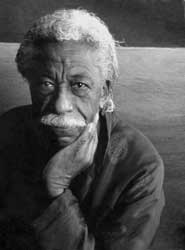
Another Photographic great passes. Gordon Parks, director and photographer dies at the age of 93. He is know for his contributions to Life magazine and as the director of the movies "Shaft" and "The Learning Tree" among others. Parks was a modern day Rennaisance Man who wrote, composed music, made films and was a prolific photographer. His life and career should serve as an inspiration for all creative souls.
Friday, March 10, 2006
AKVIS LLC release Noise Buster 1.1
AKVIS LLC today announced the release of AKVIS Noise Buster V.1.1 for Windows and Macintosh. AKVIS Noise Buster is a photoshop compatible plug-in which is designed to reduce noise in digital and scanned images. The results are quite impressive and at $49 US for the download version quite reasonable. Noise Buster reduces both luminance and color noise on images without substantially affecting other aspects of the photo. The Download a trial version here.
Friday, March 03, 2006
Buying DSLR Lenses
One of the most commonly asked question I've been asked about Digital Cameras is dealing with lenses. Which Lens, what range and how much. If you are buying a lens for film this is still a tricky question but for digital this is further compounded as it all depends on your sensor size. When it comes to the size of lens to get this factor will greatly affect the effectiveness of your lenses focal length ... as many of you are aware a 50mm lens isn't always a 50mm lens. This is due to the fact that many Digital SLRs have sensors which are about 1/3 smaller than 35mm film. This is referred to as a Focal Length Multiplier or more correctly an FOV (field of view) Crop.
This smaller sensor is why when buying a lens you have to pay a lot of attention to what its intended use is. Many cameras have an FOV Crop of 1.5 or 1.6 meaning that a 50mm lens will in essence be the optical equivalent of a 75 or 80mm respectively. Buying the right lens is crucial ... many photographers who are starting out with digital cameras will buy the lenses which are bundled with the DSLR.
Major bit of Advice #1 - Don't buy digital lenses unless you plan to sell on your lenses with the camera when you upgrade (unless of course you upgrade to a camera which will be compatible with your lenses).
My recommendation is that you buy lenses which are designed for full frame sensors especially if you want to focus on landscapes and portraits. This kind of buying will ensure you have full use of your lenses when you upgrade to a full frame based DSLR. My basic assumption here is that most photographers will eventually seek to upgrade to full frame sensors at some time in the future.
Major bit of advice #2 - When you decide to upgrade and can afford it - upgrade to a full frame sensor based camera ... currently only Canon have cameras such a sensor based on the 35mm frame size. Remember this though, your lenses will only be compatible if you buy with the future in mind.
In Canon EOS based DSLRs there are two lens types available: EF and EF-s type lenses. EF-s type lenses are designed specifically with a handful of Canons D-SLRs in mind and these lenses are not interchangeable with earlier models or full frame or 1.3 FOV Crop based models because of the depth of their rear optical elements. Using an EF-s Lens on an incompatible unit will most likely damage the Camera. This is one reason why I usually recommend buying an EF based lens.
Major bit of advice #3 - Do your research...
There are many ways to do this and besides the most obvious which is to go to a store and try out the lenses directly (which requires that you know what you are doing) there are some excellent resources online for getting some preliminary answers.
Basic Lenses to aim for -
50mm 1.4 or lower for standard and lowlight shots.
A 24mm for wide angle shots,
A 100/105mm for portraits and for an added bonus ensure it has a macro capability
A decent zoom lens in the 70 or 80-200 or 300mm range f4 will do to begin and if you can afford it better.
Bear in mind that you have to consider the FOV Crop
For excellent lens reviews try DPReview and Fred Miranda.
Where to buy ... See #3
There are many merchants out there who provide excellent service and who have been around for a while. Sure you can save £5 or more with some site or other but far too often these are fly-by-nighters who will abscond with your and lots of other peoples money ... so do your research and look for sites which will provide you with near instant feedback to your questions ... a site which will respond in 48 hours is just so much crap and if you run into a problem with the kit you will most likely not hear from them at all ... Don't buy from ebay unless the seller has a decent and long time track record and a lot of positive ratings.
In the UK, I've bought from Jessops and believe it or not Amazon.
You can also try other suppliers like Warehouse Express and Pixmania.
You can also vet dealers or check prices by visiting Reseller Ratings, Kelkoo or Pricegrabber.
Last thing I want to cover has to do with Brand versus third party lenses … I can only say here, that if you can afford to buy L series glass stick with Canon Lenses. Likewise with Nikons best glass. However if you, like many, are on a budget then by all means look at the Lenses produced by Sigma and Tamron for your Camera. Many of these have been reviewed at sites like DPReview and Fred Miranda already mentioned above.
I hope this has been useful …
For some excellent technical articles and info -
Steve Hoffmann's Nature and Lanscape Photography.
For an Excellent Reference of Digital and photographic Terminology visit DPReview.
This smaller sensor is why when buying a lens you have to pay a lot of attention to what its intended use is. Many cameras have an FOV Crop of 1.5 or 1.6 meaning that a 50mm lens will in essence be the optical equivalent of a 75 or 80mm respectively. Buying the right lens is crucial ... many photographers who are starting out with digital cameras will buy the lenses which are bundled with the DSLR.
Major bit of Advice #1 - Don't buy digital lenses unless you plan to sell on your lenses with the camera when you upgrade (unless of course you upgrade to a camera which will be compatible with your lenses).
My recommendation is that you buy lenses which are designed for full frame sensors especially if you want to focus on landscapes and portraits. This kind of buying will ensure you have full use of your lenses when you upgrade to a full frame based DSLR. My basic assumption here is that most photographers will eventually seek to upgrade to full frame sensors at some time in the future.
Major bit of advice #2 - When you decide to upgrade and can afford it - upgrade to a full frame sensor based camera ... currently only Canon have cameras such a sensor based on the 35mm frame size. Remember this though, your lenses will only be compatible if you buy with the future in mind.
In Canon EOS based DSLRs there are two lens types available: EF and EF-s type lenses. EF-s type lenses are designed specifically with a handful of Canons D-SLRs in mind and these lenses are not interchangeable with earlier models or full frame or 1.3 FOV Crop based models because of the depth of their rear optical elements. Using an EF-s Lens on an incompatible unit will most likely damage the Camera. This is one reason why I usually recommend buying an EF based lens.
Major bit of advice #3 - Do your research...
There are many ways to do this and besides the most obvious which is to go to a store and try out the lenses directly (which requires that you know what you are doing) there are some excellent resources online for getting some preliminary answers.
Basic Lenses to aim for -
50mm 1.4 or lower for standard and lowlight shots.
A 24mm for wide angle shots,
A 100/105mm for portraits and for an added bonus ensure it has a macro capability
A decent zoom lens in the 70 or 80-200 or 300mm range f4 will do to begin and if you can afford it better.
Bear in mind that you have to consider the FOV Crop
For excellent lens reviews try DPReview and Fred Miranda.
Where to buy ... See #3
There are many merchants out there who provide excellent service and who have been around for a while. Sure you can save £5 or more with some site or other but far too often these are fly-by-nighters who will abscond with your and lots of other peoples money ... so do your research and look for sites which will provide you with near instant feedback to your questions ... a site which will respond in 48 hours is just so much crap and if you run into a problem with the kit you will most likely not hear from them at all ... Don't buy from ebay unless the seller has a decent and long time track record and a lot of positive ratings.
In the UK, I've bought from Jessops and believe it or not Amazon.
You can also try other suppliers like Warehouse Express and Pixmania.
You can also vet dealers or check prices by visiting Reseller Ratings, Kelkoo or Pricegrabber.
Last thing I want to cover has to do with Brand versus third party lenses … I can only say here, that if you can afford to buy L series glass stick with Canon Lenses. Likewise with Nikons best glass. However if you, like many, are on a budget then by all means look at the Lenses produced by Sigma and Tamron for your Camera. Many of these have been reviewed at sites like DPReview and Fred Miranda already mentioned above.
I hope this has been useful …
For some excellent technical articles and info -
Steve Hoffmann's Nature and Lanscape Photography.
For an Excellent Reference of Digital and photographic Terminology visit DPReview.
Monday, February 27, 2006
Corel release Painter IX update.
Corel have released Painter IX.5, an update to their excellent natural media digital art application Painter IX. This update which is available for free to registered users of Painter IX requires the prior installation of IX 9.1 before you can update.
Corel list the follwing new enhancements to Painter:
- Photo Painting Palettes - The new Photo Painting Palettes, including the Underpainting, Auto-Painting, and Restoration palettes, work together to help users kick-start the process of creating a beautiful hand-painted work of art from a photograph
- Support for Rosetta running on Intel-based Macs - Customers running the latest hardware from Apple can enjoy working with Corel Painter and their Wacom® pen tablet, including support for the Wacom Intuos® 3 and the 6D Art Pen
- Eraser Tool - Conveniently located in the toolbox, the new Eraser tool erases any medium on the canvas
- Rubber Stamp Tool - The Rubber Stamp tool makes it easy for users to set up point-to-point cloning. Located in the toolbox, this tool lets users set a source and destination reference point, enabling them to clone within an image file or between different areas of separate image files
- Cloner Tool - Conveniently located in the toolbox, the Cloner tool provides immediate access to the last-used Cloner brush and brush variant.
- Corel® Paint Shop™ Pro Support for Windows users - Users can now open Corel Paint Shop Pro files (versions 9 and X)
- Send to Corel® Photo Album™ for Windows users - New integration makes it easy to send files to Corel Photo Album, helping customers manage their images and paintings
- In addition, new customers purchasing Corel Painter IX.5 will also receive 11 hours of lynda.com training videos on 2 CDs
Corel Painter IX.5 also incorporates all the enhancements introduced in the Corel Painter IX 9.1 update including the Art Pen Brush Pack, which leverages Wacom 6D Art Pen technology, and dual monitor support on Windows.
Update your Painter today ... if you dont already own it and are an artist working digitally you should think about getting it today.
Visit Corel for more info...
Corel list the follwing new enhancements to Painter:
- Photo Painting Palettes - The new Photo Painting Palettes, including the Underpainting, Auto-Painting, and Restoration palettes, work together to help users kick-start the process of creating a beautiful hand-painted work of art from a photograph
- Support for Rosetta running on Intel-based Macs - Customers running the latest hardware from Apple can enjoy working with Corel Painter and their Wacom® pen tablet, including support for the Wacom Intuos® 3 and the 6D Art Pen
- Eraser Tool - Conveniently located in the toolbox, the new Eraser tool erases any medium on the canvas
- Rubber Stamp Tool - The Rubber Stamp tool makes it easy for users to set up point-to-point cloning. Located in the toolbox, this tool lets users set a source and destination reference point, enabling them to clone within an image file or between different areas of separate image files
- Cloner Tool - Conveniently located in the toolbox, the Cloner tool provides immediate access to the last-used Cloner brush and brush variant.
- Corel® Paint Shop™ Pro Support for Windows users - Users can now open Corel Paint Shop Pro files (versions 9 and X)
- Send to Corel® Photo Album™ for Windows users - New integration makes it easy to send files to Corel Photo Album, helping customers manage their images and paintings
- In addition, new customers purchasing Corel Painter IX.5 will also receive 11 hours of lynda.com training videos on 2 CDs
Corel Painter IX.5 also incorporates all the enhancements introduced in the Corel Painter IX 9.1 update including the Art Pen Brush Pack, which leverages Wacom 6D Art Pen technology, and dual monitor support on Windows.
Update your Painter today ... if you dont already own it and are an artist working digitally you should think about getting it today.
Visit Corel for more info...
PMA 2006 coverage
This years PMA is now up and running and as usual, the coverage of announcements, technologies and products is coming hard and fast from many of the Digital Imaging and Photography sites. Some of the best coverage is coming from the following sites:
DPReview - read more here.
Steves Digicams - read more here.
Imaging Resource - read more here.
Luminous Landscape is taking a more personal approach reporting only on stuff which catches his interest - read more here.
DPReview - read more here.
Steves Digicams - read more here.
Imaging Resource - read more here.
Luminous Landscape is taking a more personal approach reporting only on stuff which catches his interest - read more here.
Friday, February 24, 2006
Canon Announce New Printers
Canon has introduced two affordable, new photo printers aimed at professional photographers and advanced amateurs . They are the PIXMA Pro9000 a 13 x 19 inch printer featuring a 6,144-nozzle producing 2 picolitre drops and using 8 dye-based ChromaLife100 inks and the PIXMA Pro9500 which is also a 13 x 19 inch printer. the Pro9500 uses Canon Lucia pigmented inks for maximum print life. There are 10 colours in all, including three neutral inks - Photo Black, Matte Black and Gray - as well as Cyan, Magenta, Yellow, Photo Cyan, Photo Magenta, Red and Green. Visit Canon for more info on these printers.
Canon also announced the large format "imagePROGRAF IPF5000". This A2 (17-inch) desktop printer combines a high-density twin print head and FINE (Full Photolithography Inkjet Nozzle Engineering) technology designed to produce professional-style prints at unparalleled speeds with outstanding archival image quality. Visit Canon for more info.
Canon also announced the large format "imagePROGRAF IPF5000". This A2 (17-inch) desktop printer combines a high-density twin print head and FINE (Full Photolithography Inkjet Nozzle Engineering) technology designed to produce professional-style prints at unparalleled speeds with outstanding archival image quality. Visit Canon for more info.
Epson Announce 2 New Pro Scanners
Epson Epson announced the Perfection V700 Photo and Epson Perfection V750-M Pro scanners. The usints are billed as the first scanners for photo studio applications that offer capabilities typically found in high-end commercial lab scanners but at an affordable price. The also both feature Dual Lens System. The Pro version also features a new fluid mount accessory which allows photographers to perform wet scans on a flatbed scanner, which is especially valuable for enhanced scratch removal and grain reduction from black and white film.
The Epson Perfection V700 Photo and Epson Perfection V750-M Pro both incorporate the Epson Dual Lens System, which enables super resolution (6400 dpi) scanning of 35mm, 2 ¼”, and 4”x 5” medium format film. The other lens allows for 4800 dpi scanning and allows for high resolution transparency and reflective scanning.
“These scanner models deliver the kind of quality that typically could only be found on commercial lab scanners for a much higher cost. We’ve included these advanced features so that photographers have both maximum control and the ability to get the best results in-house, at a very affordable price.”
The Epson Perfection V750-M Pro is the flagship scanner at the top of the Epson Perfection line with up to 6400 dpi optical resolution and its unique fluid mount accessory. For many years, wet mount film scanning has been a professionally recognized method for reducing scratches, grain and optical artifacts such as Newton Rings. Wet mount scanning is especially valuable for black and white film, since other scratch removal technologies, including Digital ICE, are not effective on monochrome film. By offering this unique accessory with the Epson Perfection V750-M Pro, customers can now achieve wet scan results with a flatbed scanner.
The Epson Perfection V700 Photo and Epson Perfection V750-M Pro both incorporate the Epson Dual Lens System, which enables super resolution (6400 dpi) scanning of 35mm, 2 ¼”, and 4”x 5” medium format film. The other lens allows for 4800 dpi scanning and allows for high resolution transparency and reflective scanning.
“These scanner models deliver the kind of quality that typically could only be found on commercial lab scanners for a much higher cost. We’ve included these advanced features so that photographers have both maximum control and the ability to get the best results in-house, at a very affordable price.”
The Epson Perfection V700 Photo has many of the same impressive features as the Epson Perfection V750-M Pro including super resolution 6400 dpi film scanning, the Epson Dual Lens System, and 4.0 Dmax. This scanner is ideal for anyone who has relied on a dedicated 35mm film scanner, but wants greater flexibility for scanning larger film formats. With the Epson Perfection V700 Photo, customers can scan 35mm, 2 ¼” and 4”x 5” medium format film with a built-in 8” x 10” transparency unit, as well as prints and documents. Customers also get a wide variety of high quality film scanning capabilities for well below the cost of a dedicated film scanner.
The Epson Perfection V750-M Pro is the flagship scanner at the top of the Epson Perfection line with up to 6400 dpi optical resolution and its unique fluid mount accessory. For many years, wet mount film scanning has been a professionally recognized method for reducing scratches, grain and optical artifacts such as Newton Rings. Wet mount scanning is especially valuable for black and white film, since other scratch removal technologies, including Digital ICE, are not effective on monochrome film. By offering this unique accessory with the Epson Perfection V750-M Pro, customers can now achieve wet scan results with a flatbed scanner.
In addition to the fluid mount accessory, the Epson Perfection V-750M Pro also features new High Pass Optics that further optimize image quality by using anti-reflective coatings on the CCD lens and a new high reflection mirror. Another valuable time- and cost-saving feature offered with both scanners is Digital ICE™ Technologies, a powerful tool for automatic removal of scratches and dust from film, and many surface defects from reflective prints. Both scanner models can achieve an optical density (Dmax) of 4.0, allowing for high dynamic range imaging and the ability to capture fine shadow details. They also feature Hi-Speed USB 2.0 and FireWire connectivity for fast data transmission.
My thinking is that we've now got capabilities with our home and studio system configurations which would have cost hundreds of thousands, 10 years or so ago ... crazy but great. For more info on these scanners visit Epson.
Samsung announce 3 new cameras
Samsung introduced three new cameras yesterday, the first one is the GX-1L, which is a D-SLR which is basically just a rebadged Pentax *ist DL. This follows suit with the anouncement several weeks back of their GX-1S, which is the is a rebadged *ist DS2.
The second digicam is the fixed-lens Digimax L85 and is the first camera on the market to support HDMI (which is a method of connecting to a HDTV set). The third model is the compact Digimax L60. for more information visit Samsung USA.
The second digicam is the fixed-lens Digimax L85 and is the first camera on the market to support HDMI (which is a method of connecting to a HDTV set). The third model is the compact Digimax L60. for more information visit Samsung USA.
Thursday, February 23, 2006
Nikon announce Capture NX
Capture NX is the first software release from Nikon featuring Nik Software, Inc.’s patented U Point technology. As a successor to the previously released Nikon Capture 4 software, it provides the digital photographer with more powerful tools for exploring and working with NEF, JPEG and TIFF files. The new software is scheduled for delivery during Spring 2006.
New products from Canon and Nikon
This has been a busy week so far with plenty of new products from Canon and Nikon. Canon have announced many new models today. The Canon EOS 30D is first with its 8.2 megapixel sensor and many feature which come from its full frame bigger brother the 5D. It features a large 2.5 inch display and also supports the EFs lenses which it bigger brothers don't. Also announced are 2 new lenses and the PowerShot S3 IS and the PowerShot SD700 IS, PowerShot SD600 and SD630, PowerShot A700 and A540 all of which feature 6 megapixels. The 4 megapixel PowerShot A420, A430 and A530 complete Canons new product announcements.
Nikon announced 7 new digital compacts, including the ultra-slim Coolpix S5 and S6, both of which feature 6 megapixels, the Coolpix P3 and P4 which feature 8.1 megapixels and Nikon’s VR (Vibration Reduction) capability. The Coopix L2, L3 and L4 complete the line up and 6, 5 and 4 megapixels, respectively and all feature a 3x optical zoom and 2.0-inch screens. Nikon have alos announced the AF-S VR Micro-Nikkor 105mm f/2.8G IF-ED lens the world’s first macro lens to offer reproduction ratios of up to 1:1.
PMA looks like its going to be an interesting time...
Nikon announced 7 new digital compacts, including the ultra-slim Coolpix S5 and S6, both of which feature 6 megapixels, the Coolpix P3 and P4 which feature 8.1 megapixels and Nikon’s VR (Vibration Reduction) capability. The Coopix L2, L3 and L4 complete the line up and 6, 5 and 4 megapixels, respectively and all feature a 3x optical zoom and 2.0-inch screens. Nikon have alos announced the AF-S VR Micro-Nikkor 105mm f/2.8G IF-ED lens the world’s first macro lens to offer reproduction ratios of up to 1:1.
PMA looks like its going to be an interesting time...
Wednesday, February 15, 2006
Corel announce Paint Shop Pro X offer
Corel Corporation today announced an amazing 20% discount on Corel Paint Shop Pro X. This offer will run for one month from 15 February to 15 March 2006. Customers can purchase Corel Paint Shop Pro X and receive 20% off the standard SRP (£85) or 10% off the upgrade SRP (£41) - all prices exclude VAT.
This offer will also be showcased as part of their presence at the Focus on Imaging show in Birmingham from 26 February to 1 March 2006. If you are attending the show visit Corel at stand S7 to learn more about Paint Shop Pro X and its capabilities. For more info on the offer visit Corel.
Nik Software and Nikon Announce Collaboration
Nik Software, Inc. and Nikon have entered in a relationship which includes an investment by Nikon in Nik Software and technological collaboration between the two companies to develop and distribute digital photographic software and imaging technologies. It should be interesting to see how this develops and at what level NIKs tools will be associated with Nikons product lines. For more information please read the press releases from Nikon Corporation and Nik Software.
ACDSee Pro Discount Offer
After my recent review of ACDSee Pro at kickstartnews.com, ACDSee were kind enough to offer readers of my review 15% off the purchase price. To take advantage of this offer, follow this link to digital river and download a discounted version of ACDSee Pro today.
Adobe Release Lightroom Public Beta 2
Adobe has posted the Lightroom Public Beta 2 for Mac this is Adobes RAW Photography and workflow and application for professional photographers. This public Beta is a Universal Binary, which means it contains it will run natively in on Macs running PowerPC or Intel processors. You can get Lightroom here.
Sunday, February 12, 2006
Imagine Publishing Acquires Digital Photographer
Imagine Publishing issued a press release announcing their acquisition of Digital Photographer and 19 other titles from the Receivers of Highbury Entertainment. I was recently distressed at the apparent disappearance of a title which I thought was one of the best digital photography magazines on the market. So I did some digging, after getting no joy from my emails and phone calls, I came across this press release from Imagine which cleared a few things up.
Imagine Publishing was formed by some of the former staff of Paragon Publishing who Highbury acquired in 2002. The titles in Imagines acquisition include Digital Photographer, Advanced Photoshop, Play, Powerstation, Games, iCreate, X360, Digital Camera Buyer, PDA Essentials, Web Designer and Windows XP made Easy.
I look forward to seeing what they do with Digital Photographer and Advanced Photoshop. For more information visit Imagine Publishing.
Update: Imagine publish a press release detailing their plans to honour existing subscribers of the titles they intend to publish ... more detailed information can be found in this press release.
Imagine Publishing was formed by some of the former staff of Paragon Publishing who Highbury acquired in 2002. The titles in Imagines acquisition include Digital Photographer, Advanced Photoshop, Play, Powerstation, Games, iCreate, X360, Digital Camera Buyer, PDA Essentials, Web Designer and Windows XP made Easy.
I look forward to seeing what they do with Digital Photographer and Advanced Photoshop. For more information visit Imagine Publishing.
Update: Imagine publish a press release detailing their plans to honour existing subscribers of the titles they intend to publish ... more detailed information can be found in this press release.
Nik Multimedia, Inc. becomes Nik Software, Inc.

Nik Multimedia, Inc. producer of the excellent plug-ins Nik Sharpener and Color Efex Prof have announced that the company has changed its name to Nik Software, Inc. Nik has unveiled its new corporate identity keeping the familiar “Nik” and replacing “Multimedia” with “Software” to reflect the company’s focus on software development for the digital imaging market. Read More...
The Week That Was - 12-02-2006
Fuiji Film cuts 5000 jobs
After a series of cut-back announcements from many of the film companies due to the shrinking market in film, Fuji are the latest company to announce staff reductions. For more information check out the press release here
Lexmark to cut 500 UK jobs
Lexmark have announced the phased closure of their Rosyth plant in Scotland. The phased closure is expected to begin april with approximately 500 redundancies and completed by year end 2006. Lexmark employs approximately 700 people at this facility.
The closure of the facility is attributed to redundant capacity, higher running costs in comparison to Lexmark’s other facilities, and fact that to maintain the facility there would have to be an expensive cycle of investment in new technologies.
iView MediaPro updated to v3.0.2
iView MediaPro for Windows and Mac has been updated to v3.0.2. The new version adds RAW support for cameras and backs from Panasonic, Leica, Sinar and Mamiya. The update also fixes a number of bugs and features speed improvements in scrolling and searching larger catalogs. For more info and to download the update visit iview-multimedia.com.
Photo Mechanic updated and updated again.
Camera Bits has posted Photo Mechanic 4.4.1.1 for Windows and Mac, a maintenance release of the pro photo browser that fixes bugs which caused crashing in v4.4.1 released earlier this week. Visit camerabits.com for the update and more info.
After a series of cut-back announcements from many of the film companies due to the shrinking market in film, Fuji are the latest company to announce staff reductions. For more information check out the press release here
Lexmark to cut 500 UK jobs
Lexmark have announced the phased closure of their Rosyth plant in Scotland. The phased closure is expected to begin april with approximately 500 redundancies and completed by year end 2006. Lexmark employs approximately 700 people at this facility.
The closure of the facility is attributed to redundant capacity, higher running costs in comparison to Lexmark’s other facilities, and fact that to maintain the facility there would have to be an expensive cycle of investment in new technologies.
iView MediaPro updated to v3.0.2
iView MediaPro for Windows and Mac has been updated to v3.0.2. The new version adds RAW support for cameras and backs from Panasonic, Leica, Sinar and Mamiya. The update also fixes a number of bugs and features speed improvements in scrolling and searching larger catalogs. For more info and to download the update visit iview-multimedia.com.
Photo Mechanic updated and updated again.
Camera Bits has posted Photo Mechanic 4.4.1.1 for Windows and Mac, a maintenance release of the pro photo browser that fixes bugs which caused crashing in v4.4.1 released earlier this week. Visit camerabits.com for the update and more info.
Sunday, February 05, 2006
Have you visited the OpenRAW Survey?
So you might be wondering why I ask, well, you see it's like this ... I, like you, love photography and digital imaging. The problem with RAW is that it as a format suffers from being tied to the manufacturers survival. What OpenRAW is about is an initiative to make us as photographers less dependent on the manufacturers and to provide us with open standards and the tools we need to be able to access the images we have taken with our cameras for now and in the future. With film, we weren't tied to the manufacturer and we could mostly take our films anywhere to get them developed, however, with RAW, we could be held hostage by the whims of the manufacturer or worse still if the manufacturer goes belly up or decides to stop support, lose access to our images in future OS's due to the failure. So, if you care about your photos for now and in the future, add your voice and make your opinion count by completing the OpenRAW Survey.
Alien Skin releases Exposure
Have you ever wanted an easy way to correct or modify your photos so that they look like the kind of photos produced using different kinds of film. Have you ever wanted to recreate the look of Kodachrome®, the range of Ektachrome® or even the Rich colours of Velvia®. Alien Skins latest release, Exposure, does that and a whole lot more besides. With exposure you can apply the look and feel of many real world photographic effects and characteristics found using specific film types.
In their own words "Foremost a film simulator, Exposure is based on the detailed analysis of real world film stocks. A photographer can now quickly and easily evoke the vivid colors of Velvia®, the rich blacks of Kodachrome®, or the sensitivity of Ektachrome®. Exposure includes presets that emulate the warmth, softness, and realistic grain of dozens of real world film stocks, both color and black and white. Plus, any preset can be the starting point for a signature look, adjusted to suit a particular subject, or applied to a batch of images using Photoshop Actions. Exposure adds realistic grain separately to the shadows, mid-tones, and highlights of an image. Unlike other digital products, Exposure does not add simple, harsh noise to an image. Instead, Exposure models the size, shape, and color of real world grain. Exposure can even mimic the pronounced grain of films such as Ilford® 3200 Delta, as well as the discontinued Ektachrome EES and GAF® 500."
"Collecting color, dynamic range, softness, and grain controls in one plug-in, Exposure simplifies workflow. Photographers can now master one easy-to-use tool. Streamlined color and saturation controls warm/cool with a single slider while preserving skin tones or preventing oversaturated reds. Exposure makes gamma correction and contrast changes less intimidating by adding high level contrast, highlight and shadow controls to curves editing."
"Exposure includes several, additional features that address the needs of photographers. Exposure reproduces key studio and darkroom effects such as cross processing, push processing, and glamour portrait softening. Exposure encourages non-destructive editing, allowing users to render an adjusted image as a new layer in Photoshop. Exposure's advanced preview system includes an optional, split screen preview in addition to a before/after button. Exposure pairs unlimited undo/redo with fast rendering and lets photographers zoom and pan using Photoshop style keyboard shortcuts."
This looks to be a great addition to the toolkit of many a digital photographer and I'm going to get my hands on this to try it out, I'll be interested in seeing how it compares to Nik Multimedia's Color Efex Pro and DFT's 55mm ... I'll report back on the results. Visit Exposure at Alien Skin for more information.
In their own words "Foremost a film simulator, Exposure is based on the detailed analysis of real world film stocks. A photographer can now quickly and easily evoke the vivid colors of Velvia®, the rich blacks of Kodachrome®, or the sensitivity of Ektachrome®. Exposure includes presets that emulate the warmth, softness, and realistic grain of dozens of real world film stocks, both color and black and white. Plus, any preset can be the starting point for a signature look, adjusted to suit a particular subject, or applied to a batch of images using Photoshop Actions. Exposure adds realistic grain separately to the shadows, mid-tones, and highlights of an image. Unlike other digital products, Exposure does not add simple, harsh noise to an image. Instead, Exposure models the size, shape, and color of real world grain. Exposure can even mimic the pronounced grain of films such as Ilford® 3200 Delta, as well as the discontinued Ektachrome EES and GAF® 500."
"Collecting color, dynamic range, softness, and grain controls in one plug-in, Exposure simplifies workflow. Photographers can now master one easy-to-use tool. Streamlined color and saturation controls warm/cool with a single slider while preserving skin tones or preventing oversaturated reds. Exposure makes gamma correction and contrast changes less intimidating by adding high level contrast, highlight and shadow controls to curves editing."
"Exposure includes several, additional features that address the needs of photographers. Exposure reproduces key studio and darkroom effects such as cross processing, push processing, and glamour portrait softening. Exposure encourages non-destructive editing, allowing users to render an adjusted image as a new layer in Photoshop. Exposure's advanced preview system includes an optional, split screen preview in addition to a before/after button. Exposure pairs unlimited undo/redo with fast rendering and lets photographers zoom and pan using Photoshop style keyboard shortcuts."
This looks to be a great addition to the toolkit of many a digital photographer and I'm going to get my hands on this to try it out, I'll be interested in seeing how it compares to Nik Multimedia's Color Efex Pro and DFT's 55mm ... I'll report back on the results. Visit Exposure at Alien Skin for more information.
Wednesday, February 01, 2006
Digital Film Tools Releases Snap for Photoshop.
Digital Film Tools have released Snap for Photoshop. Snap is an easy to use interactive image cutout tool which uses a coarse to fine editing approach that first looseley cuts out an object and then allows you to refine the boundary by a more selective process. The extracted object can then be combined with another image or manipulated in Adobe Photoshop. Snap provides instant visual feedback by snapping an editable curve to an object's boundary by using unique graph-cutting and segmentation algorithms. DFT calims that accurate results are achieved in a shorter amount of time than using existing tools and techniques. Visit DFT at their website for more info.
Subscribe to:
Comments (Atom)